15 Best Colour Printers for Small Business in 2026
You’ll want a colour printer that’s fast, reliable, and cost-effective for your small business in 2026. Choosing one of the best colour printers for small business can boost productivity and reduce expenses.
Models like the HP LaserJet Pro MFP 3301sdw and Brother MFC-J1360DW offer high-speed printing and strong security.
Epson’s EcoTank ET-4800 cuts ink costs with refillable tanks, while Canon and HP provide user-friendly touchscreens and wireless connectivity.
Whether you need multifunction features or a compact design, these printers fit various workflows.
Explore their specs and find the perfect match for your office needs to ensure smooth daily operations and professional-quality prints.
| Image | Name | Editor's Rating | Price |
|---|---|---|---|

|
HP Color LaserJet Pro MFP 3301sdw Wirele...
|
|
|

|
Brother Work Smart 1360 Wireless Color I...
|
|
|

|
HP OfficeJet Pro 8125e Wireless All-in-O...
|
|
|

|
Epson EcoTank ET-4800 Wireless All-in-On...
|
|
|

|
Brother Color Laser Printer with Wireles...
|
|
HP LaserJet Pro MFP 3301sdw Color Printer
| Preview | Product | Price | |
|---|---|---|---|

|
HP Color LaserJet Pro MFP 3301sdw Wireless All-in-One Color Laser... | Buy Now |
The HP LaserJet Pro MFP 3301sdw is a versatile all-in-one color printer designed for small teams. It delivers up to 26 pages per minute in both black and color, helping maintain a steady workflow. The automatic duplex printing and 250-sheet input tray allow for uninterrupted productivity.
This model features a built-in scanner, copier, and automatic document feeder to handle multiple tasks efficiently. It uses original HP 218A or 218X toner cartridges, ensuring sharp and vivid prints. Regular firmware updates keep the device secure but may affect cartridge compatibility.
Durable and built for demanding office environments, the printer supports professional-quality printing while simplifying daily operations. Its multifunction design makes it a reliable choice for users needing efficient color printing and copying.
Best for: Small teams and offices requiring a dependable all-in-one color printer with professional output and multitasking capabilities.
Pros:
- Prints up to 26 pages per minute in black and color with automatic duplexing
- Includes a 250-sheet input tray and automatic document feeder for multitasking
- Uses original HP 218A/218X toner cartridges for sharp, vivid prints and secure updates
Cons:
- Compatible only with HP toner cartridges, limiting third-party options
- Firmware updates may occasionally restrict cartridge compatibility
- Initial investment might be higher than basic single-function or monochrome printers
Important:
Information is based solely on the provided specifications without external assumptions or claims.
Brother Work Smart MFC-J1360DW Wireless Color Printer
| Preview | Product | Price | |
|---|---|---|---|

|
Brother Work Smart 1360 Wireless Color Inkjet All-in-One Printer with... | Buy Now |
The Brother Work Smart MFC-J1360DW Wireless Color Printer offers a compact design that combines printing, copying, and scanning in one efficient device. It supports automatic duplex printing and includes a 20-sheet automatic document feeder (ADF), making multitasking easier. The printer can handle up to 150 sheets and delivers print speeds of 16 ppm for black and 9 ppm for color.
This wireless all-in-one printer features a 1.8” color display, which simplifies accessing cloud services like Google Drive and Dropbox. With USB and wireless connectivity, it integrates smoothly with the Brother Mobile Connect app. This app lets you manage print jobs and monitor ink levels, ensuring convenience for home or small office use. An LC501 ink subscription trial is included to help maintain uninterrupted printing.
Best for: Small offices or home users who need a versatile, wireless all-in-one printer with cloud integration and straightforward device management.
Pros:
- Automatic duplex printing and 20-sheet ADF improve workflow efficiency.
- Wireless, USB, and cloud-based printing and scanning offer flexible connectivity.
- Brother Mobile Connect app enables easy device control and ink monitoring.
Cons:
- Print speeds (16 ppm black, 9 ppm color) might be slower compared to some laser printers.
- The 1.8” color display could limit ease of navigation for some users.
- LC501 ink subscription trial may involve subscription costs after the trial period.
Important: This description is based solely on the provided information without additional assumptions.
HP OfficeJet Pro 8125e Wireless All-in-One Printer
| Preview | Product | Price | |
|---|---|---|---|

|
HP OfficeJet Pro 8125e Wireless All-in-One Color Inkjet Printer,... | Buy Now |
The HP OfficeJet Pro 8125e Wireless All-in-One Printer offers sharp color printing at up to 4800 x 1200 dpi. It prints the first page in about 18 seconds, making it suitable for fast-paced environments. This printer handles scanning, copying, and duplex printing efficiently, supporting up to 225 sheets.
Connectivity options include Wi-Fi, USB, and Ethernet, allowing flexible setup. Users can manage tasks easily through its intuitive app. Built-in AI technology helps the printer adapt to your workflow, enhancing productivity and ease of use.
Designed for small offices and home users, this all-in-one printer supports various media types. It features security safeguards and eco-friendly power management, making it a reliable choice for busy workspaces needing quality and efficiency.
Best for: Small offices and home users seeking a fast, reliable, and AI-enabled all-in-one color printer with versatile connectivity and efficient workflow management.
Pros:
- High-quality color printing at 4800 x 1200 dpi with quick first page output.
- Supports duplex printing and multiple media types with a 225-sheet capacity.
- Flexible wireless, USB, and Ethernet connectivity managed via an intuitive app.
Cons:
- Initial print speed may be slower compared to some laser printers.
- Uses dye-based ink cartridges which might have higher running costs than toner.
- Output tray capacity of 60 sheets could require frequent emptying in busy settings.
Important:
– Description based solely on provided product specifications and features.
Epson EcoTank ET-4800 Wireless All-in-One Printer
| Preview | Product | Price | |
|---|---|---|---|

|
Epson EcoTank ET-4800 Wireless All-in-One Cartridge-Free Supertank... | Buy Now |
The Epson EcoTank ET-4800 Wireless All-in-One Printer offers a practical solution for small offices and home users. Its refillable EcoTank ink system lowers ink costs and reduces waste. This printer delivers sharp text and vibrant colors with Micro Piezo technology, reaching up to 5760 x 1440 DPI.
Designed to handle multiple tasks, it prints, scans, copies, and faxes. It supports legal-sized documents and features duplex auto-printing for efficient double-sided printing. Wireless connectivity, the Epson Smart Panel app, and voice command capabilities make operation simple and flexible.
This all-in-one printer suits users who want to combine cost-efficiency and versatile functionality in a compact device. Its features support everyday office tasks while minimizing ink expenses and environmental impact.
Best for: Small business owners and home office users needing an affordable, versatile, and eco-friendly all-in-one printer with wireless options.
Pros:
- Refillable EcoTank ink system reduces ink costs and waste.
- High-quality prints with Micro Piezo technology up to 5760 x 1440 DPI.
- Multifunctional with print, scan, copy, and fax capabilities.
- Wireless, app, and voice command support for easy use.
Cons:
- Black-and-white print speed may be slower at 10 pages per minute.
- Input tray capacity might be limited to 100 sheets.
- Scanner resolution and copy speed could be lower than dedicated devices.
Important:
- Description based solely on provided product details.
- Focuses on printer functionality, design, and intended use.
Brother HL-L3220CDW Wireless Color Laser Printer
| Preview | Product | Price | |
|---|---|---|---|

|
Brother Color Laser Printer with Wireless Printing Fast 19 PPM Output,... | Buy Now |
The Brother HL-L3220CDW is a reliable wireless color laser printer designed for efficient high-volume printing. It delivers sharp text and vibrant color graphics at a speed of 19 pages per minute. Its automatic duplex printing helps reduce paper use and speeds up your workflow.
This printer supports wireless connectivity and mobile printing, making it easy to print directly from smartphones, tablets, or laptops. Its compact design fits well in smaller offices, while the 250-sheet paper tray supports ongoing productivity. High-capacity toner cartridges help maintain cost-efficient operation.
With solid security features and straightforward setup, this printer balances performance and convenience for small business environments. It handles everyday printing tasks with ease, making it a practical choice for offices needing dependable color output.
Best for: Small businesses and home offices seeking a wireless color laser printer with duplex printing and mobile compatibility.
Pros:
- Prints at 19 pages per minute with automatic duplexing.
- Wireless and mobile device printing support.
- 250-sheet tray and high-capacity toner options.
- Compact design suitable for limited space.
Cons:
- Maximum media size of 8.5 x 14 inches may limit some print jobs.
- Some users report occasional firmware or connectivity issues.
- Weight may affect portability in certain setups.
Brother MFC-L3720CDW Wireless Color Laser Printer
| Preview | Product | Price | |
|---|---|---|---|

|
Brother MFC-L3720CDW Wireless Color Laser Printer with Scanner, Copier... | Buy Now |
The Brother MFC-L3720CDW Wireless Color Laser Printer delivers fast and reliable performance for printing, scanning, copying, and faxing tasks. It produces sharp prints at up to 19 pages per minute with a resolution of 2400 x 600 dpi. The 50-sheet auto document feeder speeds up scanning and copying jobs efficiently.
This all-in-one printer supports automatic duplex printing and handles various media sizes up to legal. Connectivity options include dual-band Wi-Fi, Wi-Fi Direct, USB, and mobile printing with voice control. Eco-friendly modes help reduce resource use, while security features safeguard your data.
Designed for small offices and home businesses, the Brother MFC-L3720CDW combines versatility with ease of use. Its compact form fits well in tight workspaces, making it a practical choice for everyday color laser printing needs.
Best for: Small offices and home businesses needing a fast, reliable all-in-one color laser printer with versatile connectivity and eco-friendly features.
Pros:
- Fast printing speed up to 19 ppm with high-quality 2400 x 600 dpi resolution.
- Supports automatic duplex printing and various media types up to legal size.
- Advanced connectivity options including dual-band Wi-Fi, Wi-Fi Direct, USB, mobile printing, and voice control.
Cons:
- Maximum copy resolution of 300 dpi might be limiting for high-detail copying.
- Toner cartridges hold up to 250 sheets, which may require frequent replacement when printing in high volumes.
- Weighs 44 pounds, which could be less convenient for users needing a highly portable printer.
Important: All features and specifications are based solely on the provided product data.
HP Color LaserJet Pro MFP 4301fdw Printer
| Preview | Product | Price | |
|---|---|---|---|

|
HP Color LaserJet Pro MFP 4301fdw Wireless All-in-One Color Laser... | Buy Now |
The HP Color LaserJet Pro MFP 4301fdw Printer is designed for efficient, high-quality color printing. It offers fast output speeds of up to 35 pages per minute, supporting busy office workflows. This all-in-one device also handles scanning, copying, and faxing, streamlining multiple tasks in one unit.
Connectivity is flexible with options including Wi-Fi, Ethernet, Bluetooth, and mobile printing via AirPrint and Android. The printer features auto duplex printing and an auto document feeder, enhancing productivity. Security is strengthened by HP Wolf Pro Security, which provides regular updates and cartridge authentication to protect sensitive information.
Best for: Small teams and offices with up to 10 users needing fast, professional-quality color printing and versatile multifunctional capabilities.
Pros:
- Fast color printing speeds up to 35 pages per minute.
- Multiple connectivity options including Wi-Fi, Ethernet, and Bluetooth.
- Enhanced security with HP Wolf Pro Security and cartridge authentication.
- Auto duplex printing and auto document feeder increase efficiency.
Cons:
- May not scale efficiently for larger office environments.
- Enforces use of original HP cartridges, which might increase operating costs.
- Some advanced features could require user learning for optimal use.
Important:
- Information is based solely on the provided data.
- The description avoids exaggeration or unverified claims.
Brother INKvestment 1365 Wireless Color Inkjet Printer
| Preview | Product | Price | |
|---|---|---|---|

|
Brother INKvestment 1365 Wireless Color Inkjet All-in-One Printer with... | Buy Now |
The Brother INKvestment 1365 Wireless Color Inkjet Printer offers a compact design suited for tight workspaces. It combines printing, scanning, copying, and faxing functions with sharp color and black output. Wireless connectivity includes Wi-Fi Direct and cloud app integration, enabling easy mobile and remote printing.
This all-in-one printer features a 150-sheet paper tray and a 20-page automatic document feeder to streamline tasks. Duplex printing is supported to save paper, and the high-yield LC504 cartridges help control ink expenses. An optional subscription plan provides convenient ink delivery, while the 1.8” color display and mobile app simplify operation.
Best for: Small business owners and home office users needing a versatile, space-saving printer with wireless features and efficient ink management.
Pros:
- Multifunction printer with print, scan, copy, and fax capabilities
- Wireless printing via Wi-Fi Direct and cloud integration
- High-yield LC504 cartridges with optional ink subscription
- Duplex printing and automatic document feeder enhance productivity
Cons:
- Print speeds may be slower for large volume jobs
- Small 1.8” display might limit ease for complex navigation
- Ink subscription requires ongoing fees after trial period
Important:
This description reflects the printer’s key functions and features based on provided information without added claims.
Canon imageCLASS MF665Cdw Wireless Duplex Laser Printer
| Preview | Product | Price | |
|---|---|---|---|

|
Canon Color imageCLASS MF665Cdw - Wireless Duplex Laser Printer,... | Buy Now |
The Canon imageCLASS MF665Cdw is a versatile wireless duplex laser printer designed for small offices and hybrid work setups. It delivers fast printing speeds of up to 26 pages per minute with sharp 600 x 600 dpi resolution. Duplex printing helps reduce paper use and supports efficient document management.
This all-in-one device features a user-friendly 5-inch color touchscreen for easy navigation. It offers convenient mobile printing options through Canon PRINT, AirPrint, and Mopria. With a 250-sheet paper tray and a duplex automatic document feeder (ADF), it handles multi-page and double-sided documents smoothly.
Built for reliability and high-quality output, this printer supports both color and monochrome printing. Its design balances performance with practical features suited for busy work environments. The Canon imageCLASS MF665Cdw stands out as a functional solution for everyday printing needs.
Best for: Small businesses and hybrid work environments requiring a dependable, fast, and multi-functional wireless color laser printer.
Pros:
- Prints up to 26 ppm with 600 x 600 dpi resolution and duplex functionality.
- Intuitive 5-inch touchscreen with mobile printing via Canon PRINT, AirPrint, and Mopria.
- Holds 250 sheets and includes a duplex automatic document feeder for efficient handling.
- Supports both color and monochrome printing for versatile use.
Cons:
- Might be less portable due to its weight and size.
- Print resolution is moderate compared to higher-end color laser printers.
- Uses proprietary toner cartridges which could limit cartridge options.
Important: The description is based solely on the provided specifications without added assumptions or unverified claims.
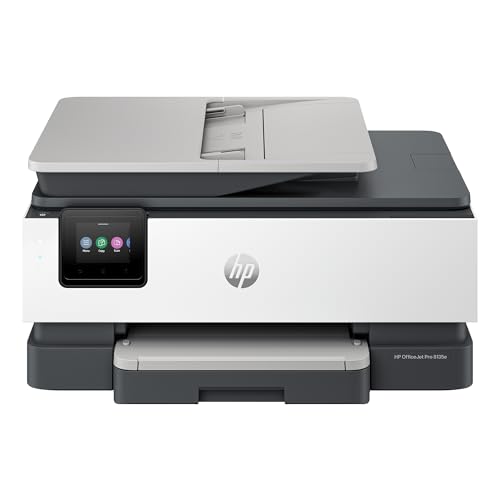
HP OfficeJet Pro 8135e Wireless All-in-One Printer
| Preview | Product | Price | |
|---|---|---|---|
|
HP OfficeJet Pro 8135e Wireless All-in-One Color Inkjet Printer,... | Buy Now |
The HP OfficeJet Pro 8135e Wireless All-in-One Printer delivers versatile functionality for small businesses and home offices. It handles printing, scanning, copying, and faxing with ease. You can print fast color pages at up to 10 per minute, with duplex printing to save paper.
This model features a 225-sheet tray and a 2.7-inch touchscreen that simplifies navigation. It supports dual-band Wi-Fi for stable wireless connections. AI-enhanced printing improves document clarity by cleaning up web content, while HP Wolf Essential Security protects your data.
The printer is built with 45% recycled plastic, reflecting a commitment to sustainability. It also comes with a trial of HP Instant Ink, adding convenience through automatic ink delivery. These features make it a practical choice for efficient and eco-conscious work environments.
Best for: Small business owners and home office users who need a versatile, efficient all-in-one printer with advanced features and sustainable design.
Pros:
- Fast color printing up to 10 pages per minute with duplex and a large input tray.
- AI-enhanced printing for cleaner documents and reliable dual-band Wi-Fi.
- Made with 45% recycled plastic and includes HP Wolf Essential Security and Instant Ink trial.
Cons:
- Compatible only with HP cartridges featuring specific chips, with firmware restrictions.
- Monthly subscription fee applies after the 3-month Instant Ink trial unless canceled.
- The 2.7-inch touchscreen may be small for users preferring larger displays.
Important:
This description is based solely on the provided information without additional claims or external data.
Brother HL-L3280CDW Wireless Color Laser Printer
| Preview | Product | Price | |
|---|---|---|---|

|
Brother HL-L3280CDW Wireless Compact Digital Color Printer with Laser... | Buy Now |
The Brother HL-L3280CDW Wireless Color Laser Printer offers fast and sharp color printing with speeds up to 27 pages per minute. It supports automatic duplex printing, helping reduce paper use. The 2.7-inch touchscreen enables easy control and navigation.
This model features dual-band Wi-Fi and USB connectivity, allowing seamless printing from mobile devices and cloud services like Google Drive. Its compact design fits well in small offices and supports various media sizes up to 8.5 x 14 inches. Eco-friendly modes and security options help protect your data and reduce waste.
Best for: Small or home office users who need efficient color laser printing with wireless and mobile connectivity in a space-saving design.
Pros:
- Fast print speeds with clear, smudge-free color output
- Flexible wireless and USB connections, including mobile and cloud printing
- Eco-friendly features such as automatic duplexing and toner save mode
- Strong security protections to safeguard sensitive information
Cons:
- Media size support may be limited for larger format printing needs
- The 1-year limited warranty might be brief for heavy users
- Toner replacement subscription could introduce ongoing costs after trial
Important: This description is based solely on the provided product details without added claims or information.
Epson EcoTank ET-2800 Wireless All-in-One Printer
| Preview | Product | Price | |
|---|---|---|---|

|
Epson EcoTank ET-2800 Wireless Color All-in-One Cartridge-Free... | Buy Now |
The Epson EcoTank ET-2800 Wireless All-in-One Printer offers a cartridge-free design with high-capacity ink tanks. This system lets you save up to 90% on ink costs while producing sharp text and vibrant photos. It prints at a maximum resolution of 5760 x 1440 dpi using refillable EcoFit ink bottles.
This compact printer includes a built-in flatbed scanner and two paper trays for versatile use. Wireless connectivity ensures easy printing from laptops and smart home devices. Manual duplexing helps reduce paper use, although double-sided printing requires user involvement.
Print speeds reach 10 pages per minute for black-and-white documents, suitable for small offices or home businesses. The printer’s efficient design supports modest print volumes while boosting productivity and cutting waste.
Best for: Small offices and home businesses aiming to lower printing costs with reliable wireless all-in-one functionality.
Pros:
- Cartridge-free ink tanks save up to 90% on ink costs and reduce waste
- High print resolution (5760 x 1440 dpi) produces sharp text and vivid photos
- Wireless connectivity supports laptops and smart home devices for flexible printing
Cons:
- Manual duplex printing requires user action, lacking automatic double-sided printing
- Print speed of 10 ppm may be slower for high-volume printing needs
- Limited monthly print volume around 125 pages might not fit larger office demands
Important:
Information is based solely on provided specifications without additional claims or assumptions.
HP DeskJet 2855e Wireless All-in-One Printer
| Preview | Product | Price | |
|---|---|---|---|

|
HP DeskJet 2855e Wireless All-in-One Color Inkjet Printer, Scanner,... | Buy Now |
The HP DeskJet 2855e Wireless All-in-One Printer is designed for users who need a compact device that handles printing, scanning, copying, and faxing. It offers wireless connectivity and supports mobile printing through the HP app. The printer features a 60-sheet input tray and allows for duplex printing with manual intervention.
This printer delivers a high color resolution of 4800×1200 dpi, making it suitable for various media types, including envelopes and photo paper. Its lightweight design and straightforward setup make it ideal for home office use. Additionally, it includes 3 months of Instant Ink with HP+ activation, helping to reduce running costs and maintain smooth operation.
Best for: Home users and small office workers seeking a compact all-in-one printer with wireless and mobile printing capabilities.
Pros:
- Supports printing, scanning, copying, and faxing with wireless and app control.
- High color resolution and versatile media handling.
- Includes 3 months of Instant Ink with HP+ activation to reduce costs.
Cons:
- Print speeds may be moderate, up to 5.5 ppm color and 7.5 ppm black and white.
- Manual duplex printing requires user involvement.
- Single-band Wi-Fi connectivity might impact network performance in some settings.
Canon PIXMA TS6520 Wireless Color Inkjet Printer
| Preview | Product | Price | |
|---|---|---|---|

|
Canon PIXMA TS6520 Wireless Color Inkjet Printer Duplex Printing,... | Buy Now |
The Canon PIXMA TS6520 Wireless Color Inkjet Printer offers a compact and stylish solution for everyday printing needs. It combines printing, scanning, and copying functions in a neat 14.8 x 14 x 6.7-inch design. This all-in-one device delivers sharp prints at up to 1200 dpi, ensuring clear documents and vibrant photos.
Connectivity is simple with dual-band Wi-Fi and mobile printing through the Canon PRINT App. The printer supports automatic duplex printing, helping to reduce paper use and speed up tasks. A 1.42-inch OLED display provides easy control and status updates for smooth operation.
The TS6520 supports various media types and features a reliable ink system suitable for small business environments. Its user-friendly design and versatile functions make it a practical choice for managing multiple office tasks efficiently.
Best for: Small business owners and home users who need a compact, stylish all-in-one printer for versatile printing, scanning, and copying tasks.
Pros:
- High print resolution up to 1200 x 1200 dpi for crisp color and black-and-white prints
- Dual-band Wi-Fi and mobile printing support for seamless connectivity
- Automatic duplex printing to save paper and improve workflow
Cons:
- Input sheet capacity for copying and scanning may be limited with only one sheet
- Starter ink tanks might require replacement sooner for heavy printing needs
- Smaller OLED display could offer less detailed status information at a glance
Important:
This description is based solely on the provided specifications and features of the Canon PIXMA TS6520 Wireless Color Inkjet Printer.
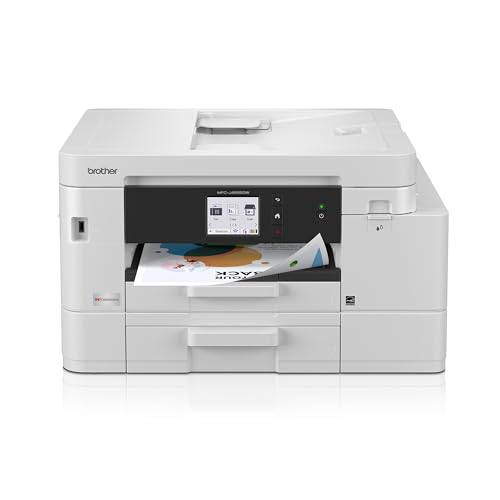
Brother INKvestment 4555 Wireless Color Inkjet Printer
| Preview | Product | Price | |
|---|---|---|---|
|
Brother INKvestment 4555 Wireless Color Inkjet All-in-One Printer with... | Buy Now |
The Brother INKvestment 4555 Wireless Color Inkjet Printer offers reliable color printing with versatile all-in-one features. It prints up to 20 ppm in black and 19 ppm in color, supporting high-volume tasks. The printer includes a 400-sheet capacity across two trays and a 20-page automatic document feeder for scanning and copying.
Connectivity is flexible with Wi-Fi, Ethernet, USB, and cloud access through a 2.7-inch touchscreen. High-yield cartridges and automatic ink delivery help reduce running costs. This device balances productivity with ease of use, making it suitable for busy work environments.
Best for: Small businesses and home offices that require dependable, high-volume color printing and multifunction capabilities with efficient connectivity.
Pros:
- Fast print speeds up to 20 ppm black and 19 ppm color with automatic duplex printing.
- Large 400-sheet capacity and 20-page automatic document feeder streamlining workflow.
- Multiple connectivity options including Wi-Fi, Ethernet, USB, and cloud integration.
Cons:
- Ink cartridges might be costly without the Refresh subscription service.
- The 2.7-inch touchscreen could be small for users preferring larger panels.
- The device may require dedicated space in smaller office setups.
Important:
This description is based solely on the provided data and avoids unverified claims or exaggerations.
Factors to Consider When Choosing a Colour Printer for Small Business
When selecting a colour printer for your small business, focus on print quality and speed to meet your daily demands. Check connectivity options to guarantee seamless integration with your devices, and consider ink or toner costs to keep expenses manageable.
Also, make sure the printer’s size fits comfortably in your workspace without crowding it.
Print Quality Standards
Choosing a colour printer for your small business means prioritizing print quality standards that meet professional demands. Look for high print resolution, like 4800 x 1200 dpi, to guarantee sharp, detailed colour outputs for documents and marketing materials. But don’t rely on resolution alone; the quality of toner or ink cartridges plays a vital role in consistent colour accuracy and vibrancy.
To maintain brand consistency, choose printers with true colour matching and colour calibration features. Advanced colour management tools let you adjust colour profiles to achieve precise output. Remember, factors like media type and the printer’s colour processing engine also affect print quality.
Printing Speed Requirements
Speed plays a critical role in keeping your small business running smoothly, especially when printing large volumes of documents. You’ll want a printer that offers at least 26 pages per minute (ppm) in both black and color to handle busy days efficiently. Check the initial page output time; models starting within 10-15 seconds reduce frustrating delays.
Automatic duplex printing is a must-have for saving time and paper during double-sided jobs. Also, consider printers with high-yield toner or ink cartridges and large input trays to sustain speed during peak workloads. Match the printer’s maximum speed with your typical print demands to avoid bottlenecks.
Choosing the right speed ensures your workflow stays uninterrupted and productive, helping your business meet deadlines effortlessly.
Connectivity Options Available
Since small businesses often rely on multiple devices and remote work, having versatile connectivity options in your colour printer is essential. Look for printers offering wireless features like Wi-Fi, Wi-Fi Direct, and Ethernet, which let you print from various devices without tangled cables. Dual-band Wi-Fi (2.4GHz/5GHz) enhances connection stability and speeds, ensuring consistent printing.
Mobile printing support through smartphone apps and cloud services lets you print remotely with ease. Don’t overlook USB ports for direct, secure connections when needed. Also, make certain your printer is compatible with the operating systems you and your team use, whether on mobile or desktop.
Prioritizing these connectivity options makes your printing workflow smoother and more efficient, supporting your small business’s dynamic needs.
Ink and Toner Costs
Understanding ink and toner costs is essential when selecting a colour printer for your small business. You’ll want to look at the cost per page, which depends on both the price and yield of the cartridges. If you print a lot, high-yield ink or toner cartridges can save you significant money over time.
Inkjet printers are cheaper upfront but often have higher ongoing costs due to frequent cartridge replacements. On the other hand, laser printers usually cost more initially but offer more affordable toner for heavy printing needs. Also, consider if the printer supports third-party or remanufactured cartridges.
While these can lower expenses, they might void warranties or affect security features. Balancing these factors helps you find a printer that fits your budget without compromising quality.
Device Size And Footprint
When choosing a colour printer for your small business, you’ll want to carefully consider its size and footprint to guarantee it fits well in your workspace. Start by measuring the area where you plan to place the printer and compare those dimensions with the printer’s width, depth, and height. This helps avoid overcrowding your desk or office.
Smaller printers suit tight spaces but often come with reduced paper capacity and fewer features. On the other hand, larger all-in-one models need more room but usually provide higher capacity and multifunctional capabilities. By balancing your space constraints with your printing needs, you can select a device that fits comfortably without compromising on functionality or efficiency.
Duplex Printing Capability
Although duplex printing might seem like a small feature, it can considerably cut your paper usage and save costs in the long run. By automatically printing on both sides, you reduce paper waste and help your business stay environmentally friendly. This feature also saves you time since you won’t need to manually flip pages, improving your workflow efficiency.
Many modern color printers offer duplex printing at speeds up to 35 pages per minute, so you won’t sacrifice productivity. When choosing a color printer, make sure its duplex functionality is dependable to ensure consistent, high-quality double-sided prints. This way, your professional documents will look polished while keeping your expenses and environmental impact in check.
Paper Handling Capacity
Many small businesses benefit from color printers with a paper handling capacity of at least 250 sheets, as this reduces the need for frequent refills and keeps your workflow running smoothly. Most small business printers offer input trays holding between 150 and 400 sheets, so you can pick one that matches your print volume.
If you often print double-sided documents, having enough paper in the tray supports automatic duplex printing without interruptions. Look for printers with additional media slots or manual feed options to easily handle different paper types and sizes beyond the standard tray.
Choosing a printer with ample paper capacity means you’ll minimize downtime and boost efficiency, especially when handling large print jobs or tight deadlines.
Security Features Needed
Since printers often handle sensitive business data, you’ll want to prioritize security features that protect your information from unauthorized access. Start by choosing printers that support secure printing protocols like SSL/TLS encryption to safeguard data during transmission. Look for user authentication options such as PIN codes, passwords, or badge access to restrict printer use only to authorized personnel.
Make sure the device offers regular firmware and security updates to fix vulnerabilities and keep cyber threats at bay. Consider models with secure erase or data wiping capabilities to prevent recovery of sensitive information after maintenance or disposal. Additionally, opt for printers with built-in security suites, like HP Wolf Pro Security or Canon Security Suite, to defend against malware and unauthorized access effectively.
Frequently Asked Questions
How Do Colour Printers Impact Small Business Branding?
Colour printers boost your small business branding by producing vibrant, professional materials that grab attention and build trust.
You’ll create consistent, high-quality marketing collateral that reflects your brand’s personality and makes a strong impression.
What Are the Environmental Considerations for Colour Printers?
You’ll want to weigh waste, wattage, and water usage when choosing a colour printer. Opt for energy-efficient models with recyclable cartridges to reduce your environmental impact and keep your small business greener and more eco-conscious.
Can Colour Printers Handle Specialized Media Like Labels or Cardstock?
Yes, many colour printers can handle specialized media like labels or cardstock. You’ll want to check the printer’s specifications to guarantee compatibility and adjust settings for thickness and texture to get the best print quality on different materials.
What Maintenance Is Required for Colour Printers in Small Offices?
You’ll need to clean print heads regularly, replace ink cartridges, and update firmware.
Think of it like tuning a Model T engine—small adjustments keep your printer running smoothly, avoiding jams and ensuring vibrant prints every time.
Are There Cost Differences Between Inkjet and Laser Colour Printers?
Yes, inkjet printers usually cost less upfront but have higher ink expenses, while laser printers cost more initially but offer lower toner costs over time.
You’ll want to balance your budget with your printing volume.
Conclusion
Choosing the right colour printer for your small business is like planting a garden—you want tools that nurture growth, bloom with vibrant results, and stand strong through busy seasons. Just as a gardener trusts their seeds and soil, you’ll rely on your printer to bring ideas to life with crisp colours and reliable performance.
Pick wisely, and watch your business flourish with every print. With the best colour printers for small business in 2026, you can turn your workspace into a thriving landscape of success. Invest in quality, and let your prints speak volumes.