11 Best Personal Printers for 2026
When choosing a personal printer, versatility, reliability, and meeting your specific needs are key factors to consider. The best personal printers for 2026 combine wireless convenience, high-quality color printing, and user-friendly features.
Whether you need an all-in-one model, a fast laser printer, or a portable thermal option, there’s a perfect printer for your setup.
Look for all-in-one models like the Canon PIXMA TR4720 or HP Envy 6155e to enjoy wireless convenience and vibrant color prints.
If speed and sharp text output are priorities, the Brother HL-L2405W laser printer is an excellent choice.
For those who need portability, thermal printers such as the N80 Wireless offer compact, inkless printing on the go.
Explore features like duplexing, media capacity, and connectivity options to find the best fit for your personal printing needs.
| Image | Name | Editor's Rating | Price |
|---|---|---|---|

|
NDYIN Portable Printers Wireless for Tra...
|
|
|

|
HP DeskJet 2855e Wireless All-in-One Col...
|
|
|

|
Canon PIXMA TR4720 All-in-One Wireless P...
|
|
|

|
HP Envy 6155e Wireless All-in-One Color ...
|
|
|

|
Canon PIXMA TS6520 Wireless Color Inkjet...
|
|
N80 Wireless Portable Thermal Printer Bluetooth Compatible
| Preview | Product | Price | |
|---|---|---|---|
|
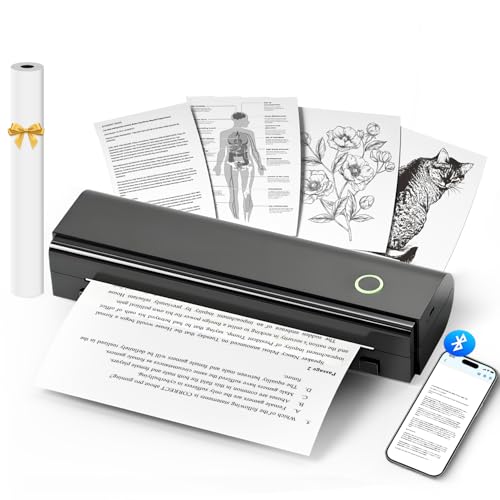
NDYIN Portable Printers Wireless for Travel, N80 Wireless Thermal... | Buy Now |
The N80 Wireless Portable Thermal Printer offers a compact and lightweight design ideal for travel. Weighing around 1.5 to 1.7 pounds, it fits easily into a backpack. Its dimensions of 3.3 x 11 x 2 inches make it simple to carry and store.
This printer connects seamlessly via Bluetooth to iOS and Android devices using the Nada Print App. It features a built-in rechargeable battery that supports printing up to 160 pages per charge. The inkless thermal technology produces sharp black-and-white prints on US Letter or A4 paper without requiring ink or toner.
Best for: Travelers and mobile professionals needing a compact, wireless printer for on-the-go printing directly from smartphones or tablets.
Pros:
- Lightweight and portable design for easy transport.
- Bluetooth connectivity with iOS and Android through the Nada Print App.
- Inkless thermal printing reduces maintenance and eliminates ink costs.
- Rechargeable battery supports extended use without frequent charging.
Cons:
- Bluetooth may not connect with laptops or PCs; USB-C cable and drivers might be needed.
- Prints only in black-and-white, which may limit color printing needs.
- Charger is not included, so a separate purchase or existing adapter could be necessary.
Important: This description is based solely on provided specifications and features without additional claims.
HP DeskJet 2855e Wireless All-in-One Printer
| Preview | Product | Price | |
|---|---|---|---|

|
HP DeskJet 2855e Wireless All-in-One Color Inkjet Printer, Scanner,... | Buy Now |
The HP DeskJet 2855e Wireless All-in-One Printer is a compact device designed for easy printing, scanning, and copying. It delivers color prints at 5.5 pages per minute and black-and-white prints at 7.5 ppm. This printer supports paper sizes from 3×5 inches up to 8.5×14 inches, making it versatile for various tasks.
Equipped with built-in Wi-Fi and mobile app compatibility, it allows direct printing from smartphones and tablets. The printer uses HP AI technology to improve web and email printouts by removing unnecessary content. Manual duplexing helps reduce paper use, although the process requires user handling.
With a 60-sheet input tray and an energy-efficient design, this all-in-one printer fits well in home or small office environments. Its compact footprint saves space while maintaining reliable performance for everyday document needs.
Best for: Individuals or small home offices seeking an affordable, compact all-in-one printer with wireless capabilities for basic printing, scanning, and copying needs.
Pros:
- Wireless connectivity with mobile app support enables easy printing from smartphones and tablets.
- Compact design and energy-efficient operation make it ideal for limited spaces and eco-conscious users.
- HP AI technology optimizes web and email printouts by removing unwanted content for cleaner results.
- Supports a range of paper sizes for versatile document handling.
Cons:
- Manual duplexing may require extra effort compared to automatic options.
- Print speeds are moderate and might limit efficiency for high-volume tasks.
- The 60-sheet tray could need frequent refilling during larger print jobs.
Important: This description is based solely on the provided specifications and features of the HP DeskJet 2855e Wireless All-in-One Printer.
Canon PIXMA TR4720 Wireless All-in-One Printer
| Preview | Product | Price | |
|---|---|---|---|

|
Canon PIXMA TR4720 All-in-One Wireless Printer, Home Use with Auto... | Buy Now |
The Canon PIXMA TR4720 is a versatile wireless all-in-one printer designed for everyday home use. It combines printing, scanning, copying, and faxing in a compact form that fits neatly on your desk. This model supports auto duplex printing and features a 100-sheet input tray for efficient handling of multiple tasks.
You can print sharp, vibrant photos up to 8.5 x 11 inches with a high resolution of 4800 x 1200 dpi. The printer also supports mobile printing and works seamlessly with Alexa to provide ink notifications. Its lightweight, energy-efficient design makes it easy to use in various home settings without taking up much space.
Best for: Home users seeking a compact, versatile all-in-one printer with wireless connectivity and efficient performance for everyday printing, scanning, copying, and faxing needs.
Pros:
- Supports wireless mobile printing and Alexa integration for ink notifications.
- Auto duplex printing with a 100-sheet input tray enhances productivity.
- Compact, lightweight design fits easily in limited spaces.
Cons:
- Print speed of 8.8 ppm might be slower for high-volume jobs.
- Average customer feedback suggests occasional reliability or print quality issues.
- Limited to 110V operation, which may restrict use in certain regions.
Important:
– Information is based solely on provided data without external references.
HP Envy 6155e Wireless All-in-One Inkjet Printer
| Preview | Product | Price | |
|---|---|---|---|

|
HP Envy 6155e Wireless All-in-One Color Inkjet Printer, Portobello,... | Buy Now |
The HP Envy 6155e Wireless All-in-One Inkjet Printer offers a compact design ideal for home use. It supports wireless printing, scanning, and copying with ease. The 2.4-inch color touchscreen simplifies navigation and operation.
This printer features automatic duplex printing and dual-band Wi-Fi, allowing seamless printing from smartphones and laptops. It produces vibrant color prints at up to 7 pages per minute and sharp black-and-white pages at 10 ppm. The device accommodates various media sizes and includes a 3-month Instant Ink trial.
Made with at least 60% recycled plastic, the HP Envy 6155e is an eco-friendly option. It combines functionality with environmental responsibility and convenient connectivity for everyday tasks.
Best for: Home users looking for a compact, eco-conscious all-in-one printer with wireless capabilities for routine printing, scanning, and copying.
Pros:
- Automatic duplex printing with vibrant, true-to-screen color output.
- Easy wireless setup via dual-band Wi-Fi and mobile app control.
- Includes a 3-month Instant Ink trial and eco-friendly recycled materials.
Cons:
- Printing speed may be moderate, with up to 7 ppm for color prints.
- Copy resolution might be limited to 300 x 300 dpi.
- Requires use of HP cartridges with specific circuitry, which could affect ink costs.
Important: The information is based solely on provided details without assumptions or external data.
Canon PIXMA TS6520 Wireless Color Inkjet Printer
| Preview | Product | Price | |
|---|---|---|---|

|
Canon PIXMA TS6520 Wireless Color Inkjet Printer Duplex Printing,... | Buy Now |
The Canon PIXMA TS6520 Wireless Color Inkjet Printer offers a compact and efficient solution for home and hybrid work environments. It produces sharp, vibrant prints using a 2-cartridge hybrid ink system, supporting resolutions up to 1200 x 1200 dpi. The flatbed scanner allows for easy scanning and copying of documents.
This printer features dual-band Wi-Fi and supports mobile printing options such as Apple AirPrint, enabling convenient wireless printing from various devices. Its intuitive OLED display provides clear status updates and ink monitoring. Duplex printing helps save paper, while the small footprint fits well in limited spaces.
Designed for everyday use, the PIXMA TS6520 balances functionality and ease of use. It is well-suited to handle typical printing, scanning, and copying tasks without complexity. The combination of wireless connectivity and compact design makes it a practical choice.
Best for: Individuals and families looking for a compact, wireless all-in-one printer for routine home and hybrid office printing needs.
Pros:
- Compact design fits easily into small workspaces.
- High-resolution printing with vibrant colors via a hybrid ink system.
- Dual-band Wi-Fi and mobile printing options including Apple AirPrint for wireless convenience.
- Duplex printing capability helps reduce paper usage.
Cons:
- Input tray capacity may require frequent refills under heavy use.
- Single USB port limits wired connection choices.
- Starter ink tanks could need early replacement with extended printing.
Important:
- Description is based solely on provided product details.
- No additional claims or unverified information included.
Brother Work Smart 1360 Wireless Color Inkjet Printer
| Preview | Product | Price | |
|---|---|---|---|

|
Brother Work Smart 1360 Wireless Color Inkjet All-in-One Printer with... | Buy Now |
The Brother Work Smart 1360 Wireless Color Inkjet Printer delivers reliable printing, copying, and scanning in a compact all-in-one design. Its small footprint fits well in home offices, complemented by a 1.8-inch color display that offers straightforward navigation. This versatile printer produces sharp documents with a high resolution of 1200 x 6000 dpi and supports automatic duplex printing for efficiency.
Connectivity is flexible with wireless, USB, and cloud options, allowing easy printing from various devices and apps. The printer’s fast output speeds—up to 16 ppm for black and 9 ppm for color—help maintain productivity. An efficient ink system includes an automatic delivery subscription, reducing downtime and managing ink supply smoothly.
Best for: individuals or small home offices needing a compact all-in-one printer with wireless and cloud capabilities for efficient color and black-and-white printing, copying, and scanning.
Pros:
- Fast print speeds with automatic duplexing and high-resolution output
- Multiple connectivity options including Wi-Fi, USB, AirPrint, Mopria, and cloud services
- Efficient ink system with automatic delivery to prevent interruptions and reduce ink costs
Cons:
- Small 1.8-inch display may limit ease of navigation compared to larger touchscreens
- Paper tray capacity of 150 sheets and 20-sheet ADF might be insufficient for high-volume jobs
- Ink cartridges could have a higher replacement cost compared to some competitors’ models
Important:
This description is based solely on the provided details about the Brother Work Smart 1360 Wireless Color Inkjet Printer.
Canon PIXMA TS4320 Wireless Color Inkjet Printer
| Preview | Product | Price | |
|---|---|---|---|

|
Canon PIXMA TS4320 Wireless Color Inkjet Printer for Duplex Printing,... | Buy Now |
The Canon PIXMA TS4320 Wireless Color Inkjet Printer offers a compact design and easy setup, ideal for home and hybrid work environments. It delivers crisp color prints at 1200 x 1200 dpi with duplex printing capabilities. This printer supports a variety of media types, including glossy photo paper and envelopes, making it versatile for everyday tasks.
Equipped with dual-band Wi-Fi, it ensures stable wireless printing from smartphones and tablets using the Canon PRINT App, AirPrint, or Mopria. The eco-friendly model uses a 2-cartridge ink system that provides sharp text and vibrant colors. It also supports voice commands through Alexa, adding convenience to your printing routine.
This wireless inkjet printer balances functionality and simplicity without overcomplicating features. Its design suits users who need reliable, high-quality prints without extra advanced options.
Best for: Home users and hybrid workers seeking a compact, easy-to-use color inkjet printer for light printing, scanning, and copying needs.
Pros:
- Sharp 1200 x 1200 dpi color printing with duplex and versatile media support
- Reliable dual-band Wi-Fi and mobile printing via Canon PRINT App, AirPrint, and Mopria
- Eco-friendly with ENERGY STAR and EPEAT Silver certifications, plus Alexa voice control
Cons:
- May lack advanced features like an OLED display and automatic document feeder
- Maximum print size limited to letter (8.5” x 11”), not suited for larger formats
- The 2-cartridge ink system might be less ideal for heavy or professional photo printing
Important:
This description is based solely on the provided product details without additional claims.
Inkless Portable Wireless Thermal Printer with Paper Kit
| Preview | Product | Price | |
|---|---|---|---|

|
Gloryang Inkless Portable Printer for Travel, Wireless Thermal Printer... | Buy Now |
The Inkless Portable Wireless Thermal Printer with Paper Kit offers a convenient solution for printing on the go. It uses advanced thermal technology to produce crisp black-and-white prints at 300 dpi. The printer supports a maximum size of 8.5 x 11 inches, ideal for standard documents and notes.
This printer connects easily via Bluetooth or drivers to iOS, Android, laptops, and PCs. Its compact design, weighing just 1.75 pounds and 1.7 inches thick, makes it easy to carry in backpacks. The built-in paper bin holds up to 360 sheets, and the kit includes thermal paper rolls, a carrying case, and charging cable for added convenience.
Designed for quick and efficient printing without ink or toner, this wireless thermal printer is practical for travel, work, or emergency use. Its simple operation and portability make it a reliable tool for everyday printing needs.
Best for: Professionals, students, and travelers who require a lightweight, portable, and ink-free printer for quick black-and-white prints.
Pros:
- Inkless thermal printing eliminates the need for ink, toner, or ribbons
- Compact and lightweight with a built-in paper bin holding up to 360 sheets
- Easy Bluetooth and driver compatibility with iOS, Android, laptops, and PCs
Cons:
- Prints only in black and white, which might limit color printing needs
- Supports simplex (single-sided) printing only
- Maximum print size of 8.5 x 11 inches may not cover larger format requirements
Important:
All features and specifications are based on the provided product details. No additional claims or outside information have been included.
Canon PIXMA TS3720 Wireless All-in-One Printer White
| Preview | Product | Price | |
|---|---|---|---|

|
Canon PIXMA TS3720 Wireless All-in-One Printer for Basic Home... | Buy Now |
The Canon PIXMA TS3720 Wireless All-in-One printer offers a compact and user-friendly design ideal for everyday home use. It combines printing, scanning, and copying functions with a hybrid ink system that produces sharp text and vibrant colors. The printer features a 1.5-inch LCD screen and a rear paper tray that holds up to 60 sheets.
Wireless connectivity is seamless with support for the Canon PRINT app, Apple AirPrint, and Mopria, allowing easy mobile printing. The printer delivers a maximum print resolution of 4800 x 1200 dpi, making it suitable for various media types. Its lightweight design fits well in any home office or creative space.
Best for: Users who need a straightforward, compact all-in-one printer for everyday printing, scanning, and copying with reliable wireless mobile options.
Pros:
- Compact design with easy setup and user-friendly 1.5-inch LCD screen.
- Hybrid ink system ensures sharp text and vivid color prints.
- Supports wireless printing via Canon PRINT app, Apple AirPrint, Mopria, and Dual Band Wi-Fi.
Cons:
- May require manual duplex printing, as automatic double-sided printing is not available.
- Paper capacity might be limited for larger print jobs with only a 60-sheet rear tray.
- Print speeds could be moderate for users with high-volume printing needs.
Brother HL-L2405W Wireless Monochrome Laser Printer
| Preview | Product | Price | |
|---|---|---|---|

|
Brother HL-L2405W Wireless Compact Monochrome Laser Printer with... | Buy Now |
The Brother HL-L2405W Wireless Monochrome Laser Printer delivers sharp, fast black-and-white printing with a resolution of 1200 x 1200 dpi. It handles up to 30 pages per minute, making it ideal for efficient document production. The compact design fits well in small offices or home workspaces.
This printer offers a 250-sheet tray to reduce refills and supports manual duplex printing for double-sided documents. Connectivity is versatile, with dual-band Wi-Fi and USB options available. Users can also manage print jobs remotely using the Brother Mobile Connect app.
With genuine Brother toner and a subscription service, you can maintain smooth operations while saving time and reducing supply hassles. This monochrome laser printer suits those who need reliable, wireless printing without color capability.
Best for: Small businesses or home offices requiring a compact, efficient monochrome laser printer with wireless functionality.
Pros:
- Fast printing speed up to 30 pages per minute with sharp 1200 x 1200 dpi output.
- Dual-band Wi-Fi and USB connectivity plus remote print management via the Brother Mobile Connect app.
- 250-sheet capacity minimizes paper refills.
- Toner subscription service offers automatic replacements and cost savings.
Cons:
- Manual duplex printing requires user involvement to print double-sided.
- Limited to black-and-white printing; no color output.
- Lacks an automatic document feeder for scanning or copying multiple pages.
Portable Wireless Thermal Printer for Travel & Office
| Preview | Product | Price | |
|---|---|---|---|

|
Portable Printers Wireless for Travel, A285M Small Inkless Thermal... | Buy Now |
The Portable Wireless Thermal Printer offers a lightweight and compact design, weighing only 1.5 pounds. It uses thermal printing technology to produce clear black-and-white documents without needing ink or toner. This makes it ideal for travel or small office use where convenience and portability matter.
Connectivity is flexible, with Bluetooth and USB-C options for smartphones, tablets, and laptops. It supports various paper sizes, including US Letter and A4. The rechargeable battery and easy-to-use app enable printing of receipts, contracts, and other documents at speeds up to seven pages per minute.
This printer fits well into mobile workflows and handles daily printing tasks efficiently. Its durable build ensures reliability during on-the-go use. While it prints only in monochrome and requires manual duplexing, it remains a practical solution for those needing an inkless, portable device.
Best for: Professionals and mobile workers who want a lightweight, wireless printer for travel and small office environments.
Pros:
- Compact, lightweight design perfect for portability.
- Inkless thermal printing eliminates the need for ink or toner.
- Supports multiple paper sizes and offers Bluetooth and USB-C connectivity.
- Rechargeable battery and user-friendly app enhance convenience.
Cons:
- Prints only monochrome, which may limit color printing needs.
- Manual duplex printing requires user intervention.
- May require driver installation for computer use, possibly complicating setup.
Important:
- Description is based solely on provided specifications.
- No additional claims beyond the given product details.
Factors to Consider When Choosing a Personal Printer
When choosing a personal printer, you’ll want to consider the printing technology, connectivity options, and print quality to match your needs. Don’t forget to check if it supports the media sizes you use and whether its size and portability fit your space.
These factors will help you pick a printer that works seamlessly for you.
Printing Technology Types
How do you choose the right printing technology for your personal printer? It depends on what you need most. Inkjet printers spray liquid ink through nozzles, making them perfect for high-quality color photos and detailed images.
If you print a lot of documents with sharp text, a laser printer is your best bet—it uses a laser beam to transfer toner quickly and efficiently, ideal for high-volume printing. Thermal printers work differently, using heat on special paper, and are great if you need to print receipts, labels, or barcodes.
Your choice affects speed, print quality, cost per page, and compatibility with paper types and sizes. Understanding these differences helps you pick a printer that fits your daily tasks perfectly.
Connectivity Options Available
Although print quality and speed matter, connectivity options often determine how easily you can integrate a personal printer into your daily routine. Most personal printers offer wireless options like Wi-Fi, Bluetooth, or both, giving you flexible ways to print from various devices. Dual-band Wi-Fi (2.4GHz and 5GHz) can boost connection stability and speed, especially in busy networks.
USB connectivity remains a reliable choice if you prefer a direct wired link to your computer or laptop. Some printers also include Ethernet ports, ideal if you want a wired network connection for shared use. Don’t overlook mobile printing apps, which let you print directly from your smartphone or tablet without needing a PC.
Choosing the right connectivity guarantees smooth, hassle-free printing every time.
Print Quality Standards
Connectivity options help you get your documents from device to printer, but the sharpness and clarity of those documents depend on print quality standards. Print quality hinges on resolution, measured in DPI—higher DPI means sharper images and text. For crisp text, laser printers usually deliver better precision, while inkjets shine with vibrant photos and color prints.
If you print detailed images, aim for at least 1200 x 1200 dpi to keep every detail clear. The type of ink or toner influences color accuracy, durability, and resistance to smudging or fading. Don’t forget, consistent quality requires proper maintenance, like regular cleaning and using high-quality, compatible consumables.
Paying attention to these factors ensures your prints always look their best.
Media Size Compatibility
Where will you use your prints most often? Make sure your printer supports the media sizes you use regularly, like letter, legal, A4, or photo sizes. Check the maximum media width and length it can handle to avoid issues with larger or custom papers.
Also, see if it prints borderless or with margins on your preferred sizes—this matters if you want professional-looking photos or projects. Consider whether it supports various media types, such as plain paper, photo paper, envelopes, or specialty media, for versatile use.
Finally, confirm the paper tray capacity and loading mechanisms fit your typical print volume and media variety, so you won’t have to keep refilling or deal with jams when switching paper types.
Portability And Size
After ensuring your printer handles the media sizes and types you need, think about where and how you’ll use it. Consider the printer’s weight and dimensions to make sure it fits comfortably in your space and is easy to carry if necessary. Compact designs with small footprints work best if your desk or storage area is limited.
Many portable printers include foldable or retractable components, enhancing mobility without losing functionality. Check whether the printer has a built-in battery or requires an external power source, as this greatly affects where you can use it. Finally, balance size with your typical printing volume—choose a model that’s portable yet can handle your daily tasks without frequent interruptions.
This way, you’ll get the convenience and performance you need.
Ink And Toner Costs
One of the biggest expenses you’ll face with a personal printer is ink or toner replacement. Inkjet printers usually cost less upfront but need frequent cartridge changes, raising your ongoing expenses. Laser printers have pricier cartridges but offer a lower cost per page and longer-lasting toner, saving you money over time.
Be sure to check the yield of each cartridge, typically measured in pages, to estimate how often you’ll need replacements based on your printing volume. If you want to avoid ink or toner costs altogether, consider a thermal printer, which uses heat-sensitive paper and is especially cost-effective for high-volume printing.
Balancing initial price against ongoing ink or toner costs will help you choose the best printer for your needs.
Additional Functional Features
Ink or toner costs are important, but you’ll also want to contemplate what extra features a printer offers to get the most value. Duplex printing lets you save paper by automatically printing on both sides, while scanning, copying, and faxing add versatility beyond simple printing.
Mobile printing support through apps or wireless protocols means you can manage documents on the go without hassle. Built-in document feeders speed up multi-page tasks, boosting your productivity. If you print photos or labels, check for compatibility with various media types and sizes.
Lastly, advanced security features like user authentication and encrypted printing protect your sensitive information, a must-have even for personal use. These extras can make a big difference in daily convenience and efficiency.
Frequently Asked Questions
How Do I Recycle Used Ink Cartridges Responsibly?
You can recycle used ink cartridges by returning them to the manufacturer’s recycling program or dropping them off at local office supply stores. Many offer free recycling bins, so don’t toss cartridges in the trash—recycle responsibly!
Can Personal Printers Connect to Smart Home Devices?
You’re sipping coffee, and yes, your personal printer can connect to smart home devices. It’s designed to sync with assistants like Alexa or Google, letting you print hands-free while multitasking around your cozy space.
What Are the Environmental Impacts of Thermal vs. Inkjet Printers?
You’ll find thermal printers use less ink but consume more energy, while inkjets waste ink and generate more plastic waste.
Choosing eco-friendly models and recycling cartridges helps reduce your environmental impact effectively.
Are There Any Subscription Services for Ink Refills?
Yes, you can subscribe to ink refill services like HP Instant Ink, which saves up to 50% on ink costs. These plans automatically send cartridges when you’re low, so you never run out unexpectedly.
This subscription model is convenient and cost-effective for frequent printer users. It ensures you always have ink on hand without the hassle of reordering manually. Many providers offer various plans tailored to different printing volumes.
How Long Do Printer Warranties Typically Last?
Printer warranties typically last one year, but some brands offer extended coverage up to three years. You can often purchase additional protection plans to cover repairs or replacements beyond the standard warranty period for peace of mind.
These extended plans provide extra security in case of unexpected issues. It’s a good idea to check the specific terms and conditions of your printer’s warranty. This way, you know exactly what is covered and for how long.
Conclusion
Choosing the perfect personal printer is like finding your printing soulmate—it should fit your lifestyle like a glove and work as smoothly as a well-oiled machine. Whether you need crisp color photos, quick black-and-white pages, or a portable buddy on the go, there’s a printer waiting to make your life easier.
So, trust your instincts, consider your needs, and watch your ideas leap from screen to paper with effortless magic. When selecting from the 11 best personal printers for 2026, prioritize features that match your daily tasks and budget. This way, you ensure your new printer becomes an indispensable tool that enhances productivity and creativity.