10 Best Printers for Artwork in 2026
If you want vibrant, detailed artwork prints in 2026, choosing the best printers for artwork is essential. Models like the Epson EcoTank ET-8550 and Canon PRO-310 deliver wide-format, high-resolution output with rich colors that bring your creations to life.
Look for printers with versatile media handling and advanced pigment or dye-based inks designed for longevity and color accuracy. Wireless connectivity and user-friendly interfaces also help streamline your creative workflow, making printing easier and faster.
Depending on your needs—from professional galleries to home studios—you’ll find options with varying sizes and speeds. Keep exploring to find the perfect fit for your art projects and achieve stunning results every time.
| Image | Name | Editor's Rating | Price |
|---|---|---|---|

|
Epson EcoTank Photo ET-8550 Wireless Wid...
|
|
|

|
Canon imagePROGRAF Professional 13" PRO-...
|
|
|

|
Canon imagePROGRAF TC-21 24" - Large For...
|
|
|

|
Canon MegaTank MAXIFY GX2020 All-in-One ...
|
|
|

|
Canon PIXMA TS6520 Wireless Color Inkjet...
|
|
Epson EcoTank ET-8550 Wireless Wide-Format Printer
| Preview | Product | Price | |
|---|---|---|---|

|
Epson EcoTank Photo ET-8550 Wireless Wide-format Color All-in-One... | Buy Now |
The Epson EcoTank ET-8550 Wireless Wide-Format Printer delivers sharp, lab-quality prints with its advanced 6-color Claria ET Premium ink system. It supports wide-format printing up to 13 x 19 inches and offers borderless printing for large, vibrant artwork and photos. This printer handles various media types, including cardstock and specialty sheets up to 1.3 mm thick.
Designed for ease of use, the ET-8550 features a 4.3-inch touchscreen and supports voice-activated printing. Wireless connectivity lets you print directly from your phone or smart device with convenience. Its cartridge-free system uses high-yield ink bottles that reduce ink costs by up to 80%, making it practical for frequent printing needs.
The printer’s design balances functionality with versatility, ideal for creative professionals. It may require a dedicated workspace due to its size. Printing photos typically takes about 15 seconds per 4 x 6-inch image. Using genuine Epson ink is necessary to maintain optimal performance and warranty coverage.
Best for: Artists, photographers, and creative professionals seeking high-quality, wide-format color printing with versatile media support.
Pros:
- Wide-format, borderless printing up to 13 x 19 inches for vibrant, large prints
- Cartridge-free 6-color Claria ET Premium ink system reduces ink costs by up to 80%
- Wireless connectivity, 4.3-inch touchscreen, and voice-activated printing for ease of use
Cons:
- May require ample workspace due to its larger footprint
- Printing speed for photos might be slower compared to some competitors
- Use of genuine Epson ink is needed to maintain warranty and avoid damage
Important:
This description is based solely on the provided information and avoids unverified claims or exaggerations.
Canon imagePROGRAF PRO-310 Wireless Photo Printer
| Preview | Product | Price | |
|---|---|---|---|

|
Canon imagePROGRAF Professional 13" PRO-310 Wireless Inkjet Photo... | Buy Now |
The Canon imagePROGRAF PRO-310 is a wireless photo printer designed for high-quality photo printing. It features a 9-color pigment-based ink system including Chroma Optimizer and Matte Black ink. This combination ensures deep blacks and vibrant colors with detailed gradations.
You can print on media sizes up to 13” x 19”, including a variety of fine art papers. The printer has a 3.0-inch LCD screen for easy operation and supports both Ethernet and USB connectivity. Its compact design balances professional output with straightforward maintenance.
This printer is ideal for those who want gallery-quality prints without extra functions like scanning or copying. It offers excellent color accuracy and media versatility for photographers focused on print quality.
Best for: advanced amateur and professional photographers seeking gallery-quality photo prints with deep blacks and vibrant colors in a compact, easy-to-use printer.
Pros:
- Produces rich, detailed prints with a 9-color pigment-based ink system including Chroma Optimizer.
- Supports large media sizes up to 13” x 19” and various fine art papers.
- Easy to operate with a 3.0-inch LCD and versatile connectivity options.
Cons:
- Print-only device without scanning or copying functions.
- Sheet capacity of 100 may require frequent paper refills for large print jobs.
- Weight might make it less portable for some users.
Important: All details are based solely on the provided product information.
Canon imagePROGRAF TC-21 24″ Large Format Printer
| Preview | Product | Price | |
|---|---|---|---|

|
Canon imagePROGRAF TC-21 24" - Large Format Printer, Poster & Plotter... | Buy Now |
The Canon imagePROGRAF TC-21 24″ Large Format Printer produces vibrant, high-resolution prints with sharp detail and rich colors. It supports wide-format media up to 24 inches and handles rolls or cut sheets up to 11×17 inches. This printer is designed for precise, professional-quality output.
It features a crisp 1200 x 1200 dpi resolution and uses large 280 ml ink bottles to minimize interruptions during printing. Connectivity options include USB, Ethernet, and Wi-Fi, complemented by an intuitive touchscreen for easy operation. Its design fits well into creative workspaces, balancing efficiency with user-friendly controls.
This printer is energy-efficient and built to support creative professionals who need reliable, high-quality prints on various media types. Its combination of functionality and connectivity makes it suitable for diverse artistic and design projects.
Best for: creative professionals and designers who require high-quality, vibrant large-format prints on a variety of media types up to 11×17 inches.
Pros:
- Sharp, detailed images with 1200 x 1200 dpi resolution.
- Large 280 ml ink bottles reduce refill frequency.
- Multiple connectivity options: USB, Ethernet, and Wi-Fi.
- User-friendly touchscreen interface.
Cons:
- May not support double-sided printing.
- Maximum media width limited to 24 inches.
- Could require a dedicated workspace due to its weight.
Important:
- Description based solely on provided specifications.
- No claims beyond stated product features.
Canon MegaTank MAXIFY GX2020 Wireless All-in-One Printer
| Preview | Product | Price | |
|---|---|---|---|

|
Canon MegaTank MAXIFY GX2020 All-in-One Wireless Color Printer –... | Buy Now |
The Canon MegaTank MAXIFY GX2020 is a wireless all-in-one printer designed for high-quality color printing with cost efficiency. It uses a refillable ink tank system that can produce up to 3,000 pages per refill, making it ideal for frequent use. The printer delivers sharp black text and vibrant dye-based colors at resolutions up to 1200 x 2400 dpi.
Its compact design fits easily on a desk, while dual paper trays support various media sizes up to 8.5 x 14 inches. Wireless connectivity and a 2.7-inch touchscreen simplify setup and enable mobile printing. This combination of features supports both creative projects and business documents efficiently.
Best for: Artists, small business owners, and home office users who need reliable, cost-effective color printing with flexible media handling and wireless convenience.
Pros:
- Refillable ink tank system yields up to 3,000 pages per set, reducing ink replacement frequency.
- High-resolution output with vibrant dye-based colors and sharp black text at 1200 x 2400 dpi.
- Compact design with dual paper trays and wireless connectivity for easy mobile printing.
Cons:
- Media handling limited to sizes up to 8.5 x 14 inches, which might not accommodate larger prints.
- Copy speed around 14 ppm may be slower than some office printers.
- Lacks automatic duplex scanning, which could affect efficiency for multi-page scans.
Important:
- Features and specifications are based solely on provided data.
- Description avoids unverified claims or exaggerations.
Canon PIXMA TS6520 Wireless Color Inkjet Printer
| Preview | Product | Price | |
|---|---|---|---|

|
Canon PIXMA TS6520 Wireless Color Inkjet Printer Duplex Printing,... | Buy Now |
The Canon PIXMA TS6520 is a compact wireless inkjet printer designed for home and casual use. It produces sharp prints at 1200 x 1200 dpi using pigment black and dye-based color inks. This printer supports borderless photo printing up to 8.5″ x 11″ and features automatic duplexing to help save paper.
Connectivity is simple with dual-band Wi-Fi and a USB port, allowing easy access from multiple devices. Mobile printing is supported through Canon PRINT and AirPrint, making it convenient to print directly from smartphones or tablets. The small OLED display offers basic navigation, keeping the design straightforward and user-friendly.
This model fits well in limited spaces and is suited for those who want reliable, vibrant prints without complicated setup. Its lightweight and intuitive interface make it a practical choice for everyday printing tasks and photo projects.
Best for: home users and casual artists looking for an affordable, easy-to-use wireless printer that delivers high-quality color and photo prints.
Pros:
- High-resolution 1200 x 1200 dpi prints with vibrant pigment black and dye colors
- Dual-band Wi-Fi and mobile printing support via Canon PRINT and AirPrint
- Automatic duplex printing and borderless photo printing up to 8.5″ x 11″
Cons:
- Input capacity may be limited with a maximum of only 1 sheet
- Small monochrome OLED display could limit ease of navigation
- Single USB port restricts wired connectivity options
Important: Information is based solely on provided product details without external additions.
Canon IP8720 Wireless Printer, AirPrint and Cloud Compatible, Black
| Preview | Product | Price | |
|---|---|---|---|

|
Canon IP8720 Wireless Printer, AirPrint and Cloud Compatible, Black | Buy Now |
The Canon IP8720 Wireless Printer delivers professional-quality prints up to 13 by 19 inches. It features a six-color ink system, including gray ink, producing sharp and detailed images at up to 9600 x 2400 dpi. This printer supports wireless printing via Wi-Fi, AirPrint, Google Cloud Print, and Canon’s Pixma solutions, allowing easy printing from multiple devices.
Designed for versatility, the IP8720 handles borderless photos quickly and supports various media sizes. Its advanced FINE print head technology combined with ChromaLife100+ ink ensures long-lasting, vibrant colors. The printer’s design focuses on high-quality output, making it suitable for photo enthusiasts and creative users.
Best for: photographers, artists, and small business users who require large-format, borderless photo prints with flexible wireless connectivity.
Pros:
- Produces sharp, vibrant prints with a six-color ink system including gray ink
- Offers multiple wireless printing options for convenient device compatibility
- Incorporates advanced FINE technology and ChromaLife100+ for durable, professional photos
Cons:
- Input tray capacity of 150 sheets may require frequent refilling during large print jobs
- Printing speeds are moderate, especially for color prints compared to office-focused models
Epson Expression Photo HD XP-15000 Wireless Printer
| Preview | Product | Price | |
|---|---|---|---|

|
Epson Expression Photo HD XP-15000 Wireless Color Wide-Format Printer,... | Buy Now |
The Epson Expression Photo HD XP-15000 Wireless Printer offers professional-quality photo printing in an ultra-wide format up to 13 by 19 inches. It utilizes a six-color dye-based ink system that produces vibrant colors and improved black-and-white images. The printer supports borderless printing, making it ideal for detailed and vivid photo artwork.
This compact printer provides both wireless and wired connectivity options. It handles specialty media like cardstock and features automatic duplex printing to save paper. The user-friendly control app and compatibility with Amazon Dash Replenishment help streamline ink management and operation.
Designed to fit neatly on desktops, the XP-15000 balances performance with space-saving convenience. Its versatility and high-quality output make it suitable for photographers and creatives who require large, colorful prints with fine detail.
Best for: Photographers and creative professionals needing high-resolution, borderless prints up to 13 x 19 inches with flexible media support and wireless ease.
Pros:
- Six-color dye-based ink system creates a wide color gamut and enhanced black-and-white prints.
- Supports wireless and wired connections plus automatic duplex printing.
- Handles specialty media such as cardstock.
- Compact design with user-friendly app and Amazon Dash Replenishment integration.
Cons:
- Uses only genuine Epson cartridges, which might limit third-party ink alternatives.
- Print speed of up to 20 ppm may be moderate for some users.
- Paper input and output capacity may require frequent refills during large print jobs.
Important:
This description is based solely on provided information about the Epson Expression Photo HD XP-15000 Wireless Printer.
Canon imagePROGRAF PRO-1100: 17” Professional Wireless Inkjet Photo Printer
| Preview | Product | Price | |
|---|---|---|---|

|
Canon imagePROGRAF PRO-1100: 17” Professional Wireless Inkjet Photo... | Buy Now |
The Canon imagePROGRAF PRO-1100 is a 17-inch professional wireless inkjet photo printer designed for artists and photographers who require precise color and fine detail. It features an 11-pigment LUCIA PRO II ink system that produces rich blacks and vibrant hues. The printer supports media sizes up to 17 x 22 inches, accommodating various photo papers for versatile printing options.
This model includes Canon’s Chroma Optimizer to enhance gloss and color consistency, delivering sharp images at a 2400 x 1200 dpi resolution. Its anti-clogging ink technology ensures smooth, reliable performance. The printer also integrates seamlessly with Adobe Photoshop and professional print software, offering accurate color management for high-quality results.
Best for: professional photographers and visual artists needing detailed, vibrant 17-inch photo prints with consistent color accuracy.
Pros:
- Advanced 11-pigment LUCIA PRO II ink system with Chroma Optimizer for enhanced gloss.
- Supports a range of media sizes up to 17 x 22 inches, including specialty photo papers.
- Smooth integration with Adobe Photoshop and professional print software.
Cons:
- May have limited connectivity options with only a single USB port.
- Could require ample workspace due to its relatively large footprint.
- Warranty coverage might be brief for users seeking extended protection.
Important:
This description is based solely on the provided specifications without additional claims or external information.
Canon PIXMA G6020 All-in-One Wireless Supertank Printer
| Preview | Product | Price | |
|---|---|---|---|

|
Canon PIXMA G6020 All-in-One Supertank Wireless (Megatank) Printer,... | Buy Now |
The Canon PIXMA G6020 All-in-One Wireless Supertank Printer offers high-volume printing with sharp, vibrant results up to 1200 x 2400 dpi. Its bottle-based ink system supports thousands of pages, making it a cost-effective choice for busy environments. The printer supports wireless, Ethernet, and USB connections, allowing easy printing from smartphones and Alexa-enabled devices.
This versatile printer handles printing, copying, scanning, and automatic duplexing. It supports various media sizes and types, adapting well to different tasks. The large 350-sheet capacity helps maintain smooth workflow without frequent paper refills.
Designed for efficiency, the PIXMA G6020 suits users needing reliable, multi-function printing with flexible connectivity. It balances quality and affordability for both home offices and creative professionals.
Best for: users requiring a cost-effective all-in-one printer with strong print quality and versatile connectivity for high-volume use.
Pros:
- High page yield with up to 6,000 black and 7,700 color pages per ink set
- Multiple connectivity options including wireless, Ethernet, USB, and voice control
- Multifunction capabilities: print, copy, scan, auto duplex, and media versatility
Cons:
- Customer rating averages around 3.9, indicating varied user experiences
- Basic 2-line LCD display may limit interface detail
- Larger footprint might need more desk space compared to compact models
Important: This description is based solely on the provided product information.
HP Envy Photo 7975 Wireless Color Inkjet Printer
| Preview | Product | Price | |
|---|---|---|---|
|
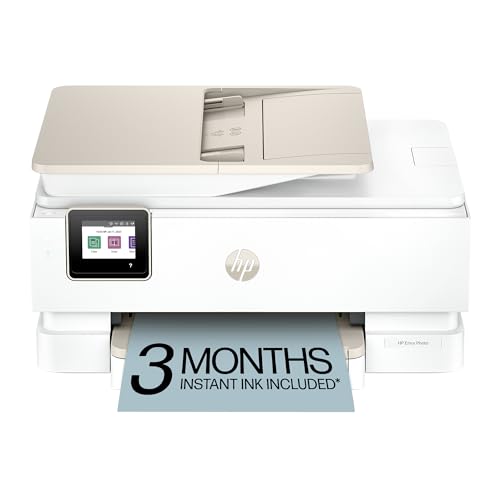
HP Envy Photo 7975 Wireless Color Inkjet Photo Printer, Print, scan,... | Buy Now |
The HP Envy Photo 7975 Wireless Color Inkjet Printer offers high-quality photo and document printing with sharp resolution up to 4800 x 1200 dpi. It supports duplex printing to help reduce paper use and features wireless connectivity for easy mobile and remote printing. The large touchscreen makes navigation simple and efficient.
This printer combines an automatic document feeder with a flatbed scanner to boost productivity. It handles various media types, making it suitable for creative projects. Built-in AI features help optimize your workflow, while solid security measures protect your data.
The design is user-friendly, fitting well in home or small office settings. Though print speeds are moderate, it delivers vibrant photo quality ideal for family and creative users. The maximum media size supports standard documents and photos but may limit larger format printing.
Best for: families and creative users needing a versatile all-in-one printer with strong photo and document capabilities.
Pros:
- High-resolution color printing with vibrant photo quality.
- Wireless and mobile printing with an intuitive touchscreen.
- Automatic duplex printing and document feeder improve efficiency.
Cons:
- Print speeds may be moderate for some tasks.
- Uses dye-based inks that could be less durable for archival photos.
- Maximum media size may not suit larger prints.
Factors to Consider When Choosing a Printer for Artwork
When choosing a printer for your artwork, you’ll want to focus on color accuracy and the type of ink it uses to guarantee vibrant, lasting prints. Consider the media sizes the printer supports and its print resolution to match your project needs. Don’t forget to check connectivity options that fit your workflow, whether it’s wireless or wired.
Color Accuracy Importance
Why does color accuracy matter so much in printing artwork? Because it guarantees your prints reflect the exact hues and tonal gradations you envisioned. When you choose a printer with a wide color gamut and high DPI resolution, like 9600 x 2400 dpi, you get vibrant, precise colors that bring your art to life.
Printers featuring multi-ink systems with extra tanks, such as gray or red, deepen color richness and accuracy. Plus, advanced calibration tools and software keep your colors consistent across multiple prints, so every copy matches perfectly. Opting for pigment-based inks also helps, as they produce stable, fade-resistant colors ideal for professional and creative projects.
Prioritizing color accuracy means your artwork always looks its best.
Ink Type Options
How do you select the right ink type for your artwork printer? Start by considering what matters most: color vibrancy, durability, and the media you’ll use. Dye-based inks deliver bright, vivid colors perfect for photographic artwork but don’t last as long under light exposure.
If longevity and water resistance top your priorities, pigment-based inks are your best bet—they provide archival-quality prints with excellent fade resistance. Don’t overlook specialty inks like white or metallic; these open up creative options for printing on dark or unique surfaces but require compatible printers and ink systems.
Ultimately, your choice influences print quality, color accuracy, and durability. Match the ink type to your artistic needs to ensure your prints look stunning and stand the test of time.
Media Size Compatibility
What media sizes do you need your printer to handle for your artwork? Make certain the printer supports dimensions that fit your pieces, like 13 x 19 inches for larger prints. You’ll also want a printer that works with both standard and specialty media—cardstock, fine art paper, and photo paper, for example.
Check the maximum media thickness the printer can handle, especially if you use thicker or textured papers. Don’t forget to take into account input tray capacity and media loading options to manage multiple or large sheets efficiently. Look for adjustable media guides, too; they keep your paper aligned properly, preventing cropping or misregistration.
Choosing a printer with versatile media size compatibility ensures your artwork prints come out exactly as intended every time.
Print Resolution Standards
Choosing a printer with the right print resolution is essential for producing sharp, detailed artwork. Print resolution, measured in DPI (dots per inch), determines how finely your printer can reproduce details. For artwork, you’ll want at least 1200 x 1200 dpi, which professional photo printers commonly offer.
High-end models push this to 9600 x 2400 dpi, delivering exceptional clarity. If you print black-and-white pieces, notice that black-and-white resolution usually surpasses color, ensuring crisp text and fine monochrome details. For larger or gallery-quality prints, medium and large-format printers prioritize higher DPI settings to capture subtle gradients and color shifts accurately.
Connectivity Features
Beyond print resolution, connectivity features play a key role in ensuring your artwork printing process runs smoothly. Choose printers with wireless options like Wi-Fi, Bluetooth, and Ethernet so you can print effortlessly from multiple devices without cables. Support for mobile printing apps and cloud services lets you send artwork directly from smartphones or tablets, boosting your workflow flexibility.
If you want hands-free convenience, look for compatibility with smart home systems and voice-activated printing. Multiple connectivity methods reduce disruptions caused by device compatibility issues, keeping your creative process uninterrupted. Advanced printers often include automatic network setup and troubleshooting, making it easier to connect and maintain your devices.
Prioritizing these connectivity features means you’ll spend less time managing connections and more time creating.
Maintenance and Durability
How can you guarantee your printer keeps producing vibrant, high-quality artwork without constant hassle? Choose a durable printer with a high-quality ink or toner system that resists smudging, fading, and water damage. Look for maintenance features like automatic print head cleaning and easy ink or toner refilling to reduce downtime and maintain consistent print quality.
Robust construction and a reliable paper handling system help prevent mechanical failures and paper jams. Opt for printers supporting high-capacity cartridges or bottles to minimize frequent replacements and keep performance steady. Don’t overlook regular firmware updates and accessible customer support, which play a vital role in your printer’s longevity and dependable operation.
Prioritizing these factors ensures your artwork prints flawlessly for years to come.
Frequently Asked Questions
What Types of Paper Are Best for Printing Artwork?
You’ll want to use heavyweight, acid-free paper like fine art matte, glossy photo paper, or textured watercolor paper. These types preserve colors, prevent fading, and enhance your artwork’s details and vibrancy for professional-quality prints.
How Do Printer Inks Affect the Longevity of Art Prints?
Printer inks directly affect your art prints’ longevity; pigment-based inks withstand fading better than dye-based ones. Using archival-quality inks guarantees your artwork remains vibrant and endures longer, preserving colors against light and environmental damage.
Can These Printers Handle Textured or Specialty Art Papers?
Yes, these printers can handle textured or specialty art papers with ease. They’re designed to adjust ink flow and drying time, ensuring vibrant, detailed prints even on thick, rough, or uniquely coated surfaces without smudging or bleeding.
What Are the Maintenance Requirements for Art Printers?
You’ll need to clean print heads regularly, use high-quality inks, and run calibration tests often.
Replacing cartridges timely and keeping the printer dust-free also prevents clogs and guarantees consistent, vibrant artwork prints without hassle.
Are There Software Recommendations for Optimizing Artwork Prints?
Like Da Vinci perfecting his strokes, you’ll want software like Adobe Photoshop or Lightroom to optimize your prints. These tools let you adjust color, sharpness, and resolution, ensuring your artwork looks vibrant and true to your vision.
They provide advanced features tailored for fine art prints, helping you achieve the highest quality results. By fine-tuning details and correcting imperfections, your prints will stand out with professional polish.
Using such software can make a significant difference in how your artwork is perceived in physical form.
Conclusion
Choosing the perfect printer for your artwork isn’t just important—it’s downright life-changing. With these top-tier printers, your creations will leap off the page with such vibrancy and detail, they might as well jump into the real world.
Don’t settle for blurry or dull prints when you can wield these powerful machines to turn every masterpiece into a jaw-dropping spectacle. Trust me, your art deserves nothing less than spectacular—and these printers deliver just that.
When looking for the best printers for artwork in 2026, prioritize color accuracy, resolution, and media compatibility. These factors ensure your prints capture every nuance and tone. With the right printer, your artwork will truly shine and leave a lasting impression.