6 Best Printers for Business in 2025 – Reliable, Fast, and Professional
You want a printer that’s fast, reliable, and professional, like the HP LaserJet Pro MFP 3101sdw or Brother DCP-L2640DW, both offering speedy output and solid duplex features.
Consider models with wireless connectivity, strong security, and multifunction capabilities for scanning and copying.
Look for high-yield cartridges to cut costs and easy maintenance to keep running smoothly.
If you need a versatile, efficient printer that fits small to medium workloads, exploring the top six picks will reveal which fits your business best.
| Image | Name | Editor's Rating | Price |
|---|---|---|---|

|
HP Color LaserJet Pro MFP 3301sdw Wirele...
|
|
|
|
Canon Color imageCLASS MF751Cdw II - Wir...
|
|
|

|
HP OfficeJet Pro 9125e Wireless All-in-O...
|
|
|

|
HP LaserJet Pro MFP 3101sdw Wireless All...
|
|
|

|
Brother DCP-L2640DW Wireless Compact Mon...
|
|
HP Color LaserJet Pro MFP 3301sdw Wireless All-in-One Color Laser Printer
| Preview | Product | Price | |
|---|---|---|---|

|
HP Color LaserJet Pro MFP 3301sdw Wireless All-in-One Color Laser... | Buy Now |
The HP Color LaserJet Pro MFP 3301sdw is designed to keep your small office running smoothly. It delivers sharp prints quickly, with speeds up to 26 pages per minute in both color and black. This helps reduce wait times and keeps your team productive during busy workdays.
This all-in-one printer combines printing, scanning, copying, and faxing in one compact device. Its automatic document feeder and 250-sheet input tray minimize interruptions, making multitasking easier. You can print double-sided automatically, saving paper and time.
Maintenance is straightforward when using original HP 218A or 218X toner cartridges. These cartridges ensure consistent, high-quality output while protecting your device with built-in security features. Regular firmware updates help maintain compatibility and safeguard your investment.
While built for small to medium workloads, the HP 3301sdw may not be ideal for very high-volume printing needs. It only supports HP toner cartridges with HP chips, limiting third-party options. However, its balance of speed, color quality, and multifunctionality makes it a solid choice for many office environments.
Best for: Small teams and busy offices needing a reliable, efficient color laser all-in-one printer for everyday document tasks.
What We Like:
- Fast print speeds up to 26 ppm in color and black
- Multifunction design with auto two-sided printing and document feeder
- Uses original HP toner cartridges for consistent quality and security
- Compact footprint fits well in smaller office spaces
Specification:
| Feature | Details |
|---|---|
| Manufacturer | HP |
| Dimensions | Approx. 16.5 x 15.3 x 12.5 in (W x D x H) |
| Weight | Around 24.7 lb (11.2 kg) |
| Material | Durable plastic and metal |
| Color Options | White with black accents |
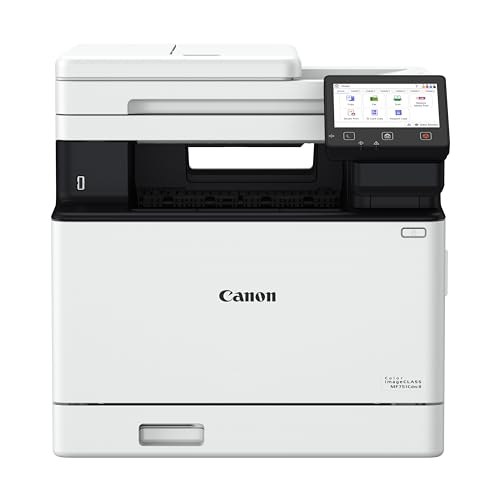
Canon imageCLASS MF751Cdw II Wireless Duplex Laser Multifunction Printer
| Preview | Product | Price | |
|---|---|---|---|
|
Canon Color imageCLASS MF751Cdw II - Wireless Duplex Laser Printer,... | Buy Now |
Experience seamless productivity with the Canon imageCLASS MF751Cdw II, designed to tackle demanding office tasks effortlessly. This multifunction wireless laser printer streamlines your workflow by combining printing, scanning, and copying in one compact unit. Its 50-sheet automatic document feeder and automatic duplex printing reduce manual effort and paper waste, saving you valuable time and resources.
Handling large volumes is simple thanks to a 250-sheet cassette and a 50-sheet multipurpose tray, with options to expand capacity as your workload grows. The printer delivers sharp, professional-quality results quickly, with print speeds up to 35 pages per minute and a rapid 7-second first page output, minimizing wait times during busy periods.
Maintenance is straightforward, keeping downtime low with easy access to consumables and intuitive controls. The 5-inch touchscreen interface offers clear navigation, while wireless connectivity and mobile app support enable printing from smartphones, tablets, and Chromebooks, enhancing flexibility for hybrid work environments.
While the initial investment is higher than basic printers, the advanced features justify the cost for businesses requiring reliable, high-speed multifunction performance. The optional paper capacity expansion requires additional purchase, which may not suit smaller offices with lighter printing needs.
Best for: Businesses and professionals needing a versatile, high-volume multifunction printer with wireless and mobile connectivity.
What We Like:
- Fast print speeds up to 35 ppm with a quick 7-second first print
- Automatic duplex printing and 50-sheet ADF for efficient document processing
- Wireless setup with mobile and Chromebook compatibility
- Intuitive 5-inch touchscreen for easy operation
- Expandable paper capacity to match growing workloads
Specification:
| Manufacturer | Canon |
|---|---|
| Model | imageCLASS MF751Cdw II |
| Dimensions | Approx. 18.5 x 18.5 x 18.7 inches |
| Weight | Approx. 46.3 lb (21 kg) |
| Printer Type | Wireless Duplex Laser Multifunction |
| Paper Capacity | 250-sheet cassette, 50-sheet multipurpose tray |
| Connectivity | Wireless, Mobile Apps, Chromebook Compatible |
HP OfficeJet Pro 9125e Wireless All-in-One Color Inkjet Printer (403X0A)
| Preview | Product | Price | |
|---|---|---|---|

|
HP OfficeJet Pro 9125e Wireless All-in-One Color Inkjet Printer,... | Buy Now |
Experience seamless productivity with the HP OfficeJet Pro 9125e Wireless All-in-One Color Inkjet Printer. Designed to streamline your office tasks, this printer combines printing, scanning, copying, and faxing into one efficient device. It helps reduce workflow interruptions by delivering professional-quality color prints quickly and reliably.
The printer’s wireless connectivity and intuitive 2.7-inch touchscreen allow you to manage print jobs effortlessly from any device. With automatic duplex printing and a 250-sheet input tray, it handles large volumes without constant refills. HP’s AI technology improves print layouts by removing unwanted content, saving both time and ink.
Maintenance is straightforward with the included 3-month HP Instant Ink trial, ensuring you never run out of ink unexpectedly. Built-in HP Wolf Pro Security protects your network, keeping your data safe. The device is crafted using over 40% recycled plastic, making it a sustainable choice for environmentally conscious offices.
While the OfficeJet Pro 9125e supports only HP cartridges with HP chips, this integration ensures optimal performance and print quality. Firmware updates may be required to maintain security and functionality, so occasional attention is needed to keep the device running smoothly.
Best for: Busy offices and professionals needing a versatile all-in-one printer with fast, high-quality color output, wireless management, and advanced security features.
What We Like:
- Fast print speeds up to 22 ppm with duplex printing and a large 250-sheet tray
- Easy wireless control via touchscreen and HP app
- HP AI optimizes print layouts by removing unwanted content
- Includes a 3-month trial of HP Instant Ink for convenient ink replacement
- Built-in HP Wolf Pro Security protects your network and data
Specification:
| Feature | Details |
|---|---|
| Manufacturer | HP |
| Model | OfficeJet Pro 9125e |
| Printer Type | Wireless All-in-One Color Inkjet |
| Print Speed | Up to 22 pages per minute |
| Input Tray Capacity | 250 sheets |
| Touchscreen Size | 2.7 inches |
| Connectivity | Wireless |
| Material | Over 40% recycled plastic |
| Security Features | HP Wolf Pro Security |
HP LaserJet Pro MFP 3101sdw Wireless All-in-One Laser Printer (9D2X4F)
| Preview | Product | Price | |
|---|---|---|---|

|
HP LaserJet Pro MFP 3101sdw Wireless All-in-One Laser Printer, Office... | Buy Now |
Experience efficient black-and-white printing with the HP LaserJet Pro MFP 3101sdw, designed to meet the needs of busy small teams and professional offices. This all-in-one laser printer delivers fast output, helping you complete tasks quickly without compromising on quality. Its auto duplex printing feature reduces paper use, making it both cost-effective and environmentally conscious.
The device combines printing, scanning, and copying functionalities, streamlining your workflow in a compact design. A 250-sheet input tray and a 50-sheet auto document feeder keep your projects moving with minimal interruptions. Wireless connectivity allows seamless printing from multiple devices, enhancing convenience and flexibility in a shared workspace.
Maintenance is straightforward, but note that the printer only accepts genuine HP cartridges. Firmware updates are designed to maintain security but may restrict the use of non-HP cartridges, which could limit options for replacement supplies. This policy ensures consistent performance and reliability over time.
Overall, the HP LaserJet Pro MFP 3101sdw stands out for its dependable performance, ease of use, and ability to handle high-volume black-and-white tasks efficiently. It fits well in environments where speed, reliability, and professional output are critical.
Best for: Small teams and professional offices needing fast, reliable black-and-white printing with scanning and copying capabilities.
What We Like:
- Fast print speeds up to 35 pages per minute with automatic duplexing.
- Large input capacity with 250-sheet tray and 50-sheet auto document feeder.
- Wireless connectivity supports printing from multiple devices.
- Reliable black-and-white performance suited for busy office environments.
Specification:
| Feature | Details |
|---|---|
| Manufacturer | HP |
| Model | LaserJet Pro MFP 3101sdw |
| Print Speed | Up to 35 pages per minute |
| Input Tray Capacity | 250 sheets |
| Auto Document Feeder | 50 sheets |
| Connectivity | Wireless |
| Printing Technology | Laser |
| Print Color | Black and white only |
Brother DCP-L2640DW Wireless Compact Monochrome Laser Printer with Copy and Scan
| Preview | Product | Price | |
|---|---|---|---|

|
Brother DCP-L2640DW Wireless Compact Monochrome Multi-Function Laser... | Buy Now |
Experience efficient printing designed to keep your small business running smoothly with the Brother DCP-L2640DW Wireless Compact Monochrome Laser Printer. This multifunction device combines printing, scanning, and copying in a compact form that fits comfortably in tight office spaces. It tackles everyday tasks quickly, producing up to 36 pages per minute, so you can focus on what matters most.
The 50-page auto document feeder streamlines handling multi-page documents, reducing manual effort and saving you time. Dual-band wireless connectivity ensures a stable and secure network connection, allowing you to print from various devices without hassle. Managing prints and scans is straightforward with the Brother Mobile Connect app, which keeps everything under control from your smartphone.
Maintenance is simple thanks to compatibility with genuine TN830 toner cartridges and the Refresh EZ Print Subscription, helping you avoid downtime and keep supplies stocked effortlessly. While this printer handles black and white documents efficiently, it is limited to monochrome output and does not support duplex scanning, which means double-sided scanning requires manual intervention.
This printer is a practical solution for busy environments where speed, reliability, and space-saving design are priorities. Its robust network options and multifunction capabilities address common office challenges, boosting productivity without complexity.
Best for: Small businesses and home offices needing a fast, compact, and multifunction monochrome laser printer with wireless connectivity.
What We Like:
- Fast printing speed up to 36 pages per minute
- 50-page auto document feeder for efficient multi-page tasks
- Dual-band wireless and Ethernet connectivity for flexible networking
- Easy mobile management via Brother Mobile Connect app
Specification:
| Feature | Details |
|---|---|
| Manufacturer | Brother |
| Dimensions (W x D x H) | Compact design (exact size not specified) |
| Weight | Not specified |
| Printing Technology | Monochrome Laser |
| Connectivity | Dual-band wireless, Ethernet |
| Toner Compatibility | Genuine TN830 toner cartridges |
HP OfficeJet Pro 8125e Wireless All-in-One Color Inkjet Printer (405T6A)
| Preview | Product | Price | |
|---|---|---|---|

|
HP OfficeJet Pro 8125e Wireless All-in-One Color Inkjet Printer,... | Buy Now |
The HP OfficeJet Pro 8125e Wireless All-in-One Color Inkjet Printer is designed to make everyday printing tasks easier and more efficient. Whether you work from home or run a small business, this printer helps streamline your workflow with fast, reliable performance. It prints, scans, and copies with ease, handling two-sided documents automatically to save time and paper.
This printer’s wireless setup means you can print from multiple devices without hassle. The bright 2.7-inch touchscreen offers simple control, while AI-driven printing ensures your documents come out clear and professionally formatted every time. You’ll appreciate the compact design that fits neatly in any workspace without taking up much room.
Maintenance is straightforward with HP’s secure ink cartridges, designed to deliver consistent, high-quality prints while protecting your printer. The eco-friendly build uses over 45% recycled plastic, reflecting HP’s commitment to sustainability. Security is also a priority, with HP Wolf Essential Security guarding your data against potential threats, so you can print with confidence.
While it’s ideal for standard letter and legal-sized documents, it doesn’t support larger media sizes. The initial page print time is a bit longer than some alternatives, and the printer requires HP’s proprietary cartridges, which may affect ink costs over time.
Best for: Small business owners and home office users needing a versatile, secure all-in-one printer with efficient wireless functionality.
What We Like:
- Fast automatic duplex printing speeds up to 20 ppm black and 10 ppm color
- Easy-to-use 2.7-inch color touchscreen for quick navigation
- AI-enabled printing for sharp, well-formatted documents
- Strong security features with HP Wolf Essential Security
- Eco-conscious design using over 45% recycled plastic
Specification:
| Feature | Detail |
|---|---|
| Manufacturer | HP |
| Dimensions (W x D x H) | 17.44 x 13.86 x 9.17 inches |
| Weight | Approximately 17.69 lbs |
| Color Options | Black |
| Media Size Supported | Up to 8.5 x 11.7 inches |
| Connectivity | Wireless, USB |
Factors to Consider When Choosing a Printer for Business
When choosing a printer for your business, you’ll want to consider how fast it needs to print and whether you require color or just monochrome. Think about the connectivity options available and if multifunction features like scanning and copying are necessary.
Also, make sure the printer can handle your typical paper volume without constant refills.
Printing Speed Requirements
Choosing the right printer speed is essential for keeping your business running smoothly. You need to take into account the pages per minute (PPM) to guarantee the printer handles your workload efficiently. If your business has high-volume printing, opt for speeds of 35 PPM or higher to cut down wait times.
For smaller or low-volume needs, a printer with 10-20 PPM will likely be enough and more budget-friendly. Make sure to match the printer’s speed with your typical print job size to avoid workflow bottlenecks. Remember, faster printers often come with higher costs and larger sizes, so balance speed with your space and budget constraints.
This way, you’ll pick a printer that fits your business perfectly.
Color vs. Monochrome
After considering how fast your printer needs to be, the next step is deciding between color and monochrome models. If you regularly produce marketing materials, presentations, or reports that benefit from vivid visuals and color accuracy, a color printer is your best bet. However, keep in mind these printers usually come with higher upfront costs and maintenance fees due to their advanced technology.
On the other hand, if your printing mainly involves large volumes of text-based documents, a monochrome printer offers a more budget-friendly solution. They’re generally faster for black-and-white printing and have lower toner costs, making them ideal for busy, high-volume environments. Ultimately, your choice should balance the need for visual impact with your budget constraints to find the perfect fit for your business.
Connectivity Options Available
How easily can your printer connect to your devices and network? Look for models offering wireless options like Wi-Fi, dual-band Wi-Fi, Ethernet, and Bluetooth to print from multiple devices without cables. Support for mobile printing protocols such as Apple AirPrint, Mopria Print Service, and proprietary apps lets you print directly from smartphones and tablets.
Ensure the printer includes network security features like secure Wi-Fi and encrypted connections to protect sensitive documents during transmission. Compatibility with various operating systems and remote management tools helps you control and access your printer efficiently. Finally, built-in auto connection detection and troubleshooting simplify setup and maintenance, saving you time.
Prioritizing these connectivity features ensures seamless, secure, and flexible printing that fits your business needs.
Multifunction Capabilities Needed
While selecting a printer for your business, you’ll want one that goes beyond just printing. Look for multifunction printers that handle scanning, copying, and faxing to cover all your document needs. Verify it supports automatic duplex printing to save time and reduce paper waste during large jobs.
An automatic document feeder (ADF) is essential for efficiently managing multi-page scans and copies without manual intervention. Check that the printer delivers high-quality color and black-and-white output for professional presentations. Also, prioritize user-friendly interfaces and diverse connectivity options like wireless, Ethernet, and mobile compatibility.
These multifunction capabilities will streamline your workflow, improve productivity, and guarantee your business communications look polished and professional every time.
Paper Handling Capacity
Beyond multifunction features, you’ll want to contemplate a printer’s paper handling capacity to keep your business running smoothly. A higher capacity means you can print longer without constantly refilling trays, which is essential in busy offices. Look for standard trays holding 250 to 550 sheets to accommodate high-volume needs.
An automatic document feeder (ADF) with at least a 50-sheet capacity helps you scan or copy multi-page documents efficiently. Also, choose printers that support multiple paper sizes and types, so you can handle diverse tasks without hassle.
Prioritizing adequate paper capacity minimizes workflow interruptions, letting you maintain productivity and focus on what matters most—growing your business.
Consumables and Costs
A key factor in choosing a business printer is understanding the costs and availability of consumables like toner or ink cartridges, as they directly affect your ongoing expenses. You’ll want to check the yield of cartridges to see how many pages each can print before needing replacement; higher yields often mean better cost-efficiency.
Be aware that some printers require specific cartridges with chips or circuitry, which can limit your options and raise prices. Consider whether the printer supports high-yield cartridges to reduce your cost per page.
Also, keep in mind firmware updates that ensure your printer stays compatible with genuine or approved supplies, preventing unnecessary costs from rejected or incompatible cartridges. Evaluating these factors helps you manage expenses effectively while maintaining reliable printing performance.
Security Features Included
Managing consumable costs is important, but protecting your business from cyber threats should also be a priority when choosing a printer. Look for models with built-in security features like HP Wolf Pro Security or HP Wolf Essential Security that guard against attacks. Guarantee the printer supports secure user authentication, such as PIN or password access, to keep unauthorized users out.
Choose devices that regularly receive firmware updates to patch vulnerabilities and maintain protection. Opt for printers offering encrypted wireless connections, like dual-band Wi-Fi, to safeguard data transmissions. Finally, verify the printer supports secure document release or pull printing, so sensitive documents don’t sit unattended in the output tray.
These security features help keep your information safe and your business compliant.
Warranty and Support
While choosing a printer that fits your business needs, you should prioritize extensive warranty coverage and dependable support services. A thorough warranty covers hardware repairs and replacements, reducing downtime and costly fixes. Opt for printers with longer warranty periods—three years or more—to secure ongoing protection and peace of mind.
Reliable support, including accessible service centers and responsive help desks, ensures quick resolution of any issues, keeping your workflow smooth. Additionally, manufacturers offering firmware and software updates during the warranty period help enhance security, fix bugs, and improve performance.
Frequently Asked Questions
How Do Printer Leasing Options Compare to Purchasing Outright for Businesses?
Leasing printers lets you avoid a big upfront cost and upgrade regularly, while buying outright gives you full ownership and can be cheaper long-term.
You’ll want to weigh flexibility against total expense based on your business needs.
What Are the Environmental Impacts of Different Printer Types?
You’ll find inkjet printers use less power but produce more waste, while laser printers consume more energy but have longer-lasting cartridges.
Choosing energy-efficient models and recycling cartridges helps reduce environmental impact considerably.
How Can I Secure My Business Printer From Cyber Threats?
Think of your printer as a castle gate; you’ll secure it by updating firmware, using strong passwords, enabling encryption, and limiting network access.
Don’t forget to monitor logs regularly—this keeps cyber invaders at bay, protecting your business domain.
Are There Subscription Services for Ink or Toner Replenishment?
Yes, many printer brands offer subscription services that automatically send ink or toner when you’re running low.
You’ll save time and avoid running out, plus often get discounted rates or free shipping with these plans.
What Maintenance Routines Extend the Lifespan of Business Printers?
You don’t need to clean your printer, right? Well, actually, regular cleaning, using quality ink, updating firmware, and avoiding paper jams will extend your printer’s life.
Trust me, your printer will thank you for the care!
Conclusion
Choosing the right printer for your business is like picking the perfect tool for a craftsman—it shapes the quality of your work and efficiency. Whether you need speed, color accuracy, or wireless convenience, one of these six printers will fit your needs.
Keep your priorities clear, and you’ll find a reliable, professional device that keeps your workflow smooth and your output sharp. Don’t settle—invest smartly to boost your business productivity.