11 Best Printers with Inexpensive Ink for 2026
You’ll save big on ink costs in 2026 by choosing printers with inexpensive ink options and refillable tanks like the Epson EcoTank ET-2800 or HP Smart Tank 5000. These models offer high page yields and wireless convenience, making them ideal for budget-conscious users.
Printers such as the HP DeskJet 2855e and Canon PIXMA TS4320 balance quality and affordability with cartridge options. Look for features like duplex printing and mobile apps to enhance ease of use and efficiency.
Exploring these options can help you find the best fit for your printing needs and budget, ensuring you get value without compromising performance.
| Image | Name | Editor's Rating | Price |
|---|---|---|---|

|
HP DeskJet 2855e Wireless All-in-One Col...
|
|
|

|
Epson EcoTank ET-2800 Wireless Color All...
|
|
|

|
Canon PIXMA TS4320 Wireless Color Inkjet...
|
|
|

|
HP Envy 6155e Wireless All-in-One Color ...
|
|
|

|
Canon PIXMA TS3720 Wireless All-in-One P...
|
|
HP DeskJet 2855e Wireless All-in-One Printer
| Preview | Product | Price | |
|---|---|---|---|

|
HP DeskJet 2855e Wireless All-in-One Color Inkjet Printer, Scanner,... | Buy Now |
The HP DeskJet 2855e Wireless All-in-One Printer offers a practical solution for home printing needs. It handles printing, scanning, and copying with ease, making it suitable for everyday tasks. Wireless connectivity is supported through single-band Wi-Fi, allowing seamless printing from smartphones and PCs via the HP app.
This printer delivers sharp print quality with a resolution up to 4800 x 1200 dpi. Print speeds are decent, reaching 7.5 ppm for black-and-white and 5.5 ppm for color documents. Its compact design and energy-efficient operation help it fit comfortably into home environments without taking up much space.
The device uses affordable HP 67 ink cartridges, which contribute to lower running costs. However, duplex printing requires manual intervention, and the paper input capacity is limited to 60 sheets. Despite these factors, it remains a convenient option for light to moderate home use.
Best for: individuals and families seeking an affordable, compact, and easy-to-use all-in-one printer for everyday home printing, scanning, and copying tasks.
Pros:
- Supports wireless printing via single-band Wi-Fi and the HP app for easy device connectivity.
- Produces sharp prints with up to 4800 x 1200 dpi resolution and reasonable print speeds.
- Compact and energy-efficient design ideal for home use.
- Uses cost-effective HP 67 ink cartridges.
Cons:
- Duplex printing may require manual page flipping.
- Paper input capacity of 60 sheets might be limited for higher volume printing.
- Some users might experience occasional limitations in performance.
Important:
This description is based solely on the provided specifications and features of the HP DeskJet 2855e Wireless All-in-One Printer.
Epson EcoTank ET-2800 Wireless Color All-in-One Printer
| Preview | Product | Price | |
|---|---|---|---|

|
Epson EcoTank ET-2800 Wireless Color All-in-One Cartridge-Free... | Buy Now |
The Epson EcoTank ET-2800 Wireless Color All-in-One Printer delivers high-quality prints with a resolution of 5760 x 1440 dpi. It prints up to 10 pages per minute and uses a cartridge-free system with refillable ink tanks. This design lowers ink costs by up to 90% and provides enough ink for approximately two years.
This all-in-one printer supports various media sizes and includes a flatbed scanner for versatile use. It offers wireless connectivity through Ethernet, USB, and Epson’s mobile apps for convenient printing options. The EcoTank ET-2800 combines functionality with an eco-conscious approach.
Its compact and user-friendly design makes it suitable for home or small office environments. The printer balances efficient performance and cost savings without compromising on print quality.
Best for: users seeking an affordable, eco-friendly, and high-quality wireless all-in-one printer with low ongoing ink costs.
Pros:
- Cartridge-free EcoTank system reduces ink replacement costs by up to 90%.
- High-resolution output (5760 x 1440 dpi) with fast print speeds up to 10 ppm.
- Wireless connectivity with mobile app support and flatbed scanning.
- Supports multiple media sizes for flexible printing needs.
Cons:
- Input tray capacity of 100 sheets may require frequent refilling in busy settings.
- Lacks automatic duplex printing, supporting only simplex mode.
- One-year limited warranty might be shorter than some alternatives.
Important:
Information is based solely on the provided data without additional claims or outside details.
Canon PIXMA TS4320 Wireless Color Inkjet Printer
| Preview | Product | Price | |
|---|---|---|---|

|
Canon PIXMA TS4320 Wireless Color Inkjet Printer for Duplex Printing,... | Buy Now |
The Canon PIXMA TS4320 Wireless Color Inkjet Printer offers a compact and efficient solution for home and hybrid work environments. Its sleek design fits easily into small spaces. The printer supports wireless printing through dual-band Wi-Fi, compatible with smartphones and tablets via the Canon PRINT App, AirPrint, or Mopria.
This inkjet printer delivers sharp documents and vibrant photos at a resolution of 1200 x 1200 dpi. It supports duplex printing and works with various media types, including labels and envelopes. The two-cartridge hybrid ink system helps keep operating costs low while maintaining quality.
Certified by ENERGY STAR and EPEAT Silver, this printer balances performance with environmental responsibility. The straightforward setup process makes it ideal for light-duty printing, scanning, and copying tasks without unnecessary complexity.
Best for: Home users and hybrid workers needing a compact, reliable printer for everyday document and photo printing.
Pros:
- Compact design fits well in limited spaces.
- Dual-band Wi-Fi enables easy wireless printing from multiple devices.
- ENERGY STAR and EPEAT Silver certifications support eco-friendly use.
- Supports duplex printing and various media types.
Cons:
- May lack some advanced features like an OLED display or automatic document feeder.
- Print sizes are limited to letter size (8.5” x 11”).
- The two-cartridge hybrid ink system might not be optimal for high-volume or professional photo printing.
Important: Only features and specifications provided in the original context are included. No additional claims or information have been added.
HP Envy 6155e Wireless All-in-One Printer (714L5A)
| Preview | Product | Price | |
|---|---|---|---|

|
HP Envy 6155e Wireless All-in-One Color Inkjet Printer, Portobello,... | Buy Now |
The HP Envy 6155e Wireless All-in-One Printer combines printing, scanning, and copying in a compact design. It features a 100-sheet capacity and automatic duplexing for double-sided printing. The 2.4-inch color touchscreen offers simple navigation and control.
This printer supports reliable dual-band Wi-Fi, allowing easy remote printing from various devices. It produces sharp, vibrant prints at up to 4800 x 1200 dpi color resolution. The device handles multiple media sizes and incorporates recycled plastic in its eco-friendly build.
The included 3-month Instant Ink trial helps reduce ink costs without compromising quality. This model suits home users who want efficient wireless connectivity and bright color output in one device.
Best for: Home users and small home offices seeking a compact all-in-one printer with strong wireless features and vivid color printing.
Pros:
- Automatic duplex printing with 100-sheet capacity improves efficiency.
- Dual-band Wi-Fi and color touchscreen enhance remote and local use.
- Eco-friendly design includes recycled materials and Instant Ink trial.
- High color resolution supports sharp, vibrant prints.
Cons:
- Print speed may be moderate for high-volume users.
- Copy resolution is relatively low compared to some alternatives.
- Only compatible with HP cartridges featuring specific circuitry.
Important:
- Information is based solely on the provided data.
- No additional claims or details have been added.
Canon PIXMA TS3720 Wireless All-in-One Printer
| Preview | Product | Price | |
|---|---|---|---|

|
Canon PIXMA TS3720 Wireless All-in-One Printer for Basic Home... | Buy Now |
The Canon PIXMA TS3720 is a compact all-in-one printer designed for everyday home use. It handles printing, copying, and scanning with ease. The hybrid ink system ensures sharp text and vibrant colors in every document and photo.
Setup is straightforward, aided by a 1.5-inch LCD screen and wireless connectivity. It supports Dual Band Wi-Fi and mobile printing through apps like Canon PRINT and Apple AirPrint. The 60-sheet rear tray accommodates various paper sizes, making it versatile for different tasks.
Replacing ink is simple with just two cartridges, minimizing maintenance time. Although it offers manual duplex printing and moderate print speeds—especially for color documents—it delivers reliable performance for typical home workflows.
Best for: Home users seeking a compact and affordable all-in-one printer for everyday printing, scanning, and copying with wireless and mobile connectivity.
Pros:
- Compact design with easy setup and intuitive 1.5-inch LCD.
- Sharp text and vivid colors from a hybrid ink system.
- Wireless printing via Dual Band Wi-Fi and mobile apps.
Cons:
- Paper capacity may be limited with a 60-sheet rear tray.
- Duplex printing is manual, not automatic.
- Print speeds might be moderate, especially for color pages.
Important:
This description uses only the provided information without added claims or details beyond the original data.
HP OfficeJet Pro 8125e Wireless All-in-One Printer
| Preview | Product | Price | |
|---|---|---|---|

|
HP OfficeJet Pro 8125e Wireless All-in-One Color Inkjet Printer,... | Buy Now |
The HP OfficeJet Pro 8125e Wireless All-in-One Printer offers fast, high-quality color printing with a resolution up to 4800 x 1200 dpi. It supports smart duplexing for printing, scanning, and copying, making it suitable for busy small offices or home workspaces. Its wireless connectivity allows easy integration with laptops, PCs, and smartphones for convenient printing.
This printer features a 225-sheet input capacity, balancing everyday printing needs with efficiency. AI-enabled tools help adapt the device to your workflow, while security features protect your data during wireless operations. Using HP 923 series cartridges, it combines cost efficiency with reliable print quality.
Best for: Small office and home users seeking a versatile, wireless all-in-one printer with fast color output and smart duplex functions.
Pros:
- High-resolution color printing with fast first-page output
- AI-driven features tailored to workflow and strong security measures
- Wireless connectivity and app control for multiple device integration
Cons:
- Customer feedback may vary, reflecting a range of user experiences
- The 225-sheet tray might require frequent refilling for heavy print jobs
- Dye-based ink cartridges could be less ideal for long-term archival prints
Important:
– Information is based solely on provided data without additional claims.
HP Envy 6555e Wireless All-in-One Printer
| Preview | Product | Price | |
|---|---|---|---|
|
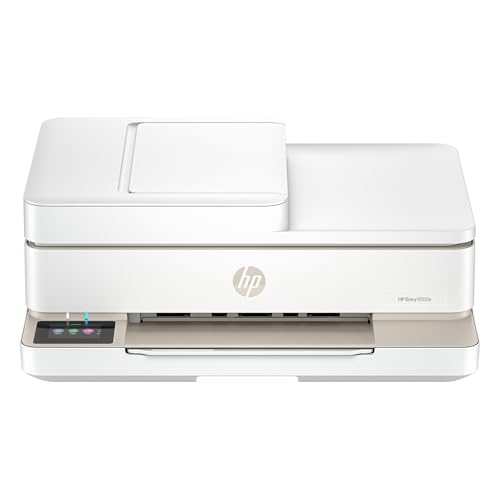
HP Envy 6555e Wireless All-in-One Color Inkjet Printer, Portobello,... | Buy Now |
The HP Envy 6555e Wireless All-in-One Printer offers versatile functionality for home and small office use. It handles color printing, scanning, copying, and duplex printing in a compact design. The 35-sheet auto document feeder and 100-sheet paper capacity help manage everyday tasks efficiently.
This printer features a 2.4-inch color touchscreen for easy operation. Dual-band Wi-Fi and mobile printing support enable flexible connectivity. The AI-enabled workflow streamlines common tasks, making it suitable for various printing needs.
Using original HP 68 ink cartridges, the Envy 6555e delivers good page yields with affordable refills. It also includes a three-month Instant Ink trial for added convenience. This combination enhances productivity without complexity.
Best for: users seeking an affordable, wireless all-in-one printer with versatile features for home or small office environments.
Pros:
- Combines color printing, scanning, copying, and duplex printing in one device.
- Supports dual-band Wi-Fi, mobile printing, and AI-enabled workflow.
- Includes a 2.4-inch color touchscreen for straightforward navigation.
- Comes with a three-month Instant Ink trial and uses original HP 68 cartridges.
Cons:
- Print speeds may be moderate, with up to 7 ppm in color and 10 ppm in black.
- Paper input capacity might require frequent refilling during heavy use.
- Some users could experience occasional limitations based on customer feedback.
Important: The description is based solely on the provided information without adding unverified claims or outside data.
HP Smart Tank 5000 Wireless All-in-One Printer
| Preview | Product | Price | |
|---|---|---|---|

|
HP Smart Tank 5000 Wireless All-in-One Ink Tank Printer, Scanner,... | Buy Now |
The HP Smart Tank 5000 Wireless All-in-One Printer offers reliable, high-volume printing with a focus on cost efficiency. It features refillable, cartridge-free ink tanks that provide up to two years of ink, making it ideal for users who need to keep ink expenses low. The printer delivers sharp images with up to 4800 x 1200 dpi color resolution and includes AI-enhanced web and email printing to remove unwanted content.
Designed for convenience, this printer supports wireless connectivity and voice control compatibility. It handles various media sizes and allows manual duplex printing, which adds flexibility for different printing tasks. The durable design ensures it can withstand regular use in home or small office environments.
Best for: users seeking a cost-effective, high-volume printer with wireless features and efficient ink management.
Pros:
- Comes with two years of ink via refillable, cartridge-free tanks.
- Produces high-quality prints up to 4800 x 1200 dpi with AI-enhanced printing.
- Supports wireless connectivity and voice control.
- Handles multiple media sizes and manual duplex printing.
Cons:
- Manual duplex printing may require extra effort compared to automatic options.
- Input tray holds up to 100 sheets, which might need frequent refills in heavy-use scenarios.
- Some users might find the overall experience less seamless based on average ratings.
Important:
– Descriptions are based solely on provided information without external data or assumptions.
Epson EcoTank ET-2400 Wireless All-in-One Printer
| Preview | Product | Price | |
|---|---|---|---|

|
Epson EcoTank ET-2400 Wireless Color All-in-One Cartridge-Free... | Buy Now |
The Epson EcoTank ET-2400 Wireless All-in-One Printer features a cartridge-free ink system that helps reduce ink replacement costs by up to 90%. It includes refillable ink tanks designed to last up to two years, supporting high-volume printing with approximately 4,500 black and 7,500 color pages. This printer offers wireless connectivity for easy setup and use within home or small office environments.
Designed for multifunctionality, the EcoTank ET-2400 supports printing, scanning, and copying with sharp resolution up to 5760 x 1440 dpi. It has a rear-feed tray that holds 100 sheets, allowing for convenient paper handling. Manual duplex printing is available, and the printer integrates with Epson’s smart home features to enhance user convenience.
This wireless all-in-one printer combines efficient ink use with reliable performance and versatile features. Its compact design fits well in limited spaces while delivering quality output. The inclusion of Epson’s original ink ensures consistent print results and maintains device integrity.
Best for: Home users and small office workers seeking an affordable, high-quality wireless all-in-one printer with low ink replacement costs.
Pros:
- Cartridge-free refillable ink tanks significantly reduce ink costs by up to 90%.
- High-resolution printing and scanning at 5760 x 1440 dpi for sharp output.
- Wireless connectivity with smart home compatibility and a convenient rear-feed 100-sheet tray.
Cons:
- Manual duplex printing may require user intervention.
- Output tray capacity might be limited to about 30 pages.
- Use of genuine Epson ink is necessary to maintain warranty and print quality.
Important:
- Information is based solely on provided data without external additions.
- Focuses on functional features and practical benefits.
Brother Work Smart 1360 Wireless Color Inkjet Printer
| Preview | Product | Price | |
|---|---|---|---|

|
Brother Work Smart 1360 Wireless Color Inkjet All-in-One Printer with... | Buy Now |
The Brother Work Smart 1360 Wireless Color Inkjet Printer offers versatile functionality for printing, copying, and scanning. Its compact design fits well in home or office settings. The printer supports automatic duplex printing and delivers fast black-and-white print speeds up to 16 pages per minute.
Wireless connectivity options are robust, including Wi-Fi, AirPrint, and Mopria, allowing seamless mobile and cloud printing. The 1.8-inch color display provides easy access to settings and functions. High-yield LC501 ink cartridges help lower ink costs and come with a free two-month trial of Refresh EZ Print for additional savings.
This printer is designed for users who want efficient ink usage without sacrificing functionality. It performs well for everyday printing tasks and supports moderate color printing speeds up to 9 pages per minute. The maximum media size accommodates legal documents, making it suitable for most standard printing needs.
Best for: Individuals and home office users seeking a compact, versatile all-in-one printer with efficient ink usage and strong wireless connectivity.
Pros:
- Supports automatic duplex printing and fast black print speeds up to 16 ppm
- Multiple wireless options including Wi-Fi, AirPrint, and Mopria
- High-yield LC501 cartridges with a two-month Refresh EZ Print trial
- Compact design suitable for home or office use
Cons:
- Maximum media size limited to legal, which may not fit larger formats
- Small 1.8-inch display might limit navigation ease for some users
- Moderate color print speed (up to 9 ppm) may be slower for heavy color jobs
Important:
The description strictly reflects the provided features without added claims or outside information.
Epson EcoTank ET-4800 Wireless All-in-One Printer
| Preview | Product | Price | |
|---|---|---|---|

|
Epson EcoTank ET-4800 Wireless All-in-One Cartridge-Free Supertank... | Buy Now |
The Epson EcoTank ET-4800 Wireless All-in-One Printer offers a versatile solution for home and small office use. Its cartridge-free EcoTank system features high-capacity, easy-to-refill ink tanks, helping reduce both printing costs and waste. The printer supports printing, scanning, copying, faxing, and Ethernet connectivity, making it a multifunctional device for various tasks.
This model uses Micro Piezo Heat-Free Technology to deliver sharp text and vibrant colors on different paper types. The wireless design adds convenience, allowing users to print and manage documents without cables. Its eco-friendly ink efficiency combines with practical functionality for everyday document needs.
Best for: individuals and small office users looking for an efficient, cartridge-free all-in-one printer with wireless and multifunction capabilities.
Pros:
- High-capacity EcoTank ink tanks minimize waste and lower running costs.
- Multifunction printer with scanning, copying, faxing, and Ethernet support.
- Micro Piezo technology ensures clear text and vivid color output.
Cons:
- Initial setup might require more time compared to traditional printers.
- May have slower first-page-out times relative to some laser printers.
- Could take up more space due to integrated ink tanks and features.
Factors to Consider When Choosing Inexpensive Printer Ink
When choosing inexpensive printer ink, you’ll want to balance cost efficiency with how much ink each cartridge or tank holds. Consider whether cartridges or refillable tanks fit your printing needs, and how each option affects print quality.
Also, make sure the ink you pick is fully compatible with your printer to avoid any issues.
Ink Cost Efficiency
You’ll find that choosing printers with refillable tanks or compatible cartridges can slash your ink costs considerably. Focus on models offering high page yields per refill or cartridge—that way, you’ll replace ink less often and save money.
Pay close attention to the cost per page since lower numbers mean more affordable printing over time. Cartridge-free ink systems, like refillable tanks, usually provide the best value if you print in high volumes.
Also, consider printers that accept third-party or compatible inks; these options often reduce expenses further, as long as using them doesn’t void your warranty. By prioritizing these factors, you’ll guarantee your printer remains cost-efficient, helping you avoid expensive ink replacements while maintaining smooth printing performance.
Cartridge Versus Tank
Although cartridge-based printers usually cost less upfront, ink tank models save you more over time by drastically lowering your cost per page. If you print frequently or in large volumes, ink tank printers let you refill tanks with bottles that last for thousands of pages, cutting both expenses and waste.
Cartridge printers suit casual users better since they’re cheaper initially and simpler to maintain, with cartridges easy to swap out. However, cartridges need replacing more often, increasing ongoing costs. Ink tank systems require a higher upfront investment but reward you with long-term savings and eco-friendliness due to less plastic waste.
When choosing between cartridge and tank, consider your printing habits, budget, and willingness to manage refills versus replacements to find the most cost-effective option for you.
Ink Yield Capacity
Ink yield capacity plays an essential role in determining how often you need to replace cartridges or refill tanks, directly impacting your printing costs. A higher ink yield means you can print more pages per cartridge or refill, reducing how frequently you need replacements.
Keep in mind that ink yield is measured in pages and varies based on coverage and print type—text uses less ink than images. Printers with larger reservoirs or refillable tanks usually provide better ink yield, making them more cost-effective if you print a lot.
The type of ink, whether dye-based or pigment-based, also affects yield and document longevity. By monitoring ink yield, you can better estimate your total cost of ownership and plan supply purchases, especially if you print regularly.
Print Quality Impact
Understanding how ink yield affects your printing expenses is important, but print quality should also influence your choice of inexpensive ink. Cheaper inks often compromise resolution, making your text and images less sharp and clear. You might also notice colors appearing dull or inconsistent due to color inaccuracies.
Additionally, many budget inks use dyes that fade faster, reducing how long your prints look vibrant. Be cautious—some low-cost inks can clog your printer’s nozzles or even damage the print head, which hurts both print quality and printer lifespan.
Finally, cheaper cartridges sometimes contain less ink, forcing you to replace them more often, which can negate initial savings. Balancing cost with dependable print quality ensures your prints meet your standards without frequent interruptions or unexpected expenses.
Compatibility With Printers
When choosing inexpensive printer ink, you need to make sure it’s fully compatible with your specific printer model and series to avoid malfunctions or damage. Check that the ink cartridges or refill bottles match your printer’s ink system, whether dye-based, pigment-based, or ink tank. Confirm the ink’s size, shape, and connectors fit your printer’s cartridge slots or refill ports for proper installation.
It’s also important to verify if the ink is officially supported by your printer manufacturer or approved third-party suppliers to keep your warranty intact. Finally, be aware of any firmware or software restrictions that might block third-party ink usage. Ensuring compatibility upfront saves you from costly errors and helps maintain reliable printer performance.
Refillable Ink Options
After confirming your printer’s compatibility with various inks, you might want to explore refillable ink options as a way to cut costs further. These systems use high-capacity tanks or bottles that you can easily refill, reducing how often you replace cartridges. You’ll save up to 90% on ink costs, especially if you print a lot.
Refillable ink systems are designed to be mess-free, with simple filling mechanisms that help prevent spills and waste. Plus, using refillable tanks can extend your printer’s lifespan since they support multiple refills over time. Just make sure to maintain your printer properly and use genuine refill inks to keep print quality high and avoid damage that might void your warranty.
Environmental Considerations
Since choosing inexpensive printer ink affects more than just your wallet, you should consider its environmental impact as well. Opt for printers that use refillable tanks or cartridges to markedly cut down plastic waste. Selecting models compatible with eco-friendly inks or refill systems helps reduce landfill disposal.
Pay attention to the type of ink—dye-based or pigment-based formulations vary in biodegradability, so choose the greener option whenever possible. Printers with automatic duplex printing can save paper, complementing your eco-conscious ink choice. Also, look for printers supporting long-lasting ink supplies; this lowers how often you replace ink, reducing resource consumption.
Ease Of Ink Replacement
Balancing affordability and environmental responsibility means you’ll want to choose a printer that doesn’t just save money but also makes ink replacement hassle-free. Look for models with refillable tanks or simplified cartridge designs—they make swapping ink quick and mess-free. Easy-to-access cartridges or tanks save you time and effort during routine replacements.
Refillable ink tanks often have clear reservoirs, so you can monitor levels and refill before running dry. Simplified designs with fewer components reduce the risk of damage and keep replacements straightforward. Also, consider printers compatible with widely available or third-party ink bottles; this widens your options and cuts costs.
Prioritizing ease of ink replacement guarantees you maintain your printer efficiently without stress or unnecessary expense.
Frequently Asked Questions
How Do Printer Ink Cartridges Impact Environmental Sustainability?
You impact environmental sustainability by choosing ink cartridges that reduce waste, like refillable or remanufactured ones. They cut plastic use and harmful chemicals, helping conserve resources and lower pollution from frequent cartridge disposal.
Refillable cartridges can be used multiple times, minimizing the need for new plastic production. Remanufactured cartridges are recycled and restored, preventing cartridges from ending up in landfills.
Both options support a circular economy by extending the life of existing materials. This reduces the environmental footprint associated with manufacturing and disposing of printer ink cartridges.
Can Third-Party Ink Void My Printer’s Warranty?
Yes, using third-party ink can void your printer’s warranty because manufacturers often claim it causes damage. However, some companies allow it, so check your warranty terms carefully before deciding to use non-original cartridges.
What Is the Average Lifespan of Printer Ink Once Opened?
Once opened, printer ink lasts about six months before it starts playing hide and seek with your prints.
You’ll want to use it quickly, or it might dry up faster than you can say “refill!”
Are There Subscription Services for Discounted Printer Ink?
Yes, you’ll find subscription services like HP Instant Ink or Epson’s subscription that deliver discounted ink regularly. They save you money and hassle by automatically sending ink before you run out, keeping your printer ready.
How Does Printer Ink Quality Affect Photo Printing Results?
When you print photos, ink quality paints vibrant colors and sharp details like a masterful artist. Poor ink makes your images look dull and blurry, so choosing good ink guarantees your memories stay vivid and crisp.
Conclusion
Choosing the right printer with affordable ink is like planting a seed for hassle-free printing. Just as a well-tended garden blooms with vibrant flowers, your choice will blossom into crisp documents and vivid photos without draining your wallet.
By considering factors like ink cost and wireless features, you’re nurturing a reliable companion for your creative and work needs.
So, pick wisely and watch your printing experience flourish effortlessly. Finding the best printers with inexpensive ink ensures you save money while enjoying high-quality prints every time.
