10 Best Sticker Cutting Machines of 2025 for Precision and Creativity
You’ll find top sticker cutting machines in 2025 that handle over 50 materials, including vinyl and fabric, with precise, tension-controlled cuts perfect for detailed designs.
Models like Brother ScanNCut and Cricut Joy offer built-in scanners and wireless connectivity, making creativity seamless.
Easy-to-use software and compact designs suit any space, whether you’re a hobbyist or small business owner.
Ready to explore which machine fits your creative needs and workflow best?
| Image | Name | Editor's Rating | Price |
|---|---|---|---|

|
Brother ScanNCut SDX125E Electronic DIY ...
|
|
|

|
Liene PixCut S1 Color Sticker Printer & ...
|
|
|

|
Siser Juliet High-Definition Cutter - 12...
|
|
|

|
Cricut Joy Xtra Smart Cutting Machine
|
|
|

|
Brother ScanNCut SDX125EGY Electronic DI...
|
|
Brother ScanNCut SDX125E Electronic DIY Cutting Machine with Scanner
| Preview | Product | Price | |
|---|---|---|---|
|
Brother ScanNCut SDX125E Electronic DIY Cutting Machine with Scanner,... | Buy Now |
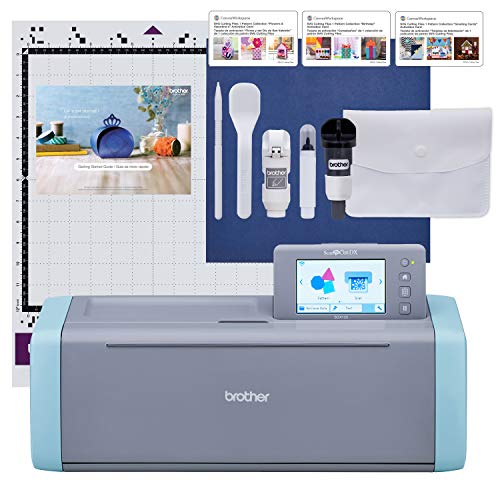
Transform your creative ideas into stunning stickers and art with the Brother ScanNCut SDX125E. This innovative cutting machine lets you scan your own drawings directly, turning hand-drawn designs into precise cut files. It’s a smart solution for DIY crafters who want to personalize projects without complicated software.
The 5-inch touchscreen offers an intuitive interface for easy project customization. You can import additional designs via USB or wireless, expanding your creative possibilities. The auto blade adjusts automatically to materials up to 3 mm thick, eliminating guesswork and ensuring clean cuts every time.
Maintenance is straightforward thanks to the included accessories like the tack mat, pens, and spatula. These tools help keep your workspace organized and your materials in perfect condition. The machine’s design supports various projects, from vinyl art to fabric crafts, making it versatile for different needs.
However, the Brother ScanNCut SDX125E is limited to 120 volts, designed specifically for use in the US. Also, cutting materials thicker than 3 mm isn’t supported, which might restrict some heavy-duty crafting. Despite these points, it remains a valuable tool for creative crafters.
Best for: DIY crafters and hobbyists seeking a user-friendly cutting machine with built-in scanning for custom projects.
What We Like:
- Built-in scanner converts hand-drawn designs into cut files seamlessly
- Auto blade sensor removes manual adjustments for efficient cutting
- Large touchscreen with wireless and USB connectivity enhances design flexibility
- Includes essential accessories for easy maintenance and project setup
Specification:
| Feature | Details |
|---|---|
| Manufacturer | Brother |
| Dimensions | Not specified |
| Weight | Not specified |
| Material | Not specified |
| Color Options | Not specified |
Liene PixCut S1 Color Sticker Printer & Cutting Machine for DIY Crafts and Custom Labels
| Preview | Product | Price | |
|---|---|---|---|

|
Liene PixCut S1 Color Sticker Printer & Cutting Machine - All-in-One... | Buy Now |
Step up your sticker-making game with the Liene PixCut S1 Color Sticker Printer & Cutting Machine, designed to bring professional-quality creations right to your desktop. This compact device tackles the challenge of producing vivid, durable stickers quickly, making it ideal for both hobbyists and small business owners. Its precise die-cutting and high-resolution printing ensure every sticker looks polished and lasts.
The printer uses advanced thermal dye-sublimation technology that delivers waterproof and fade-resistant stickers at 300 dpi in about two minutes. This means your custom labels maintain their vibrant colors even with daily wear. The built-in AI-powered image extraction simplifies cutting, saving time and preventing errors, so you get perfect edges without needing design skills.
Convenience is key with Bluetooth connectivity and smartphone control via the Liene Photo App, allowing you to design and print wherever you are. The lightweight design supports various media types, making it versatile for projects ranging from personalized labels to social media content. Maintenance is straightforward, with easy media loading and minimal upkeep required to keep the machine running smoothly.
While it supports only single-sided printing and handles up to 18 sheets per load, the PixCut S1 balances quality and usability for most DIY and small-scale needs. Its intuitive interface and reliable performance make it a valuable tool for creative sticker production.
Best for: DIY craft enthusiasts and small business owners looking to create vibrant, custom stickers and labels quickly and easily.
What We Like:
- High-quality, waterproof, and fade-resistant prints using thermal dye-sublimation
- AI-powered image extraction for precise, professional cutting
- Bluetooth and smartphone app control for on-the-go creativity
- Lightweight and supports various media types for diverse projects
Specification:
| Feature | Details |
|---|---|
| Manufacturer | Liene |
| Dimensions | Compact (exact size not specified) |
| Weight | Lightweight (exact weight not specified) |
| Printing Technology | Thermal dye-sublimation |
| Resolution | 300 dpi |
| Connectivity | Bluetooth |
| Media Capacity | 18 sheets per load |
| Supported Media | Various sticker papers |
| Color Options | Full color |
Siser Juliet High-Definition Cutter 12″ Professional Cutting Machine with Software
| Preview | Product | Price | |
|---|---|---|---|

|
Siser Juliet High-Definition Cutter - 12" Professional Cutting Machine... | Buy Now |
Unlock new creative possibilities with the Siser Juliet High-Definition Cutter, designed for professionals and hobbyists who demand precision and speed. This 12″ cutting machine tackles a variety of materials such as vinyl, paper, cardstock, and stickers, making it a versatile tool for crafting and professional projects.
Its high-speed cutting capability reduces production time by up to 60% compared to traditional cutters. The intuitive touch-screen interface simplifies setup, while adjustable pinch rollers and premium blades ensure accurate cuts every time. Whether you choose to cut with or without the included 12×12 High Tack Mat, this cutter adapts to your workflow.
Maintenance is straightforward, with easy access to replaceable blades and rollers, helping to keep the machine running smoothly. The wireless WiFi connection pairs seamlessly with Leonardo Design Studio software, allowing you to work untethered and manage your designs efficiently.
The Marker Adapter adds another layer of functionality, enabling you to draw or write directly on your materials. While the 12″ cutting width suits most projects, larger designs may require alternative equipment. Beginners might find the initial setup a bit challenging, but the user-friendly interface helps ease the learning curve.
Best for: professionals and serious hobbyists seeking a fast, precise, and adaptable cutting machine for diverse crafting and design needs.
What We Like:
- Cuts up to 60% faster than traditional cutters, enhancing efficiency
- User-friendly touch-screen with adjustable rollers and professional-grade blades
- Wireless WiFi connectivity for flexible, untethered operation
- Versatile use with or without the included High Tack Mat
- Marker Adapter expands creative possibilities by allowing drawing and writing
Specification:
| Feature | Details |
|---|---|
| Manufacturer | Siser |
| Cutting Width | 12 inches (30.48 cm) |
| Compatible Materials | Vinyl, paper, cardstock, stickers |
| Connectivity | Wireless WiFi |
| Included Accessories | 12×12 High Tack Mat, Marker Adapter |
| Interface | Touch-screen |
Cricut Joy Xtra Cutting Machine
| Preview | Product | Price | |
|---|---|---|---|

|
Cricut Joy Xtra Smart Cutting Machine | Buy Now |
The Cricut Joy Xtra Cutting Machine is a smart solution for crafters seeking a compact and versatile device. It simplifies the process of creating detailed projects by handling more than 50 material types, including vinyl and cardstock. This machine combines cutting, writing, drawing, foiling, and scoring in one tool, allowing users to complete multiple crafting steps without switching devices.
Its compatibility with home inkjet printers enables full-color print-then-cut projects, enhancing creative possibilities without the need for expensive equipment. Maintenance is straightforward, with easy blade and mat replacements ensuring consistent performance over time. The compact design fits neatly in small workspaces, making it ideal for hobbyists with limited room.
Using the free Cricut Design Space app, users can upload custom designs or select from a vast library, providing flexibility in project planning. While the machine is user-friendly, new users may spend time learning design software features. Some advanced options require a subscription, which could be a consideration for those seeking full access.
The Cricut Joy Xtra is best suited for those who want professional-quality results in a small, multi-functional device that supports a wide range of crafting materials and techniques.
Best for: Hobbyists and crafters needing a compact, versatile cutting machine for detailed, multi-material projects.
What We Like:
- Handles over 50 materials with multiple functions in one machine.
- Supports full-color print-then-cut when paired with an inkjet printer.
- Compact size suits small workspaces without sacrificing capability.
- Easy maintenance with simple blade and mat changes.
Specification:
| Feature | Details |
|---|---|
| Manufacturer | Cricut |
| Dimensions | Compact (Exact size not specified) |
| Weight | Lightweight (Exact weight not specified) |
| Material | Durable plastic housing |
| Color Options | Not specified |
Brother ScanNCut SDX125EGY Electronic DIY Cutting Machine with Scanner and 682 Patterns
| Preview | Product | Price | |
|---|---|---|---|
|
Brother ScanNCut SDX125EGY Electronic DIY Cutting Machine with... | Buy Now |
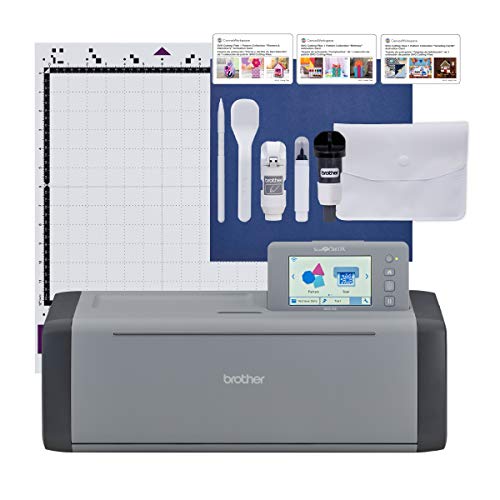
The Brother ScanNCut SDX125EGY is a versatile cutting machine designed to simplify your creative projects. Its built-in scanner lets you turn your drawings or printed images into precise cut files without needing extra software. This feature saves time and opens up new possibilities for personalized crafts.
With an auto blade sensor, the machine automatically adjusts blade depth to suit materials up to 3mm thick. This means you can cut paper, vinyl, fabric, and more confidently, knowing the machine adapts to different textures. The intuitive 5-inch touchscreen makes navigating patterns and settings straightforward.
Over 680 built-in patterns, including fonts and quilting designs, expand your creative options. Wireless connectivity further enhances convenience, allowing you to send designs directly from your device. The design encourages easy maintenance, with straightforward blade replacement and cleaning.
Though limited to materials no thicker than 3mm, this machine meets the needs of many hobbyists working with diverse materials. Note that it is made for 120V US use, requiring attention to voltage compatibility for safe operation.
Best for: hobbyists and crafters looking for an all-in-one electronic cutting machine that integrates scanning for custom DIY projects using various materials up to 3mm thick.
What We Like:
- Built-in scanner converts images to cut files without extra software
- Auto blade sensor adjusts depth for consistent cutting accuracy
- Large library of 682 patterns and fonts for creative flexibility
- Wireless connectivity simplifies project transfer
- User-friendly 5-inch touchscreen interface
Specification:
| Feature | Details |
|---|---|
| Manufacturer | Brother |
| Dimensions | Approx. 15.4 x 17.7 x 6.0 in (39.1 x 45 x 15.2 cm) |
| Weight | Approx. 11.5 lbs (5.2 kg) |
| Material | Plastic housing with metal components |
| Color Options | Gray with yellow accents |
Cricut Joy Xtra Machine with Sticker Paper and Vinyl Sampler Bundle
| Preview | Product | Price | |
|---|---|---|---|

|
Cricut Joy Xtra Machine with Printable Sticker Paper and Vinyl Sampler... | Buy Now |
Discover the Cricut Joy Xtra, a compact crafting solution designed to fit seamlessly into small spaces while unlocking endless creative possibilities. This versatile machine handles over 50 different materials, including vinyl and cardstock, making it ideal for personalized projects like stickers, decals, and cards. Its small footprint does not limit its capabilities, allowing you to cut, write, draw, and foil with precision.
The Cricut Joy Xtra connects effortlessly to your Bluetooth-enabled device, enabling you to design and print full-color stickers using your home inkjet printer. This integration simplifies the crafting process and helps you bring your ideas to life quickly. The included bundle enhances your creative journey with sticker paper, a vinyl sampler, transfer tape, tools, and digital design files.
Maintenance is straightforward, but beginners should prepare for a brief learning curve with blade swaps and initial setup. The machine’s cutting mat size suits smaller projects, so those needing larger formats may find this limiting. Responsive customer support and a detailed 30+ page ebook provide valuable assistance to build confidence and ease troubleshooting.
This machine is perfect for anyone seeking a user-friendly, space-saving craft cutter that supports diverse materials and projects without overwhelming their workspace. Its design and included accessories make it a practical choice for personalizing everyday items or gifts.
Best for: Crafters wanting a compact, versatile cutting machine for small-scale projects like stickers, decals, and card making.
What We Like:
- Compact design saves space without losing functionality
- Supports cutting, writing, drawing, and foiling on 50+ materials
- Comprehensive bundle includes essential supplies and digital designs
- Bluetooth connectivity enables seamless device pairing
- Helpful ebook and customer support ease the learning process
Specification:
| Feature | Details |
|---|---|
| Manufacturer | Cricut |
| Dimensions | 12.5 x 6 x 5.5 inches |
| Weight | Not specified |
| Material Support | 50+ materials including vinyl and cardstock |
| Connectivity | Bluetooth |
| Included Supplies | Sticker paper, vinyl sampler, transfer tape, cutting mat, tools, digital designs |
Silhouette Portrait 4-9 inch Vinyl Cutting Machine with Studio Software
| Preview | Product | Price | |
|---|---|---|---|
|
Silhouette Portrait 4-9 inch Vinyl Cutting Machine with Studio... | Buy Now |
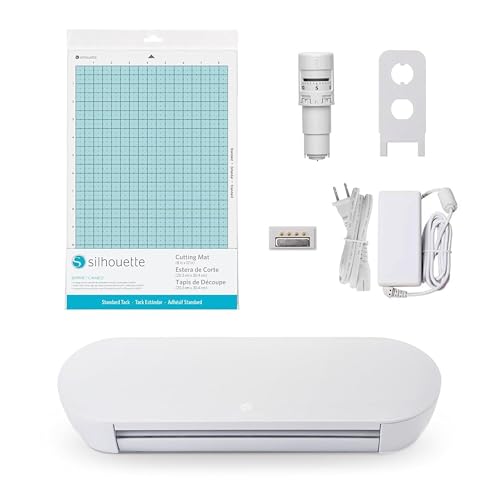
The Silhouette Portrait 4-9 inch Vinyl Cutting Machine delivers precise, tension-free cuts, making detailed projects easier and more enjoyable. Its advanced IPT and SNA technologies reduce material strain, ensuring clean, accurate edges on various materials. This machine’s belt-driven chassis maintains steady movement for sharp angles and multi-layered designs without compromising quality.
Designed for quiet operation, it runs at just 50 dB, allowing you to work without disruption. The compact, durable build supports versatility, especially with ES Mat compatibility that handles different material types smoothly. Maintenance is straightforward, with durable components that require minimal upkeep.
Included Studio Software and new electric tools expand your creative range beyond cutting and sketching. This integrated setup helps streamline your workflow and lets you experiment with different craft techniques. The 9-inch cutting width suits small to medium projects, ideal for hobbyists or small business owners focusing on quality and detail.
While the cutting size limits larger projects, its precision and quiet operation make it a strong choice for intricate vinyl work. Using compatible mats adds to the setup cost but improves performance and material handling. Overall, this machine balances functionality and reliability for professional-quality sticker applications.
Best for: hobbyists and small business owners seeking precise, quiet, and versatile vinyl cutting for detailed and multi-layered designs.
What We Like:
- Advanced IPT and SNA technologies for tension-free cutting
- Quiet operation at 50 dB ideal for home or small studio use
- Compatibility with ES Mat enhances material versatility
- Includes Studio Software and electric tools for creative expansion
Specification:
| Feature | Details |
|---|---|
| Manufacturer | Silhouette |
| Cutting Width | 4 to 9 inches |
| Noise Level | 50 dB |
| Compatible Mat | ES Mat |
| Software Included | Studio Software |
| Operation Type | Belt-driven chassis |
| Use Case | Vinyl cutting, sketching |
Likcut Vinyl Cutter Machine Glee S501 for DIY Crafting and Home Projects
| Preview | Product | Price | |
|---|---|---|---|
|
Likcut Vinyl Cutter Machine, Smart Sticker Maker Glee S501 for DIY... | Buy Now |
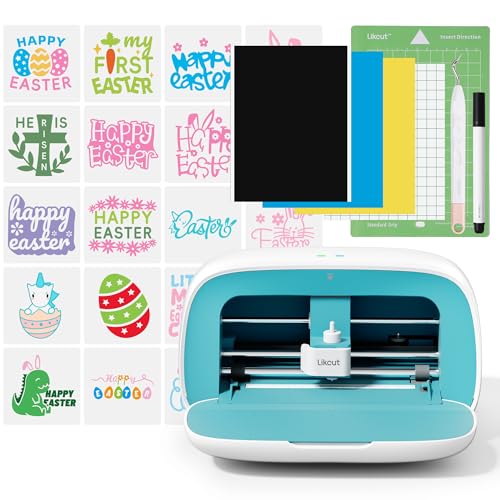
Bring your creative ideas to life with the Likcut Vinyl Cutter Machine Glee S501, designed to simplify your crafting journey. This machine helps you cut intricate vinyl designs easily, making it ideal for both beginners and experienced DIYers. Its user-friendly software ensures you spend less time learning and more time creating.
The cutter’s Bluetooth 5.0 and USB 2.0 connectivity provide reliable and fast data transfer, reducing interruptions during your projects. Its compact and lightweight frame means you can craft anywhere, whether at home or on the go. The built-in storage keeps your tools neat and accessible, so you stay organized.
Maintaining the Glee S501 is straightforward, with easy access to the cutting blade and simple software updates. This vinyl cutter is perfect for personalizing home decor, crafting party decorations, or completing school projects, helping you add a professional touch to every creation.
While the compact design limits the maximum cutting size, it enhances portability and convenience. Some users might find USB 2.0 slower than newer standards, and beginners may need some time to explore all features fully, but the included tutorials support smooth learning.
Best for: DIY enthusiasts and crafters seeking a portable, easy-to-use vinyl cutter with reliable connectivity and a rich design library.
What We Like:
- Intuitive software with guided tutorials and extensive design options
- Stable Bluetooth 5.0 and USB 2.0 connections for smooth operation
- Lightweight and compact with built-in storage for tools
- Simple maintenance with easy blade access
Specification:
| Feature | Details |
|---|---|
| Manufacturer | Likcut |
| Dimensions | Compact size (exact size not specified) |
| Weight | Lightweight (exact weight not specified) |
| Connectivity | Bluetooth 5.0, USB 2.0 |
| Included Software | Intuitive with tutorials |
| Storage | Built-in tool storage |
Likcut Vinyl Cutter Machine Glee S501 for DIY and Craft Projects
| Preview | Product | Price | |
|---|---|---|---|
|
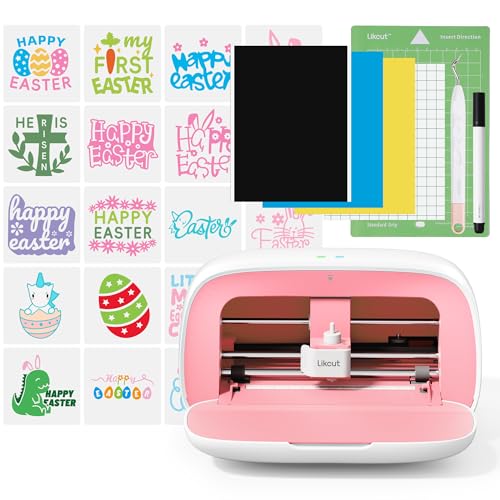
Likcut Vinyl Cutter Machine, Upgrade Cutting Machine Glee S501 for DIY... | Buy Now |
Discover the perfect blend of style and functionality with the Likcut Vinyl Cutter Machine Glee S501. Designed to fit compact spaces, this machine is ideal for crafting enthusiasts working in small areas. Its vibrant pink finish adds a touch of personality while ensuring you don’t compromise on performance.
This cutter handles over 46 different materials, including vinyl and smart materials, without requiring a mat. It delivers precise, clean cuts every time, making it easier to create detailed decals, stickers, and labels. The ability to support multiple devices allows for seamless crafting wherever you go.
Maintenance is straightforward thanks to the included storage for your pen and weeding tools, keeping your workspace tidy and organized. While it offers excellent portability, the machine is limited to materials up to 4.5 inches wide and does not support print-and-cut functions, which may restrict some project types.
Ideal for DIY enthusiasts, students, and hobbyists, the Likcut Glee S501 combines convenience with precision. It’s a practical solution that enhances creativity without occupying much space or requiring complicated setups.
Best for: DIY enthusiasts and hobbyists needing a compact and stylish vinyl cutter for small-scale projects.
What We Like:
- Compact A5 size for easy portability and storage
- Cuts 46+ materials, including smart materials without a mat
- Supports multiple devices for flexible crafting
- Includes pen and weeding tool storage for organized use
Specification:
| Feature | Details |
|---|---|
| Manufacturer | Likcut |
| Dimensions | A5 size (approx. 8.3 x 5.8 inches) |
| Weight | Lightweight (exact weight not specified) |
| Material Support | 46+ materials including vinyl and smart materials |
| Color Options | Vibrant Pink |
Cricut Explore 4 Smart Cutting Machine Engagement Bundle (Seashell)
| Preview | Product | Price | |
|---|---|---|---|

|
Cricut Explore 4 - Smart Cutting Machine (Seashell) | Engagement... | Buy Now |
Discover the Cricut Explore 4 Smart Cutting Machine Engagement Bundle (Seashell)—a powerful tool designed to elevate your crafting projects with precision and ease. This bundle addresses the common challenge of juggling multiple tools by combining cutting, drawing, foiling, and scoring in one machine. It simplifies complex designs and speeds up your creative process.
The Explore 4 supports over 100 materials, including vinyl, iron-on HTV, and cardstock, allowing you to experiment with diverse projects. Its compatibility with Cricut Design Space lets you customize effortlessly and access digital images and templates. The Print-Then-Cut feature enhances your sticker and full-color design capabilities, making personalization straightforward and professional.
Maintenance is straightforward, with easy-to-clean surfaces and simple blade replacement. The machine’s design supports consistent performance, ideal for both hobbyists and professionals who need reliable, repeatable results. While the initial setup may require some patience to master the software, the long-term benefits in productivity and quality are significant.
The bundle is thoughtfully curated to include essential tools and a materials sampler, getting you started quickly without extra purchases. Keep in mind, full access to the extensive Cricut Access content library requires a subscription, which is an added investment but expands your creative possibilities.
Best for: Crafters and DIY enthusiasts seeking a versatile smart cutting machine that handles a wide variety of materials and techniques for both personal and professional use.
What We Like:
- Supports over 100 materials for versatile crafting options
- Includes essential tools and materials sampler for immediate use
- Seamless integration with Cricut Design Space for easy customization
- Print-Then-Cut feature for vibrant, full-color projects
- Durable design with simple maintenance and blade replacement
Specification:
| Feature | Details |
|---|---|
| Manufacturer | Cricut |
| Dimensions | 22 x 7 x 8 inches |
| Weight | 7.5 lbs |
| Material | Plastic and metal |
| Color Options | Seashell (included in bundle) |
Factors to Consider When Choosing a Sticker Cutting Machine
When choosing a sticker cutting machine, you’ll want to take into account the types of materials it can handle and how precise and fast it cuts. Check the software and connectivity options to make sure they fit your workflow, and look at what accessories come included.
Don’t forget to factor in the machine’s size and portability if you need to move it around or have limited space.
Material Compatibility Range
Choosing a sticker cutting machine that handles a wide range of materials guarantees your creative projects won’t be restricted. You want a cutter that supports everything from vinyl and paper to fabric and specialty media like balsa wood or foam.
Check the maximum thickness it can handle—most range between 1mm and 3mm—to ensure it fits your project needs. Make sure it can cut both thin and thick materials such as cardstock, chipboard, or leather.
If you plan to create print-and-cut stickers, confirm the machine works with printable materials. Look for adjustable blade settings or automatic material sensors; these features optimize cutting across various materials, saving you time and improving results.
A versatile machine lets your creativity flow freely without material limitations.
Cutting Precision and Speed
Although having a machine that cuts quickly is important, you’ll want to prioritize cutting precision to guarantee your sticker designs come out sharp and detailed. High cutting precision is essential when working with intricate patterns or small text, ensuring each cut is accurate and clean.
At the same time, faster cutting speeds boost your productivity, letting you finish multiple projects without sacrificing quality. Look for machines with advanced blade technology and strong motor speed, which help reduce material tearing and create smoother edges. Consistent speed and precision matter, especially across different materials and design complexities.
Plus, adjustable settings for speed and pressure let you customize cuts, optimizing results no matter what sticker material you use. Balancing precision and speed will elevate your sticker-making process.
Software and Connectivity Options
Since seamless design transfer can save you time and hassle, you’ll want to prioritize a sticker cutting machine with robust software and connectivity options. Look for machines offering wireless connections like Bluetooth or Wi-Fi, allowing you to send designs effortlessly and control the device remotely. Make certain the software supports popular platforms such as Cricut Design Space, Silhouette Studio, or proprietary programs compatible with your computer or mobile device.
A user-friendly interface with editing tools, pattern libraries, and easy custom design integration will boost your creativity. Also, check for versatile connectivity options like USB ports, SD card slots, or app-based controls to fit your workflow. Finally, confirm compatibility with your operating system—Windows, Mac, iOS, or Android—to ensure smooth updates and functionality.
Included Accessories and Tools
After ensuring your sticker cutting machine connects smoothly with your devices and software, you’ll want to check what accessories come included. Look for essential tools like blades, pens, spatulas, and cleaning tools that support various sticker projects right out of the box.
See if the package offers pre-cut or pre-cuttable materials such as sticker paper, vinyl sheets, or transfer tape, so you can start crafting immediately. Also, explore whether additional accessory packs or starter kits are available to expand your toolkit.
Verify compatibility with optional extras like specialty blades, pens, or mats to boost your machine’s versatility. Finally, consider if the machine provides storage or organizational features to keep your accessories neatly arranged, helping you stay efficient and focused on your creative work.
Machine Size and Portability
When choosing a sticker cutting machine, consider its size and portability to match your workspace and crafting habits. First, check the machine’s physical dimensions to ensure it fits comfortably in your crafting area without crowding your setup. If you plan to move your machine often, evaluate its weight and look for lightweight models or those with built-in handles for easier transport.
Also, consider how compact the machine is for storage when not in use—some require dedicated space, while others fit neatly on a shelf. Finally, match the size of the machine to your project needs; smaller machines work well for decals, while larger ones handle bigger sticker sheets efficiently. Balancing these factors helps you pick a machine that fits your lifestyle perfectly.
Warranty and Support Services
Along with size and portability, considering warranty and support services can save you time and money down the road. Make sure the manufacturer offers a thorough warranty covering parts, labor, and defects for at least one year. Check if customer support is reachable through phone, email, or live chat, and that they respond quickly to troubleshooting requests.
Confirm the availability of replacement parts like blades and mats to keep your machine running smoothly long-term. Review the warranty policy carefully to understand what might void your coverage, such as unauthorized repairs or modifications. Also, look for online support communities or tutorial resources, which can be invaluable for solving issues and enhancing your experience beyond official assistance.
Frequently Asked Questions
What Materials Can Sticker Cutting Machines Handle Besides Vinyl?
You can cut materials like paper, cardstock, heat transfer vinyl, fabric, and even thin leather with sticker cutting machines.
Just make sure you adjust the settings for each material to get clean, precise cuts every time.
How Do Software Updates Affect Machine Performance?
Software updates boost your machine’s performance like fresh oil smooths gears; they fix bugs, add features, and improve precision. You’ll notice faster cuts, better compatibility, and enhanced creativity with each update you install.
Are Replacement Blades and Mats Widely Available?
Yes, replacement blades and mats are widely available for most machines. You’ll find plenty of options online and in stores, ensuring you can keep your cutter sharp and your mats sticky without hassle or delay.
Can These Machines Connect to Mobile Devices?
Like a bridge over water, many of these machines connect seamlessly to your mobile devices via Bluetooth or Wi-Fi.
You’ll enjoy designing and cutting stickers directly from your phone or tablet, making creativity truly portable and effortless.
What Is the Average Maintenance Cost for These Machines?
You’ll typically spend around $50 to $150 annually on maintenance, including blade replacements and software updates. Costs vary based on usage and brand, but regular care keeps your machine precise and running smoothly.
Regular maintenance not only prolongs the life of your equipment but also ensures consistent performance. Keeping up with updates and part replacements prevents costly repairs down the line.
Conclusion
Choosing the right sticker cutting machine might seem overwhelming with so many options, but that’s where your creativity shines. While some machines focus on precision, others offer vibrant features that spark imagination. You don’t have to sacrifice one for the other.
Whether you’re crafting simple labels or intricate designs, the perfect machine blends accuracy with artistic freedom—just like you balancing work and play. Immerse yourself, pick what fits your style, and watch your ideas come alive!