6 Best Printers for Android Phones in 2025 – Easy Wireless Printing Solutions
You’ll want a printer that easily connects to your Android phone via Wi-Fi, Bluetooth, or NFC. Models like the HP DeskJet 2827e, Canon PIXMA TS3720, and MG3620 offer versatile all-in-one functions with smooth mobile app support.
For portable photo printing, the Liene M100 and KODAK Step or Dock Plus provide vibrant, quick prints on the go. These printers blend quality, speed, and convenience perfectly—keep going to explore features that match your exact needs.
| Image | Name | Editor's Rating | Price |
|---|---|---|---|

|
HP DeskJet 2827e Wireless All-in-One Color Inkjet Printer, S...
|
|
|

|
Canon PIXMA TS3720 Wireless All-in-One Printer for Basic Hom...
|
|
|

|
Canon Pixma MG3620 Wireless All-in-One Color Inkjet Printer ...
|
|
|

|
Liene M100 4x6'' Photo Printer, Phone Printer 100 Sheets...
|
|
|

|
KODAK Step Instant Smartphone Photo Printer, Portable Mini C...
|
|
HP DeskJet 2827e Wireless All-in-One Color Printer (6W7F5A)
| Preview | Product | Price | |
|---|---|---|---|
|
|
HP DeskJet 2827e Wireless All-in-One Color Inkjet Printer, Scanner... | $55.84 | Buy Now |
Experience hassle-free printing with the HP DeskJet 2827e Wireless All-in-One Color Printer, designed to make your home office tasks simpler and more efficient. This compact printer connects seamlessly to your Android phone, allowing you to print, scan, and copy documents without complicated setups. Its 60-sheet input tray handles everyday printing needs, reducing the time you spend refilling paper.
Wireless printing is smooth and reliable thanks to the built-in Wi-Fi, while the HP app puts control at your fingertips. Manage your print jobs directly from your smartphone or tablet, streamlining your workflow and saving valuable time. The printer’s moderate print speeds—up to 7.5 pages per minute in black and 5.5 in color—are well-suited for typical home use, balancing performance and quiet operation.
Maintenance is straightforward, but keep in mind that this model uses HP cartridges with chips, which limits compatibility with third-party ink options. It also offers an Instant Ink subscription, initially free for three months, which helps you avoid running out of ink but requires a monthly fee thereafter. The printer’s eco-friendly design features recycled plastic components and Energy Star certification, reflecting a commitment to sustainability.
Best for: Home users and families looking for a compact, easy-to-use wireless printer that integrates well with mobile devices for everyday document tasks.
What We Like:
- Seamless wireless connectivity with reliable Wi-Fi and HP app support
- Multifunctional design for printing, scanning, and copying
- Eco-conscious build using recycled plastics and energy-efficient components
- User-friendly maintenance with straightforward cartridge replacement
Specification:
| Feature | Details |
|---|---|
| Manufacturer | HP |
| Dimensions | Compact size (exact dimensions not provided) |
| Weight | Not specified |
| Material | Recycled plastic components |
| Color Options | Standard color finish |
Canon PIXMA TS3720 Wireless All-in-One Printer
| Preview | Product | Price | |
|---|---|---|---|
|
|
Canon PIXMA TS3720 Wireless All-in-One Printer for Basic Home... |
$64.99 |
Buy Now |
Experience hassle-free printing with the Canon PIXMA TS3720 Wireless All-in-One Printer, designed to simplify everyday tasks. Whether you need to print, copy, or scan, this compact device handles it all with ease. It supports a variety of media, including envelopes and photos, delivering sharp, vibrant images up to 5” x 7” size without borders.
Setting up the PIXMA TS3720 is straightforward thanks to its dual-band Wi-Fi connectivity. You can connect directly from your Android phone or other mobile devices using the Canon PRINT app or Mopria, enabling wireless printing without a computer. The small but clear LCD screen guides you through operations, making it user-friendly for home environments.
Maintenance is minimal with this printer. Its reliable print speeds of 7.7 images per minute in black and 4 in color keep your workflow steady. While it lacks duplex printing and has a compact 1.5” display, it remains a practical choice for users prioritizing simplicity and versatility over advanced features.
This all-in-one printer is ideal for home users who want a dependable, easy-to-use device that covers basic printing needs. Its thoughtful design and mobile compatibility streamline your printing tasks and enhance your productivity.
Best for: Home users seeking a reliable, easy-to-set-up all-in-one printer with wireless printing and versatile media support.
What We Like:
- Quick print speeds with high-quality photo and document output
- Easy dual-band Wi-Fi setup and wireless mobile printing options
- Supports various media types, including borderless 5” x 7” photos
- Compact design suited for home use and limited space
Specification:
| Feature | Detail |
|---|---|
| Manufacturer | Canon |
| Dimensions (W×D×H) | 14.5 × 11.7 × 5.1 inches |
| Weight | Approx. 6.7 lbs (3.04 kg) |
| Color Options | Black |
Canon Pixma MG3620 Wireless All-in-One Color Inkjet Printer
| Preview | Product | Price | |
|---|---|---|---|
|
|
Canon Pixma MG3620 Wireless All-in-One Color Inkjet Printer with... | Buy Now |
The Canon Pixma MG3620 Wireless All-in-One Color Inkjet Printer is designed to make printing, scanning, and copying simple and efficient. Its compact design fits neatly in tight spaces, making it ideal for home or small office setups. With wireless connectivity, you can easily print documents and photos directly from your smartphone or tablet without needing cables.
This printer addresses common hassles by offering auto 2-sided printing, which helps reduce paper use and lowers your operating costs. It delivers respectable print speeds of 9.9 ppm for black and white and 5.7 ppm for color, balancing speed and quality for everyday tasks.
Maintenance is straightforward, supported by Alexa integration that alerts you when ink is low and can even reorder supplies automatically. This smart feature helps prevent unexpected interruptions and keeps your workflow smooth without the need for a subscription.
The 100-sheet paper capacity suits moderate printing demands but may require frequent refills for heavier use. As an inkjet model, it offers vibrant color output but might be less economical for large volume printing compared to laser alternatives.
Best for: individuals or small office users seeking a compact, wireless all-in-one printer that integrates with mobile devices for efficient document handling.
What We Like:
- Wireless printing from smartphones and tablets for convenience
- Auto 2-sided printing to save paper and costs
- Alexa integration for low ink alerts and automatic supply orders
- Compact size ideal for limited space environments
Specification:
| Feature | Details |
|---|---|
| Manufacturer | Canon |
| Dimensions (W×D×H) | Approx. 17.7 × 12.0 × 5.9 in |
| Weight | Approx. 8.3 lbs |
| Technology | Inkjet |
| Paper Capacity | 100 sheets |
| Connectivity | Wireless (Wi-Fi) |
| Color Options | Color printing capability |
Liene M100 Portable 4×6” Photo Printer with 100 Sheets and 3 Cartridges for iPhone and Android
| Preview | Product | Price | |
|---|---|---|---|
|
|
Liene M100 4x6'' Photo Printer, Phone Printer 100 Sheets... | $159.99 | Buy Now |
Capture and share your memories instantly with the Liene M100 Portable 4×6” Photo Printer. Designed for both iPhone and Android users, this compact printer lets you create vibrant, durable photos wherever you are. It uses advanced thermal dye sublimation technology to produce prints that resist water and scratches, ensuring your photos stay crisp and clear.
The printer’s connectivity options solve common hassles by allowing seamless pairing through Wi-Fi or its own built-in hotspot. Up to five devices can connect simultaneously, making it great for group events or family gatherings. The included 100 sheets and 3 cartridges mean you can print plenty of photos without worrying about running out quickly.
Maintenance is straightforward but essential; regular cleaning of the print head is needed to avoid smudges and maintain high print quality. The Liene app enhances your printing experience by offering simple customization tools like filters and borders, perfect for personalizing your photos before printing.
Its magnetic, compact design makes it easy to carry, fitting perfectly into your lifestyle for on-the-go photo printing. While limited to 4×6-inch prints and reliant on the proprietary app for editing, it excels in delivering quick and attractive photo prints that bring your digital moments to life.
Best for: Anyone needing a portable, user-friendly photo printer compatible with both iPhone and Android devices for vibrant, high-quality prints on the move.
What We Like:
- Thermal dye sublimation produces water- and scratch-resistant photos
- Includes 100 sheets and 3 cartridges for extended printing
- Connects via Wi-Fi or built-in hotspot, supporting multiple devices
- Compact magnetic design ideal for travel and portability
- Simple photo customization through the user-friendly Liene app
Specification:
| Feature | Details |
|---|---|
| Manufacturer | Liene |
| Print Size | 4 x 6 inches |
| Included Supplies | 100 sheets, 3 cartridges |
| Connectivity | Wi-Fi, built-in hotspot |
| Compatible Devices | iPhone, Android |
| Design | Compact, magnetic |
KODAK Step Instant Smartphone Photo Printer, Portable Wireless Mobile Printer
| Preview | Product | Price | |
|---|---|---|---|
|
|
KODAK Step Instant Smartphone Photo Printer, Portable Mini Color... |
$71.99 |
Buy Now |
Capture your memories instantly with the KODAK Step Instant Smartphone Photo Printer, a compact solution designed to bring your digital photos to life. This portable printer connects seamlessly through Bluetooth or NFC, allowing you to print directly from your Android or iOS phone without any hassle. It solves the common problem of waiting or needing a computer to get physical photos.
The device uses zero-ink ZINK technology, so there’s no need for ink cartridges or ribbons. This means less maintenance and mess while producing vibrant 2” x 3” photos that resist moisture, rips, and smudges. Its sticky-back design lets you easily display or share your prints, making it perfect for creative projects or quick keepsakes.
With a rechargeable battery supporting up to 25 prints per charge, the KODAK Step is ideal for on-the-go use. The accompanying app offers simple editing tools, filters, and stickers so you can personalize each photo before printing. This keeps the process fun and flexible, enhancing your creative experience without complexity.
However, the small photo size might not suit everyone, and the limited battery life requires periodic recharging during extended use. You will also need to purchase additional ZINK paper to continue printing, which is an important consideration for ongoing use.
Best for: Anyone seeking a lightweight, portable photo printer for instant, high-quality prints directly from their smartphone.
What We Like:
- Wireless printing via Bluetooth and NFC for easy connection
- Zero-ink ZINK technology produces durable, smudge-resistant photos
- Compact, lightweight design for portability
- User-friendly app with editing and personalization features
Specification:
| Feature | Details |
|---|---|
| Manufacturer | KODAK |
| Dimensions | Approx. 4.7 x 3.1 x 1.3 in |
| Weight | About 0.38 lb (172 g) |
| Printing Technology | ZINK Zero Ink |
| Photo Size | 2” x 3” |
| Connectivity | Bluetooth, NFC |
| Battery | Rechargeable, ~25 prints per charge |
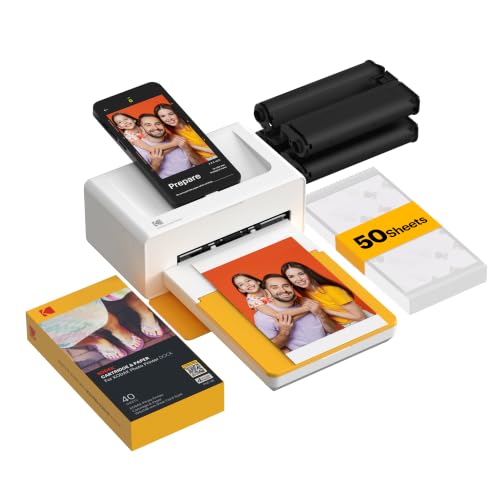
KODAK Dock Plus 4PASS Instant Photo Printer with Bluetooth and Dock, 4×6” Portable Printer Bundle
| Preview | Product | Price | |
|---|---|---|---|
|
KODAK Dock Plus 4x6 Photo Printer, Smartphone Docking, 4PASS... | $109.99 | Buy Now |
Capture and print your favorite moments instantly with the KODAK Dock Plus 4PASS Instant Photo Printer. This portable printer docks your smartphone, allowing you to print vibrant 4×6” photos effortlessly while keeping your device charged. Say goodbye to tangled cables and slow transfers—Bluetooth connectivity makes wireless printing seamless and convenient.
Designed for both Android and Apple users, the printer’s dock securely holds your phone, making it easy to print without disconnecting from power. Its 4PASS printing technology produces vivid, fingerprint-proof, and water-resistant photos, ensuring your memories stay sharp and durable over time. The choice between border and borderless prints adds flexibility for different photo styles.
Maintenance is simple with included photo sheets and easy paper replacement. While the printer focuses on 4×6” photos, this size fits most common photo needs and is perfect for home use or on the go. Regular supply of photo sheets is necessary, but the included 50-sheet bundle provides an affordable start for frequent printing.
Compact and lightweight, the KODAK Dock Plus is built for portability and ease of use. It enhances your photo printing experience by combining fast, high-quality prints with the practical benefit of charging your phone, making it a handy tool for preserving memories effortlessly.
Best for: Anyone seeking a portable, high-quality photo printer that also charges their phone and offers easy wireless connectivity for quick 4×6” prints.
What We Like:
- Produces vibrant, durable, fingerprint-proof, and water-resistant photos.
- Convenient phone dock that charges Android and Apple devices during printing.
- Wireless Bluetooth connectivity enables cable-free, on-the-go printing.
- Compact, portable design ideal for home or travel use.
- Includes 50 photo sheets to start printing immediately.
Specification:
| Feature | Details |
|---|---|
| Manufacturer | KODAK |
| Photo Size | 4×6 inches (10.16×15.24 cm) |
| Connectivity | Bluetooth |
| Compatibility | Android and Apple devices |
| Included Supplies | 50 photo sheets |
| Weight | Lightweight (exact weight not specified) |
| Color Options | Not specified |
Factors to Consider When Choosing a Printer for Android Phone
When choosing a printer for your Android phone, you’ll want to check its wireless connectivity options and confirm it supports mobile printing apps. Consider print quality and speed to match your needs, and don’t forget to factor in ink or cartridge costs.
Also, think about the printer’s size and portability if you plan to move it around frequently.
Wireless Connectivity Options
Although wireless connectivity options vary widely, choosing a printer for your Android phone means prioritizing features like dual-band Wi-Fi support and Bluetooth pairing. Dual-band Wi-Fi (2.4GHz and 5GHz) ensures stable connections, minimizing interruptions when printing. Bluetooth pairing lets you connect directly without relying on a Wi-Fi network, which is handy on the go.
Make sure the printer supports Android-compatible wireless protocols such as Mopria or Google Cloud Print to guarantee smooth communication. Look for devices with easy setup processes and automatic network detection, so you can start printing quickly without hassle. Additionally, check if the printer offers dedicated mobile apps or cloud printing services, which simplify wireless printing from your Android phone and enhance your overall user experience.
Mobile Printing Compatibility
Since seamless mobile printing relies heavily on compatibility, you should prioritize printers that support wireless options like Wi-Fi, Bluetooth, or NFC for easy pairing with your Android device. Make certain the printer works smoothly with your Android OS and supports popular printing apps such as Google Cloud Print or brand-specific solutions. Choose printers that allow direct printing from your phone without complicated setups or extra software.
It’s also useful if the printer can handle prints from commonly used Android apps and offers cloud or social media printing features. Finally, check the printer’s connectivity range and stability to ensure it matches your usual mobile printing environment. This way, you’ll enjoy hassle-free, efficient printing every time.
Print Quality and Speed
Beyond guaranteeing your printer connects smoothly with your Android phone, you’ll want to focus on print quality and speed to get the best results. Look for higher DPI settings to achieve sharp, detailed images and crisp text, especially if you print photos or professional documents.
Speed matters too; printers with higher pages per minute (PPM) ratings save you time when handling bulk or urgent tasks. Consider color accuracy and vibrancy, which depend on the printer’s color management and ink quality, to ensure your prints look true to life.
Also, check if the printer maintains consistent quality across different media types like photo paper or standard sheets. Keep in mind that regular maintenance and good-quality ink or toner cartridges play a key role in preserving print clarity and durability over time.
Ink and Cartridge Costs
When choosing a printer for your Android phone, you’ll want to factor in ink and cartridge costs, as these expenses can quickly add up. Look for printers that use high-yield cartridges to get more pages per cartridge and lower your cost per print. Consider whether the printer accepts third-party cartridges, which are cheaper but might affect warranty or print quality.
If you print a lot, a printer with a continuous ink supply system (CISS) can notably reduce your long-term ink costs. Also, check if the printer offers ink subscription services or instant ink plans—they help you manage and predict ongoing ink expenses. Being mindful of these factors ensures your printing stays affordable without sacrificing convenience or quality.
Printer Size and Portability
How portable does your printer need to be? Consider the overall size and weight to guarantee it fits your space and travel needs. If you print on the go, a compact, lightweight printer—usually under 3 pounds—is ideal.
Battery-powered models give you freedom from outlets, perfect for outdoor or mobile use. Some printers even fold or have foldable parts, letting you shrink their footprint when not in use. This makes carrying and storage much easier.
Keep in mind that bulky printers can be inconvenient if you plan to move them frequently. By choosing a size and portability feature that matches your lifestyle, you’ll enjoy seamless wireless printing from your Android phone wherever you are.
Multi-function Features Included
Choosing a portable printer is just one piece of the puzzle—you’ll also want to think about what functions the device offers. Multi-function printers that support Android typically include printing, scanning, copying, and sometimes faxing, giving you versatile options. Make sure the printer supports wireless connections like Wi-Fi or Bluetooth for smooth printing from your Android device.
Compatibility with mobile printing apps such as Google Cloud Print, Canon PRINT, or HP Smart is *essential* for easy operation. Features like automatic document feeders and duplex printing can save you time when handling multiple pages. Also, consider if the printer handles various media types and sizes—like photo paper, labels, or envelopes—to suit all your printing needs efficiently.
Ease of Setup and Use
Although many printers offer advanced features, ease of setup and use should be top priorities to guarantee a hassle-free experience with your Android phone. Look for printers with wireless setup options like Wi-Fi or NFC pairing, allowing you to connect quickly without complicated steps. Choose models that support easy mobile app installation and provide clear, step-by-step instructions for both initial setup and ongoing use.
Printers with intuitive control panels or simple LCD screens help you navigate functions effortlessly. Additionally, opt for devices featuring automatic Wi-Fi detection and troubleshooting, so you won’t need technical help if issues arise. Prioritizing these factors ensures you spend less time configuring and more time printing seamlessly from your Android device.
Frequently Asked Questions
Can I Print From Multiple Android Devices Simultaneously?
Yes, you can print from multiple Android devices simultaneously if your printer supports wireless connections and handles multiple print jobs.
Just connect each device to the same network, and your printer will manage the tasks smoothly.
Are These Printers Compatible With Older Android Versions?
You’d think these printers work with every Android version ever made! Most are compatible with older Android versions, but you should verify specific model requirements to guarantee smooth printing without any hiccups or outdated tech headaches.
Do These Printers Support Duplex (Double-Sided) Printing?
Yes, many of these printers support duplex printing, letting you print double-sided effortlessly. Check each model’s specs to confirm, but most wireless printers designed for Android phones include this convenient feature to save paper and time.
What Is the Average Printing Speed for Photos?
Printing photos usually takes around 1 to 2 minutes per page, but some models can be faster than a cheetah on roller skates!
You’ll get sharp, vivid images without waiting forever.
Can These Printers Handle Printing From Cloud Storage Apps?
Yes, you can print directly from cloud storage apps with these printers. They support wireless connections and integrate smoothly with services like Google Drive, Dropbox, and OneDrive, making your printing tasks quick and hassle-free.
Conclusion
Choosing the perfect printer for your Android phone doesn’t have to be complicated. Whether you want the convenience of the HP DeskJet’s all-in-one features or the portability of the KODAK Step for on-the-go moments, there’s a solution that fits your lifestyle.
You can have high-quality prints or quick snapshots, wireless ease or instant photo fun. It’s all about matching your needs—because printing should be simple, not stressful.