6 Best Printers for Printing Postcards in 2025 – Quality and Speed Reviewed
If you want vibrant, durable postcards fast, look for all-in-one inkjet printers like Canon Pixma MG3620 or HP Envy Inspire 7255e—they offer borderless printing and handle heavyweight cardstock.
For portable quick prints, KODAK Dock Plus or Step printers provide smudge-proof photos on the go.
Pairing these with Avery’s micro-perforated postcard sheets guarantees easy separation.
Prioritize wireless connectivity and high print speeds to boost your workflow efficiency.
Explore the top options to find the perfect fit for your postcard printing needs.
| Image | Name | Editor's Rating | Price |
|---|---|---|---|

|
Canon Pixma MG3620 Wireless All-in-One Color Inkjet Printer ...
|
|
|
|
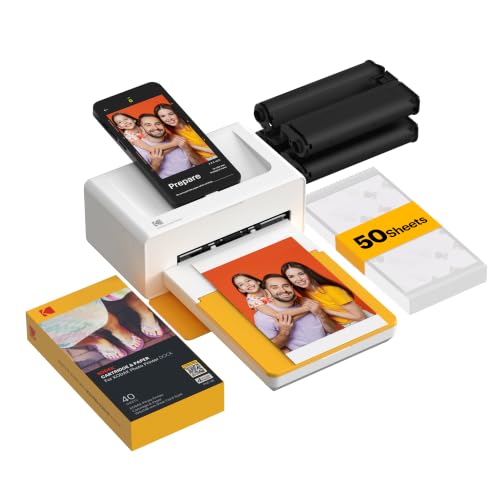
KODAK Dock Plus 4x6 Photo Printer, Smartphone Docking, 4PASS...
|
|
|
|
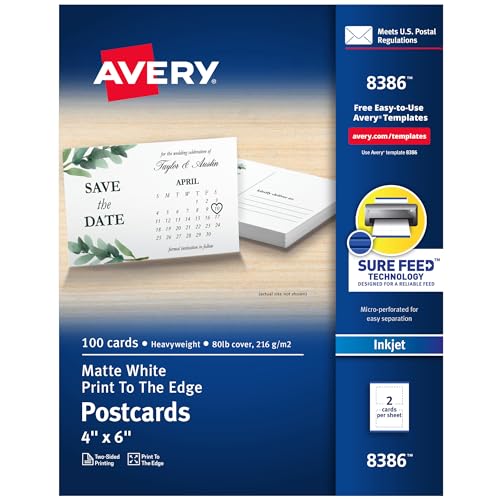
Avery Printable Postcards, Sure Feed Technology, 4" x 6", Ma...
|
|
|

|
HP Envy Inspire 7255e Wireless Color Inkjet Printer, Print, ...
|
|
|

|
KODAK Step Instant Smartphone Photo Printer, Portable Mini C...
|
|
Canon Pixma MG3620 Wireless All-in-One Color Inkjet Printer
| Preview | Product | Price | |
|---|---|---|---|
|
|
Canon Pixma MG3620 Wireless All-in-One Color Inkjet Printer with... | $49.99 | Buy Now |
The Canon Pixma MG3620 offers a compact and wireless solution for your everyday printing needs. Designed to handle postcards and other documents with ease, this all-in-one printer lets you print, copy, and scan from a single device. Its wireless connectivity simplifies printing from your mobile phone or tablet, making it ideal for quick tasks on the go.
Maintaining the printer is straightforward with features like auto two-sided printing, which helps reduce paper waste, and a 100-sheet paper tray that means fewer interruptions to reload. The MG3620’s energy-efficient design keeps operating costs down, while its moderate print speeds—9.9 ppm for black and 5.7 ppm for color—are well suited for home or small office use.
This printer also integrates with Alexa, allowing you to monitor ink levels and reorder supplies verbally. This smart feature helps prevent unexpected ink shortages and keeps your workflow smooth. Though it has a smaller paper capacity compared to larger office models, its compact size and wireless ease make it a practical choice for limited spaces.
Best for: Home users or small offices needing a compact, wireless all-in-one printer for convenient postcard printing, copying, and scanning with mobile compatibility.
What We Like:
- Wireless printing from mobile devices and tablets
- Auto two-sided printing reduces paper use
- 100-sheet capacity minimizes reloads
- Alexa integration for ink monitoring and reordering
- Compact design fits small workspaces
Specification:
| Feature | Details |
|---|---|
| Manufacturer | Canon |
| Dimensions | Approx. 17.7 x 11.7 x 5.9 inches (W x D x H) |
| Weight | Approx. 8.6 lbs |
| Color Options | Black |
| Connectivity | Wireless (Wi-Fi) |
| Print Speed (Black) | 9.9 pages per minute |
| Print Speed (Color) | 5.7 pages per minute |
| Paper Capacity | 100 sheets |
KODAK Dock Plus 4PASS Instant Photo Printer with Bluetooth and Dock (4×6”, 50 Sheets Bundle)
| Preview | Product | Price | |
|---|---|---|---|
|
|
KODAK Dock Plus 4x6 Photo Printer, Smartphone Docking, 4PASS... | $114.99 | Buy Now |
Experience the convenience of printing high-quality photos instantly with the KODAK Dock Plus 4PASS Instant Photo Printer. Designed to be compact and portable, this device lets you print vibrant 4×6” photos quickly, solving the hassle of waiting for prints or dealing with bulky equipment. Its docking feature also charges your phone, combining two essential functions in one.
The printer wirelessly connects via Bluetooth, allowing you to print from your iPhone, iPad, or Android device without any cables. This simplifies the process, making it ideal for on-the-go use or quick home printing sessions. The 4PASS technology ensures your photos are laminated and resistant to water, fingerprints, and fading, guaranteeing lasting memories.
Maintenance is straightforward, but keep in mind you will need to replenish photo paper regularly, which is essential for continued use. The printer supports both border and borderless prints, giving you flexibility in presentation. However, the docking station is designed for specific phone models, so compatibility may vary.
This printer is perfect for those who want a reliable, portable device that combines phone charging with quick, durable photo printing. It enhances your ability to preserve moments without complexity or delay.
Best for: Users looking for a compact photo printer that delivers durable 4×6” prints and charges their mobile devices wirelessly.
What We Like:
- Produces vibrant, water-resistant, and fingerprint-proof prints
- Wireless Bluetooth printing with broad device compatibility
- Convenient phone docking that also charges your device
- Includes a 50-sheet photo paper bundle for immediate use
Specification:
| Feature | Details |
|---|---|
| Manufacturer | KODAK |
| Photo Size | 4 x 6 inches (10 x 15 cm) |
| Connectivity | Bluetooth |
| Included Paper | 50 sheets |
| Compatible Devices | iPhone, iPad, Android |
| Color Options | Black |
Avery Printable Postcards with Sure Feed Technology (4″ x 6″, 100 Pack)
| Preview | Product | Price | |
|---|---|---|---|
|
|
Avery Printable Postcards, Sure Feed Technology, 4" x 6", Matte White... |
$20.54 |
Buy Now |
Avery Printable Postcards with Sure Feed Technology transform your printing experience by delivering smooth, jam-free results every time. These 4″ x 6″ postcards are designed for inkjet printers, allowing you to print vibrant, edge-to-edge images on both sides without interruptions. Say goodbye to frustrating paper jams and misfeeds that disrupt your workflow.
The postcards come in sheets with micro-perforations, making it easy to separate each card cleanly and professionally. This feature ensures polished edges without the need for additional trimming. The matte-coated surface provides a sturdy, non-reflective finish that works well for clear, easy-to-read designs and messages.
Maintenance is simple thanks to the Sure Feed technology, which helps keep your printer running smoothly by feeding each sheet properly. These postcards meet U.S. postal standards, so you can mail them directly without envelopes, saving time and materials. This makes them an excellent choice for marketing campaigns, thank-you notes, or product announcements.
While ideal for inkjet printers, these postcards may not be suitable for laser printers, and the matte finish might not match glossy design preferences. The fixed 4″ x 6″ size offers convenience but limits flexibility for other mailing formats.
Best for: businesses and individuals needing reliable, easy-to-print postcards that deliver professional quality without envelopes.
What We Like:
- Sure Feed technology prevents jams and misfeeds during printing
- Double-sided, edge-to-edge printing for full customization
- Micro-perforations enable clean separation of postcards
- Matte coating offers a sturdy, professional finish
Specification:
| Feature | Details |
|---|---|
| Manufacturer | Avery |
| Dimensions | 4″ x 6″ (10.2 x 15.2 cm) |
| Quantity | 100 postcards (50 sheets) |
| Printer Type | Inkjet |
| Finish | Matte |
HP Envy Inspire 7255e Wireless Color Inkjet Printer (1W2Y9A)
| Preview | Product | Price | |
|---|---|---|---|
|
|
HP Envy Inspire 7255e Wireless Color Inkjet Printer, Print, scan... | Buy Now |
The HP Envy Inspire 7255e Wireless Color Inkjet Printer is designed to bring vibrant, high-quality photo printing right into your home. It solves the common problem of dull prints by delivering bright, borderless photos with true-to-screen colors. This makes it ideal for creating personalized postcards and family keepsakes that stand out.
Its wireless setup simplifies your workflow, letting you print directly from smartphones, tablets, or laptops using the HP app. The separate photo tray supports various paper sizes, so you can switch between printing documents and photos without hassle. This printer adapts to your creative needs with ease.
Maintenance is straightforward thanks to the Instant Ink subscription, which ensures you never run out of ink mid-project. This service also promotes eco-friendly printing by reducing waste. However, it requires a subscription after the initial trial period and uses only HP cartridges with chips, limiting third-party ink options.
With print speeds of up to 10 pages per minute in color, it handles everyday tasks efficiently, though it may be less suited for heavy-duty office printing. Its compact design fits well into home environments where space and convenience matter.
Best for: Home users seeking a versatile color inkjet printer that combines vibrant photo printing with easy wireless and mobile connectivity.
What We Like:
- Produces vibrant, borderless photos with accurate colors
- Easy wireless setup with mobile printing and scanning via the HP app
- Instant Ink subscription ensures continuous ink supply and eco-friendly use
- Separate photo tray supports multiple paper sizes for versatile printing
Specification:
| Feature | Details |
|---|---|
| Manufacturer | HP |
| Model | Envy Inspire 7255e |
| Printer Type | Wireless Color Inkjet |
| Print Speed | Up to 10 ppm (color) |
| Connectivity | Wireless, HP app support |
| Paper Handling | Separate photo tray |
| Ink System | HP cartridges with chips |
| Dimensions | Compact size (not specified) |
| Intended Use | Home photo and document printing |
KODAK Step Instant Smartphone Photo Printer (Wireless, Bluetooth Compatible)
| Preview | Product | Price | |
|---|---|---|---|
|
|
KODAK Step Instant Smartphone Photo Printer, Portable Mini Color... |
$79.99 |
Buy Now |
Capture and print your favorite moments instantly with the KODAK Step Instant Smartphone Photo Printer. This compact device fits easily in your bag, allowing you to create vibrant, peel-and-stick photos anywhere. Wireless Bluetooth and NFC connectivity make linking your iOS or Android phone quick and effortless, so you can start printing without hassle.
The printer uses ZINK (Zero Ink) technology, producing smudge-proof, moisture-resistant photos that measure 2” x 3”. These durable prints are perfect for scrapbooks, postcards, or decorating your space with personalized images. The free KODAK App enhances your creativity by letting you add filters, text, and stickers before printing.
Designed for on-the-go use, its rechargeable battery supports up to 25 prints per charge. Maintenance is simple—just keep the ZINK photo paper stocked and recharge as needed. While the photo size is fixed, the quality and convenience make it a valuable tool for quick prints wherever you are.
The printer’s lightweight build and straightforward operation help you capture memories in a fun and easy way. Its unique peel-and-stick photos eliminate the need for glue or tape, making it ideal for creative projects and instant sharing.
Best for: Anyone wanting a portable, easy-to-use instant photo printer for vibrant, peel-and-stick photos on the move.
What We Like:
- Compact, lightweight design for easy portability
- Durable, smudge-resistant ZINK prints
- Free app with extensive customization features
- Wireless Bluetooth and NFC connectivity
- Simple maintenance with rechargeable battery
Specification:
| Feature | Details |
|---|---|
| Manufacturer | KODAK |
| Dimensions | Compact, fits in a bag |
| Weight | Lightweight |
| Print Technology | ZINK (Zero Ink) |
| Photo Size | 2” x 3” |
| Connectivity | Bluetooth, NFC |
| Battery Life | Up to 25 prints/charge |
Avery Printable White Postcards 4.25″ x 5.5″ (200 Pack)
| Preview | Product | Price | |
|---|---|---|---|

|
Avery Printable Postcards, 4.25" x 5.5", White, 200 Blank Postcards... | $17.50 | Buy Now |
Captivate your audience with Avery Printable White Postcards, designed specifically for laser printer users seeking professional-quality mailers. These postcards solve the challenge of producing sharp, durable prints in bulk without sacrificing quality. Their 80 lbs heavyweight cardstock offers a sturdy feel, ensuring your messages arrive looking polished and lasting through the mailing process.
Measuring 4.25″ x 5.5″, each sheet includes four postcards separated by micro-perforations. This thoughtful design makes it easy to detach cards with clean edges, saving you time and effort during preparation. Plus, the uncoated surface lets your laser printer deliver crisp, smudge-free images ideal for text and graphics alike.
Customization is straightforward with Avery’s online design tools. You can create double-sided postcards tailored for promotions, invitations, or personal notes. The postcards comply with U.S. postal regulations, so you can skip envelopes—just print, address, stamp, and send.
While optimized for laser printers, these postcards may not perform as well with inkjet printers due to their uncoated finish. Also, manual addressing and stamping might require extra time for large campaigns. Still, they provide a cost-effective, reliable solution for bulk mailing needs.
Best for: Small business owners, marketers, and individuals who require customizable, professional postcards for efficient bulk mailing via laser printers.
What We Like:
- Durable 80 lbs uncoated cardstock for professional appearance
- Micro-perforated sheets allow easy separation with clean edges
- Compatible with Avery Design & Print Online for simple double-sided customization
Specification:
| Feature | Details |
|---|---|
| Manufacturer | Avery |
| Dimensions | 4.25″ x 5.5″ per postcard |
| Quantity | 200 postcards (50 sheets) |
| Material | 80 lbs heavyweight cardstock |
| Color | White (uncoated) |
Factors to Consider When Choosing a Printer for Printing Postcards
When choosing a printer for postcards, you’ll want to focus on print quality and whether it handles your paper size. Consider the type and cost of ink, plus how easily the printer connects to your devices.
Also, think about speed and efficiency to keep your printing smooth and hassle-free.
Print Quality Requirements
How do you guarantee your postcards look sharp and professional? Start with a printer that offers at least 600 dpi resolution to ensure crisp images and clear text. You’ll also want advanced color management to achieve vibrant, accurate colors that grab attention.
Don’t overlook ink quality—pigment-based inks deliver better water and fade resistance, making your postcards last longer. Consistency matters, too; choose a printer that reproduces colors reliably across large print runs to maintain a uniform look.
Finally, make sure the printer handles various paper weights easily, as sturdy cardstock is standard for postcards. By focusing on these print quality requirements, you’ll produce postcards that impress with sharp detail, rich colors, and durability.
Paper Size Compatibility
Where should you start when matching a printer to your postcard projects? First, verify the printer supports standard postcard sizes like 4×6 inches or 4.25×5.5 inches to fit your design perfectly. Next, check if the paper tray can handle thicker cardstock or specialty paper since postcards often require sturdier material.
If you want edge-to-edge prints, confirm the printer offers borderless printing to avoid unwanted margins. It’s also wise to pick a printer that accommodates multiple paper sizes and custom dimensions if you plan to print various postcard formats. Finally, consider whether the printer supports automatic paper size detection or lets you adjust settings manually, so your postcards print accurately every time without hassle.
Ink Type and Cost
Why does ink type matter when choosing a printer for your postcards? It directly influences print durability, color vibrancy, and resistance to water or smudging. Pigment-based inks generally provide better water and fade resistance than dye-based ones, making them ideal for postcards meant to last.
Ink cost also plays a big role. Inkjet printers often use separate cartridges for black and color, so you only replace what you need, which can save money. Laser printers usually have higher ink costs per page compared to inkjets.
If you plan to print large batches, look for printers with high-yield cartridges or refillable ink systems to reduce per-page expenses. Balancing ink type and cost ensures your postcards look great without breaking your budget.
Connectivity and Convenience
Although print quality is essential, connectivity and convenience play an equally important role when choosing a printer for your postcards. You’ll want a printer with wireless options like Wi-Fi, Bluetooth, or NFC, so you can print directly from your smartphone or tablet without messy cables.
Look for compatibility with mobile printing apps, which lets you print and scan quickly on the go. Support for cloud printing services means you can send postcard projects to your printer from anywhere, adding flexibility. Built-in wireless features simplify setup and reduce clutter.
Finally, verify the printer works smoothly with your devices’ operating systems to avoid compatibility headaches. Prioritizing these features makes postcard printing hassle-free and fits easily into your workflow.
Speed and Efficiency
When you need to print postcards quickly and in large quantities, speed and efficiency become crucial factors in choosing the right printer. Look for a high print speed, measured in pages per minute, to cut down production time. Automatic duplex printing helps by printing on both sides without your intervention, saving valuable minutes.
Wireless connectivity, like Wi-Fi or Bluetooth, lets you print directly from multiple devices without dealing with cables, speeding up your workflow. A printer with a large paper capacity means fewer interruptions for reloads during large batches. Also, consider printers with fast warm-up times and quick print-to-print readiness to minimize waiting between jobs.
Prioritizing these features ensures your postcard printing runs smoothly and efficiently every time.
Frequently Asked Questions
Can These Printers Handle Cardstock Thickness Beyond Standard Postcards?
Yes, you can handle cardstock thicker than standard postcards with these printers. Just check each model’s maximum paper thickness specs to guarantee compatibility, and adjust settings for ideal feed and print quality on heavier stock.
What Ink Types Are Best for Waterproof Postcard Printing?
You know what they say: “Don’t put all your eggs in one basket.” For waterproof postcards, you’ll want pigment-based inks—they resist water, fade, and smudging better than dye inks,
ensuring your prints stay vibrant and durable.
Are There Compatible Software Options for Custom Postcard Design?
Yes, you’ve got plenty of compatible software options like Adobe Photoshop, Canva, and Microsoft Publisher that let you customize postcard designs easily.
These tools offer templates and design flexibility to make your postcards look professional and unique.
How Do These Printers Perform With Bulk Postcard Orders?
You’ll find these printers handle bulk postcard orders smoothly, coincidentally matching your deadlines with impressive speed and consistent quality.
They don’t just keep up; they excel, making large runs effortless and maintaining vibrant, professional results every time.
What Are the Environmental Impacts of Inkjet vs. Dye-Sublimation Printers?
Inkjet printers use liquid ink, producing more waste and chemicals, while dye-sublimation emits fewer toxins but uses heat-transfer materials.
You’ll find inkjet cartridges less eco-friendly, but dye-sublimation’s energy use can impact the environment too.
Conclusion
When picking your perfect postcard printer, prioritize precision, pace, and portability. Whether you want vibrant visuals with the Canon Pixma or speedy snapshots with the Kodak Dock Plus, selecting a solution that suits your style simplifies your sending.
Remember, reliable results require research—consider cartridge cost, connection convenience, and print quality carefully. By balancing these factors, you’ll produce postcards packed with personality and professionalism, making each mail moment memorable and marvelous.