The 5 Best Printers for Quality Photos in 2025 – Stunning Prints Guaranteed
If you want vibrant, sharp photos in 2025, consider the Liene M100 for portable 4×6 prints, Epson XP-7100 for high-res images, Epson ET-8550 for wide-format lab-quality photos, or the cost-efficient Epson ET-2800 for everyday use.
These printers balance speed, quality, and ink savings, ensuring stunning results.
They support wireless connectivity and various media types to fit your needs.
Keep exploring to discover how to pick the perfect printer for your photo projects.
| Image | Name | Editor's Rating | Price |
|---|---|---|---|

|
Liene M100 4x6'' Photo Printer, Phone Printer 100 Sheets...
|
|
|
|
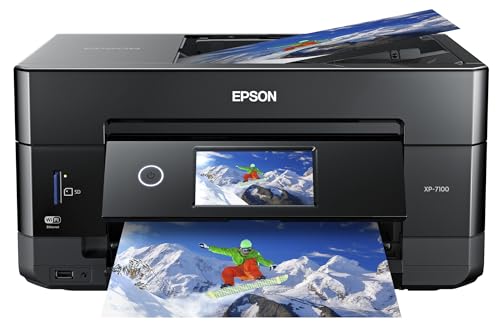
Epson Expression Premium XP-7100 Wireless Color All-in-One I...
|
|
|

|
Epson EcoTank Photo ET-8550 Wireless Wide-Format All-in-One ...
|
|
|

|
Epson EcoTank ET-2800 Wireless Color All-in-One Supertank Pr...
|
|
Key Takeaways
- Liene M100 Portable Printer delivers vibrant, water- and scratch-resistant 4×6” photos with compact, wireless convenience for on-the-go printing.
- Epson Expression Premium XP-7100 offers 4800 dpi resolution and a 4.3-inch touchscreen for sharp, vivid photos and easy direct printing.
- Epson EcoTank Photo ET-8550 produces lab-quality prints up to 13×19 inches with cost-efficient 6-color dye-based inks and wireless voice printing.
- Epson EcoTank ET-2800 features high-resolution 5760 x 1440 dpi prints, fast speeds, and EcoFit ink tanks to reduce ink costs by 90%.
- Choose printers with high dpi, dye-based inks, versatile media support, wireless connectivity, and cost-effective ink systems for stunning, affordable photo prints.
Liene M100 Portable 4×6” Photo Printer with 100 Sheets and 3 Cartridges for iPhone and Android
| Preview | Product | Price | |
|---|---|---|---|
|
|
Liene M100 4x6'' Photo Printer, Phone Printer 100 Sheets... | $159.99 | Buy Now |
The Liene M100 Portable 4×6” Photo Printer offers vibrant, water-resistant prints directly from your smartphone or PC. It employs thermal dye sublimation technology to create durable photos with a laminated finish that resists water, scratches, and fading. This printer features a built-in Wi-Fi hotspot, allowing up to five devices to connect without cables or Bluetooth.
Included are 100 glossy photo sheets and three color cartridges, so you can start printing immediately. The companion Liene app lets you personalize your photos with filters and borders for unique prints. Its compact design supports on-the-go use while maintaining ease of operation.
Best for: Users needing a portable photo printer that produces high-quality, water-resistant 4×6-inch prints from iPhone or Android devices.
Pros:
- Durable prints with water and scratch-resistant laminate
- Built-in Wi-Fi hotspot supports multiple device connections
- Includes 100 sheets and 3 cartridges for instant printing
Cons:
- Print resolution up to 300 x 300 dpi may not meet professional standards
- Print speed around 59 seconds per page might be slow for large volumes
- Heavier than some portable printers, which could affect portability
Epson Expression Premium XP-7100 Wireless Color Photo Printer
| Preview | Product | Price | |
|---|---|---|---|
|
|
Epson Expression Premium XP-7100 Wireless Color All-in-One Inkjet... |
$149.99 |
Buy Now |
The Epson Expression Premium XP-7100 is a wireless color photo printer designed for sharp, vibrant prints up to 8 x 10 inches. It features a 4.3-inch touchscreen, allowing easy photo editing and printing directly from USB drives or SD cards. With a high resolution of 4800 dpi, it produces detailed images quickly, printing 4 x 6 photos in about 12 seconds.
This printer also supports duplex printing and has a 30-page auto document feeder, making it versatile for various media types and document tasks. Its compatibility with multiple devices and Epson’s genuine ink ensures consistent, high-quality output. The design balances functionality with user convenience, suitable for both photographers and home users.
Best for: photographers and home users who want vibrant, borderless photo prints with flexible media handling and wireless convenience.
Pros:
- High-resolution printing at 4800 dpi for sharp, vivid images.
- Easy-to-use 4.3-inch touchscreen for direct photo editing and printing.
- 30-page auto document feeder and duplex printing enhance productivity.
Cons:
- Requires genuine Epson ink cartridges, which might increase ongoing costs.
- Print speed can vary based on system setup and print complexity.
- Printer size may be less ideal for very compact spaces.
Liene M100 Portable 4×6” Photo Printer with 100 Sheets and 3 Cartridges for iPhone and Android
| Preview | Product | Price | |
|---|---|---|---|
|
|
Liene M100 4x6'' Photo Printer, Phone Printer 100 Sheets... | $159.99 | Buy Now |
The Liene M100 Portable 4×6” Photo Printer offers wireless photo printing with vibrant, water- and scratch-resistant results. It uses thermal dye sublimation technology to produce sharp 4×6” photos at 300 x 300 dpi. The compact design supports up to five devices via its built-in Wi-Fi hotspot.
You can print directly from your iPhone, Android, or PC without cables. The printer includes 100 glossy sheets and three cartridges. The Liene app adds photo customization with filters and borders for creative prints on the go.
Weighing just over six pounds, the printer balances portability with professional-quality output. Its user-friendly features make it ideal for quick, reliable photo printing wherever you need it.
Best for: Users seeking easy, high-quality mobile photo printing from smartphones or PCs with wireless convenience.
Pros:
- Produces vibrant, water- and scratch-resistant 4×6” photos using thermal dye sublimation
- Built-in Wi-Fi hotspot supports up to five devices for seamless wireless printing
- Includes 100 sheets and three cartridges with an app for photo customization
Cons:
- Printing speed may be slower at about 59 seconds per page
- Printer weight might be a consideration for those wanting ultra-light portability
- Resolution capped at 300 x 300 dpi, which could be lower than some alternatives
Epson EcoTank Photo ET-8550 Wireless Wide-format Color All-in-One Printer
| Preview | Product | Price | |
|---|---|---|---|
|
|
Epson EcoTank Photo ET-8550 Wireless Wide-Format All-in-One Tank... | $667.88 | Buy Now |
The Epson EcoTank Photo ET-8550 is a versatile all-in-one printer designed for high-quality photo printing up to 13 x 19 inches. It features a 6-color Claria ET dye-based ink system that delivers sharp images at 5760 x 1440 dpi. This printer offers cost-efficient printing, producing 4 x 6 photos for about 4 cents each using high-yield ink bottles.
Wireless connectivity is simple with the Epson Smart Panel app, which also supports voice-activated printing. The 4.3-inch touchscreen provides easy navigation and operation. Its design balances advanced features with user-friendly controls, making it suitable for detailed photo projects and everyday use.
Best for: photographers, graphic designers, and home users needing wide-format photo printing with economical ink usage and flexible wireless options.
Pros:
- Produces lab-quality photos up to 13 x 19 inches with a 6-color dye-based ink system
- High-yield ink bottles enable cost-effective printing for up to two years
- Easy wireless and mobile printing with a 4.3-inch touchscreen and voice activation
- Supports voice-activated printing for hands-free convenience
Cons:
- Might require ample desk space due to its larger physical dimensions
- Power consumption may be higher than some comparable models
- Warranty coverage could be limited if non-genuine ink is used
Epson EcoTank ET-2800 Wireless Color All-in-One Supertank Printer
| Preview | Product | Price | |
|---|---|---|---|
|
|
Epson EcoTank ET-2800 Wireless Color All-in-One Supertank Printer... | Buy Now |
The Epson EcoTank ET-2800 is a wireless color all-in-one printer designed for efficiency and ease. It uses high-capacity EcoFit ink tanks that help reduce ink replacement costs by up to 90%. This model produces sharp text and vibrant photos with a high resolution of 5760 x 1440 DPI using Micro Piezo Heat-Free Technology.
Setup is straightforward, and the printer delivers a fast first-page print in about 10 seconds. It offers versatile scanning and copying functions, making it suitable for various everyday tasks. Its compact and lightweight design fits well in home or small office environments.
Best for: individuals and small offices needing an affordable, high-quality color printer with low-cost ink and multifunction features.
Pros:
- Reduces ink expenses significantly with EcoFit ink tanks.
- Delivers sharp text and vibrant images at 5760 x 1440 DPI.
- Supports wireless connectivity and multifunction scanning and copying.
- Fast first-page print speed of approximately 10 seconds.
Cons:
- Monthly print volume may be limited for users with high printing needs.
- Initial ink refilling might require some learning for those new to supertank printers.
- Copy speed could be slower than desired in busy office settings.
Factors to Consider When Choosing a Printer for Quality Photos
When choosing a printer for quality photos, you’ll want to focus on print resolution and the type of ink it uses. Make sure it supports the media types you plan to print on and offers the connectivity options that fit your setup. Also, consider how fast it prints without sacrificing image quality.
Print Resolution Importance
Print resolution plays an essential role in determining the clarity and detail of your photos. Measured in dots per inch (dpi), higher resolutions produce sharper, more vibrant images. You’ll want a minimum of 300 dpi for high-quality prints, which guarantees fine detail and smooth color shifts.
Some photo printers reach up to 4800 dpi, perfect for professional-grade photos with rich colors and textures. Keep in mind, though, that higher resolutions often mean longer print times since more detail is processed. To get the best results, choose a printer that supports high dpi and advanced printing technologies like thermal dye sublimation.
This combination greatly enhances the overall quality of your photo prints, delivering stunning, lifelike images every time.
Ink Type Options
Choosing the right ink type is essential for achieving the photo quality you want. Dye-based inks deliver vibrant colors and a wide color gamut, making your photos pop with rich, deep tones. If you want prints that last, pigment-based inks offer excellent fade resistance and archival quality, though their colors might be less vivid.
Some printers combine both ink types, giving you the best of both worlds—vibrancy and durability. Also, consider printers with high-capacity ink tanks instead of traditional cartridges; they cut down your printing costs greatly. Remember, the ink type you choose works hand in hand with print resolution to produce sharp, detailed images, so pick an option that aligns with your photo quality goals and budget.
Media Compatibility Range
Although selecting a printer with advanced features is important, you’ll also want to take into account its media compatibility range to guarantee it meets your photo printing needs. Start by checking the maximum media size the printer supports—larger sizes let you create more detailed, creative prints.
It’s also smart to choose a printer that handles various media types like glossy photo paper, cardstock, and specialty papers, giving you flexibility in your projects. Don’t forget to look for borderless printing capabilities, which help produce professional-looking photos without white margins. Additionally, make sure the printer accommodates both standard and wide-format papers.
Finally, verify that your printer’s ink system works well with the media you plan to use, as some inks don’t perform effectively on all surfaces, which could affect your print quality.
Connectivity and Compatibility
Beyond media compatibility, how your printer connects to your devices can greatly impact your photo printing experience. Look for printers with built-in Wi-Fi, so you can print photos directly from your smartphone or tablet without messy cables. It’s helpful if your printer supports multiple device connections at once, especially if several users share the printer in your home or office.
Check that the printer works smoothly with your operating system—whether it’s iOS, Android, or Windows—to avoid any compatibility headaches. Some models offer dedicated mobile apps, letting you customize photos and track print jobs right from your phone. Prioritize printers that handle various media sizes and types, giving you the flexibility to create stunning prints on specialty papers or different formats.
Printing Speed Considerations
When printing high-quality photos, speed plays a key role in your overall experience. Some printers can produce a 4 x 6 photo in as little as 12 seconds, while others may take nearly a minute. Keep in mind that higher resolutions, like 4800 dpi, usually slow down print times compared to lower settings such as 300 dpi.
If you need multiple prints quickly, look for models that handle several photos simultaneously or support multiple users printing at once. Remember, faster printers might sacrifice detail and vibrancy, so you’ll need to balance speed with the quality you want. Evaluating this trade-off guarantees you get stunning photos without unnecessary delays.
Choose a printer that fits your pace and quality demands perfectly.
Cost Efficiency Factors
Balancing printing speed with quality is just one part of choosing the right photo printer; cost efficiency plays an equally important role. You’ll want to take into account the long-term expenses of ink and media, as some printers can save up to 90% on replacement ink compared to traditional cartridges.
Look for models with high-capacity ink tanks or replacement bottles that print thousands of photos, lowering your cost per print considerably. For example, printing 4 x 6 photos can cost as little as 4 cents each, compared to 40 cents with standard cartridges. Don’t overlook the initial printer price, but weigh it against ongoing ink and paper costs to find the best value for stunning, affordable photo prints in the long run.
Frequently Asked Questions
How Do I Properly Maintain My Photo Printer to Extend Its Lifespan?
To properly maintain your photo printer, clean the print heads regularly to avoid clogs, use high-quality ink and photo paper, and keep it covered when not in use to prevent dust buildup.
Run printer maintenance cycles as recommended, avoid letting ink cartridges run completely dry, and store your printer in a cool, dry place.
Regular use also helps keep the ink flowing smoothly and extends your printer’s lifespan effectively.
What Types of Photo Paper Yield the Best Print Quality?
Did you know that using the right photo paper can improve print quality by up to 40%? For the best results, you should opt for glossy or semi-gloss photo paper, which enhances color vibrancy and sharpness.
Matte paper works well if you prefer a non-reflective finish. Always choose paper compatible with your printer type—inkjet or laser—to avoid smudging and guarantee longevity.
Don’t forget to store paper properly to keep prints flawless.
Can These Printers Handle Borderless Photo Printing?
Yes, many of these printers can handle borderless photo printing, letting you create full-bleed images without white edges. You’ll want to check the printer’s specifications to confirm borderless capability and supported paper sizes.
When you choose borderless printing, make sure to use compatible photo paper and adjust settings properly for the best results. This feature enhances your photos’ professional look, making them perfect for framing or gifting.
Are There Eco-Friendly Ink Options Available for Photo Printers?
Yes, you can find eco-friendly ink options for photo printers. Many manufacturers now offer inks made from biodegradable or vegetable-based materials that reduce environmental impact. These inks still deliver vibrant colors and sharp details, so you won’t sacrifice print quality.
When choosing a printer, look for those compatible with sustainable ink cartridges or refillable systems. This way, you’ll enjoy stunning photos while minimizing waste and harmful chemicals.
What Software Is Recommended for Editing Photos Before Printing?
You’ll want to use Adobe Photoshop or Lightroom for powerful photo editing before printing. Both offer advanced tools to adjust color, exposure, and sharpness, ensuring your photos look their best.
If you prefer free options, try GIMP or Darktable. These let you fine-tune your images without spending a dime. Whichever you choose, make sure to calibrate your monitor and use color profiles to get prints that truly match what you see on screen.
Conclusion
Choosing the perfect photo printer is like capturing the perfect moment—it brings your memories to life with vivid clarity. Whether you want a portable companion or a powerhouse for wide-format masterpieces, these top picks guarantee your photos don’t just sit in your phone but leap off the page.
So, don’t just print pictures; create stunning stories that shine bright, letting every snapshot tell your unique tale in brilliant color.