8 Best Low Cost Printers for 2026
When searching for the best low-cost printers for 2026, you’ll want a model that balances quality, speed, and connectivity without taking up much space.
Affordable printers like the HP DeskJet 2827e and Canon PIXMA TS4320 offer wireless all-in-one convenience, making them ideal for home or small office use.
Portable options such as the Rongta thermal printer provide inkless, on-the-go printing for those who need mobility.
Consider important features like duplex printing to save paper, mobile app support for easy remote printing, and ink costs to ensure your choice remains budget-friendly over time.
With many options available, keep exploring to find the printer that perfectly matches your specific needs and lifestyle.
| Image | Name | Editor's Rating | Price |
|---|---|---|---|

|
HP DeskJet 2827e Wireless All-in-One Color Inkjet Printer, S...
|
|
|

|
Canon PIXMA TS4320 – Wireless Color Inkjet Printer with Prin...
|
|
|

|
NDYIN Portable Printers Wireless for Travel, N80 Bluetooth T...
|
|
|

|
Canon PIXMA TS3720 Wireless All-in-One Printer for Basic Hom...
|
|
|

|
Canon Pixma MG3620 Wireless All-in-One Color Inkjet Printer ...
|
|
HP DeskJet 2827e Wireless All-in-One Printer
| Preview | Product | Price | |
|---|---|---|---|
|
|
HP DeskJet 2827e Wireless All-in-One Color Inkjet Printer, Scanner... | $55.32 | Buy Now |
The HP DeskJet 2827e Wireless All-in-One Printer is designed for simple home use. It prints, scans, and copies efficiently while holding up to 60 sheets in its tray. Its compact design includes eco-friendly recycled plastic and Energy Star certification, helping reduce environmental impact.
Wireless connectivity lets you print from smartphones or tablets using the HP mobile app. This printer delivers clear, high-resolution prints with reasonable speeds for both color and black-and-white documents. While it supports manual duplex printing, automatic double-sided printing is not available.
Setup is straightforward, making it accessible for everyday tasks. However, the copy function is limited to a maximum of nine copies per run. Also, the printer blocks ink cartridges with non-HP chips, which might restrict the use of some third-party cartridges.
Best for: individuals and families seeking an affordable, compact all-in-one printer with wireless features for everyday home printing, scanning, and copying.
Pros:
- Eco-friendly design with recycled plastic and Energy Star certification
- Wireless printing via HP mobile app for convenience
- Clear, high-resolution prints in color and black-and-white
Cons:
- Copy function limited to up to nine copies per job
- Manual duplex printing only, no automatic double-sided printing
- Ink cartridges with non-HP chips may be blocked, limiting third-party options
Important: This description is based solely on the provided product details.
HP DeskJet 2855e Wireless All-in-One Printer
No products found.
The HP DeskJet 2855e Wireless All-in-One Printer combines printing, scanning, copying, and faxing in a compact design. It features wireless connectivity enhanced by HP AI technology, which helps optimize printing tasks from the web and email. This makes it convenient for home users who want a versatile device.
This printer supports a variety of media types, including photos and envelopes. It delivers clear prints with a resolution up to 4800×1200 dpi using HP 67 cartridges. Print speeds reach up to 7.5 ppm in black, suitable for everyday documents. The HP app lets you manage printing and scanning remotely, adding flexibility to your workflow.
Best for: Home users seeking an affordable and easy-to-use all-in-one wireless printer with mobile app support.
Pros:
- Wireless connection with HP AI for improved web and email printing
- Supports multiple media types and sizes, such as photos and envelopes
- HP app enables remote printing, scanning, and faxing
Cons:
- Print speed of up to 7.5 ppm black may be modest for heavy printing
- Only manual duplex printing available, no automatic double-sided printing
- Input tray holds 60 sheets, which might require frequent refills for large tasks
Important:
This description is based solely on the provided product details without additional claims or information.
Canon PIXMA TS4320 Wireless Color Inkjet Printer
| Preview | Product | Price | |
|---|---|---|---|
|
|
Canon PIXMA TS4320 – Wireless Color Inkjet Printer with Print, Copy... |
$69.00 |
Buy Now |
The Canon PIXMA TS4320 Wireless Color Inkjet Printer offers a compact and stylish design, perfect for small home offices or hybrid workspaces. It uses a 2-cartridge hybrid ink system that produces sharp text and vibrant colors on documents up to 8.5” x 11”. This model supports easy setup and mobile printing through the Canon PRINT App, Apple AirPrint, and Mopria Print Service.
Connectivity is reliable thanks to dual-band Wi-Fi, ensuring stable wireless performance. Automatic duplex printing helps reduce paper use, supporting eco-friendly practices. The printer also includes scanning and copying functions, making it a versatile all-in-one solution for everyday printing needs.
Best for: Budget-conscious home users and hybrid workers looking for a compact, versatile all-in-one printer with wireless connectivity and eco-friendly features.
Pros:
- Compact design fits well in small workspaces.
- Supports mobile printing via popular apps.
- Automatic duplex printing saves paper.
- Includes scanning and copying capabilities.
Cons:
- Print size limited to 8.5” x 11”, which may not meet larger format needs.
- Hybrid ink system might require more frequent cartridge changes.
- Lacks advanced features like touchscreens or faster print speeds.
Important:
Information is based solely on the provided data without additional external details.
Portable Wireless Thermal Printer Bluetooth Inkless
| Preview | Product | Price | |
|---|---|---|---|
|
|
NDYIN Portable Printers Wireless for Travel, N80 Bluetooth Thermal... | $41.99 | Buy Now |
The Portable Wireless Thermal Printer Bluetooth Inkless is a compact, lightweight device ideal for mobile printing needs. It weighs just 1.7 pounds and connects seamlessly via Bluetooth or USB-C. Compatible with iOS, Android, tablets, laptops, and PCs, it uses the Nada Print App to deliver quick, wireless printing.
This printer uses direct thermal technology, printing on US Letter and A4 thermal paper without the need for ink or toner. It offers eco-friendly, cost-effective printing at a resolution of 203 DPI. The built-in rechargeable 2600mAh battery supports up to 160 sheets per charge, printing at a speed of 4 pages per minute.
Designed for versatility, it is perfect for printing documents, invoices, contracts, and tattoo transfer templates on the go. Its portability and inkless operation make it a practical choice for professionals and travelers alike.
Best for: individuals who need a lightweight, portable, and inkless printer for on-the-go printing of documents, invoices, contracts, and tattoo transfer templates across multiple devices.
Pros:
- Compact, travel-friendly design with lightweight build.
- Wireless Bluetooth and USB-C connectivity for multiple devices.
- Eco-friendly, inkless printing with rechargeable battery lasting for 160 sheets.
Cons:
- Requires Nada Print App for smartphone use, which might limit some users.
- Prints only in black and white at a maximum of 4 pages per minute.
- Charger not included, so a compatible charger must be purchased separately.
Important:
- Uses direct thermal printing on US Letter and A4 paper.
- Supports iOS, Android, tablets, laptops, and PCs through the Nada Print App.
Canon PIXMA TS3720 Wireless All-in-One Printer
| Preview | Product | Price | |
|---|---|---|---|
|
|
Canon PIXMA TS3720 Wireless All-in-One Printer for Basic Home... |
$59.00 |
Buy Now |
The Canon PIXMA TS3720 Wireless All-in-One Printer offers a compact design ideal for home use. It delivers sharp black text and vibrant photos with a hybrid ink system. This all-in-one device supports printing, scanning, and copying at a crisp 4800 x 1200 dpi resolution.
Wireless connectivity is seamless with dual-band Wi-Fi support. You can print easily from mobile devices using the Canon PRINT app, Apple AirPrint, or Mopria Print Service. Setup is straightforward, and the 1.5” LCD screen simplifies operation.
This printer handles various media sizes up to 8.5” x 14”, making it versatile for everyday tasks. Ink replacement is quick and convenient. Manual duplex printing is available but may require extra effort for double-sided jobs.
Best for: Home users needing a compact, affordable all-in-one printer with wireless features and high-quality photo and document printing.
Pros:
- Compact design with easy setup and simple operation via the 1.5” LCD screen.
- High-resolution printing (4800 x 1200 dpi) producing clear text and vivid photos.
- Supports dual-band Wi-Fi and mobile printing through Canon PRINT, Apple AirPrint, and Mopria.
Cons:
- Manual duplex printing might be less convenient for frequent double-sided printing.
- Paper capacity is limited with a single 60-sheet rear tray.
- Print speeds are moderate, which may be slower for heavy use.
Canon Pixma MG3620 Wireless All-in-One Printer
| Preview | Product | Price | |
|---|---|---|---|
|
|
Canon Pixma MG3620 Wireless All-in-One Color Inkjet Printer with... | Buy Now |
The Canon Pixma MG3620 Wireless All-in-One Printer offers a versatile solution for home and small office needs. It supports wireless printing and scanning, allowing users to easily connect and operate from mobile devices. The printer features auto 2-sided printing, which helps reduce paper use and enhances efficiency.
Its print speeds are 9.9 ipm for black and 5.7 ipm for color, suitable for regular printing tasks. The compact design fits well in limited spaces, while Alexa compatibility provides the convenience of voice control and automatic ink reordering. This model is also Energy Star certified, reflecting its energy-efficient operation.
Best for: budget-conscious users seeking a compact, wireless all-in-one printer for everyday printing, copying, and scanning tasks.
Pros:
- Wireless connectivity enables direct printing and scanning from mobile devices.
- Auto 2-sided printing saves paper and increases efficiency.
- Alexa compatibility supports voice commands and automatic ink reordering.
- Energy Star certification ensures eco-friendly performance.
Cons:
- Print speeds may be moderate for high-volume printing needs.
- The 100-sheet paper capacity might require frequent refills during heavy use.
- Color print speed is slower than black, which may affect color document tasks.
Important: This description is based solely on the provided data and does not include additional information.
Brother HL-L2405W Wireless Compact Monochrome Laser Printer
| Preview | Product | Price | |
|---|---|---|---|

|
Brother HL-L2405W Wireless Compact Monochrome Laser Printer with... |
$139.99 |
Buy Now |
The Brother HL-L2405W Wireless Compact Monochrome Laser Printer is designed for efficient black-and-white printing. It offers sharp text output at speeds up to 30 pages per minute. This compact printer supports both dual-band wireless and USB connections, allowing flexible placement in small spaces.
The printer includes a 250-sheet paper tray and a manual feed slot for specialty paper types. You can easily print remotely using the Brother Mobile Connect App. It also supports Alexa voice commands for added convenience. Using genuine Brother toner ensures consistent print quality and reliable performance.
This monochrome laser printer suits environments where fast, dependable printing is essential. Its wireless capabilities and mobile management features make it a practical choice for home offices or individual users needing straightforward document printing.
Best for: Small home offices or individuals requiring fast, reliable monochrome printing with flexible wireless connectivity and mobile control.
Pros:
- Prints up to 30 pages per minute with clear, consistent quality.
- Supports dual-band wireless (2.4GHz/5GHz) and USB connections.
- Enables mobile printing through Brother Mobile Connect App and Alexa voice control.
- Includes a 250-sheet paper tray plus manual feed for specialty media.
Cons:
- Prints only in black and white, no color output.
- Manual feed slot might slow down specialty paper printing for high-volume tasks.
- 250-sheet tray may require frequent refilling in larger offices.
Important:
– Description based solely on provided product features and specifications.
Rongta Portable Wireless Thermal Printer for Travel
| Preview | Product | Price | |
|---|---|---|---|
|
Rongta Portable Printers Wireless for Travel,Thermal Inkless Printer... | $37.99 | Buy Now |
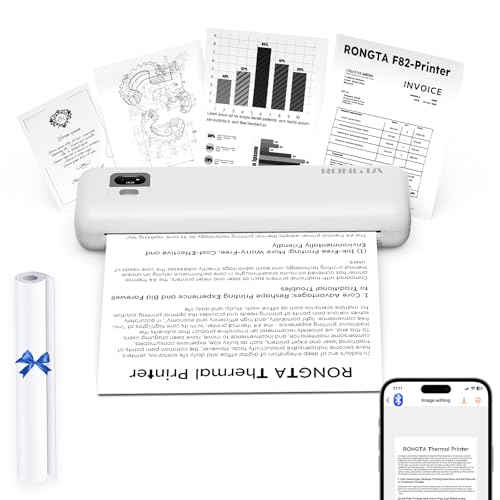
The Rongta Portable Wireless Thermal Printer is designed for those who need a compact and lightweight printer on the go. It delivers high-quality prints without ink or ribbons, using thermal paper. Weighing just 735g and under 11 inches, it fits easily into backpacks or travel bags.
This printer supports wireless printing through the SoPrint app, compatible with Android, iOS, Windows, and MacOS devices. It also offers USB-C connectivity for laptops. The printing process is quiet and efficient, producing clear documents up to US Letter or A4 size.
Setup is straightforward, and its low operating costs make it a practical choice for travel, school, or office use. However, printing is limited to thermal paper, and wireless functionality depends on the SoPrint app.
Best for: Travelers, students, and professionals needing a portable, wireless printer for quick, ink-free document printing.
Pros:
- Compact and lightweight design for easy portability
- Wireless printing via SoPrint app across multiple platforms
- Quiet, high-resolution thermal printing without ink or ribbon
- USB-C support for laptop connectivity
Cons:
- Wireless printing requires the SoPrint app; no direct Bluetooth pairing
- Only compatible with thermal paper, not standard paper
- Driver installation might be challenging with Chrome browser on some systems
Important: This description is based solely on provided details without external information.
Factors to Consider When Choosing a Low Cost Printer
When choosing a low cost printer, you’ll want to consider print quality and how fast it can handle your tasks. Think about the connectivity options it offers and whether ink or cartridge costs fit your budget.
Also, keep in mind the printer’s size and portability to match your space and lifestyle.
Print Quality Importance
How important is print quality when picking a low-cost printer? It’s vital because resolution directly affects sharpness—higher dpi means clearer text and images. You’ll want to check the printer’s dpi capabilities; for example, 4800 x 1200 dpi offers detailed, vivid prints.
The type of ink or toner also matters since it influences color vibrancy, sharpness, and durability. Keep in mind, low-cost models often have fewer color cartridges or lower resolution, which can reduce crispness and color fidelity. Additionally, using the right paper or specialty media enhances clarity and color accuracy.
Paying attention to these factors ensures your prints look professional, even on a budget. So, don’t compromise on print quality if you want consistently sharp, vibrant results.
Connectivity Options Available
Although low-cost printers focus on affordability, they still offer a range of connectivity options to fit your needs. You can choose models with Wi-Fi, USB, Ethernet, or Bluetooth, depending on how you plan to print. Wi-Fi lets you print wirelessly from smartphones, tablets, or laptops, perfect for a multi-device setup.
Some budget printers even support dual-band Wi-Fi (2.4GHz and 5GHz) for a more stable, faster connection. If you prefer a direct, no-fuss link, USB connections provide reliable, simple connectivity. Bluetooth-enabled printers are great if you want quick pairing with mobile devices, ideal for portable or home use.
Considering these connectivity options helps you pick a printer that fits your environment without overspending.
Ink and Cartridge Costs
Beyond connectivity, ink and cartridge costs play a major role in determining the overall expense of owning a low-cost printer. While inkjet printers often come with lower upfront prices, their ink replacement costs tend to add up quickly. You’ll want to contemplate printers that support high-yield or XL cartridges, as these reduce the cost per page and save you money in the long run.
Also, printers compatible with generic or refillable cartridges can lower ongoing expenses, but be cautious—using third-party cartridges might affect print quality or void your warranty. Laser printers usually have higher initial costs but offer more affordable toner replacements. By weighing these factors, you can choose a printer that balances upfront savings with manageable ink costs over time.
Printer Speed Requirements
When do you really need a faster printer? If you print frequently or handle multi-page documents, opting for a printer with higher pages per minute (ppm) can boost your productivity. Most low-cost printers range between 4 to 9 ppm, with black-and-white models generally printing faster than color ones at the same price.
Keep in mind that print speed varies by document type—text-only pages print quicker than those with high-resolution images. If your printing is casual or occasional, a slower speed around 4 to 6 ppm usually meets your needs while keeping expenses down. Assess how often and what you print to choose a printer speed that balances efficiency and cost without overspending on unnecessary performance.
Size and Portability
Choosing the right print speed is important, but you’ll also want to think about how much space your printer takes up and whether you need to move it around. Compact printers with smaller dimensions fit easily into tight spots, making them perfect if you have limited desk space.
If you plan to carry your printer between home, office, or while traveling, lightweight models under 10 pounds are your best bet. Look for portable designs with foldable parts or integrated handles—they make transport and storage hassle-free.
Just remember to balance size and portability with functionality; a tiny printer won’t help much if it lacks the features you need. Prioritize models that stay manageable without sacrificing essential printing capabilities.
Frequently Asked Questions
How Long Do Low Cost Printer Ink Cartridges Typically Last?
Ink cartridges in low-cost printers usually last for about 200 to 500 pages, depending on usage.
You’ll want to keep an eye on print quality and replace them when colors fade or prints become streaky.
Can Low Cost Printers Handle Photo Printing Quality?
Yes, low cost printers can handle photo printing quality, but don’t expect professional-grade results. You’ll get decent prints for casual use, though colors and sharpness might not be as vibrant or detailed as high-end models.
What Are Common Connectivity Issues With Budget Printers?
Think of your budget printer as a shy traveler lost in a crowded city—common issues include weak Wi-Fi signals, outdated drivers, and incompatible devices.
You’ll want to troubleshoot connectivity settings and update software to guide it home.
Are Low Cost Printers Compatible With Mac and Windows?
Yes, most low cost printers work with both Mac and Windows. You’ll want to check the specific model’s compatibility and drivers before buying to guarantee seamless setup and avoid any frustrating installation issues on your device.
How Noisy Are Budget Printers During Operation?
You’ll find budget printers produce about 50 decibels, similar to a quiet conversation. While not silent, they’re usually not disruptive.
Just don’t expect whisper-quiet operation during heavy printing tasks or long print jobs.
Conclusion
Choosing the right low-cost printer is like finding a trusty compass in a sea of options—it guides you to seamless printing without sinking your budget. Whether you need vibrant color bursts or sleek monochrome efficiency, these picks have you covered.
Remember, the best printer fits your unique rhythm, balancing quality and cost like a well-tuned instrument.
So, go ahead—print your story with confidence and clarity, knowing you’ve made a savvy choice for 2026.
When selecting from the 8 best low cost printers for 2026, focus on features that match your needs for affordability and performance.
This ensures your investment in a low-cost printer delivers excellent value and reliability throughout the year.