10 Best Photographic Printers for 2026
You’ll find top photographic printers for 2026 like the Epson EcoTank ET-8550 and Canon imagePROGRAF PRO-1100 offer stunning wide-format, vibrant prints with professional-grade inks and wireless convenience. These best photographic printers deliver exceptional color accuracy and detail that photographers and artists demand.
Whether you need high-resolution prints for portfolios or gallery displays, these models stand out.
For portability, consider the KODAK Dock Plus or Fujifilm Instax Mini Link 2 for quick, durable photos on the go.
Versatile options like the Canon PIXMA PRO-200S and HP Envy Photo 7975 balance quality and home use.
Explore these picks, and you’ll uncover which suits your creative needs best.
| Image | Name | Editor's Rating | Price |
|---|---|---|---|

|
Liene M100 4x6'' Photo Printer, Phone Printer 100 Sheets...
|
|
|

|
Epson EcoTank Photo ET-8550 Wireless Wide-Format All-in-One ...
|
|
|

|
Canon imagePROGRAF PRO-1100: 17” Professional Wireless Inkje...
|
|
|

|
Canon PIXMA PRO-200S Professional 13" Wireless Inkjet Photo ...
|
|
|
|
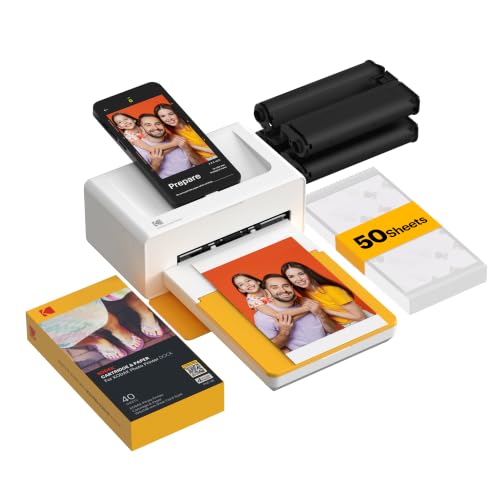
KODAK Dock Plus 4x6 Photo Printer, Smartphone Docking, 4PASS...
|
|
Liene M100 Portable 4×6” Wi-Fi Photo Printer
| Preview | Product | Price | |
|---|---|---|---|
|
|
Liene M100 4x6'' Photo Printer, Phone Printer 100 Sheets... | $159.99 | Buy Now |
The Liene M100 Portable 4×6” Wi-Fi Photo Printer offers a compact solution for printing vibrant, durable photos directly from your smartphone or laptop. It uses thermal dye sublimation technology to create water-, scratch-, fingerprint-, and fade-resistant prints at 300×300 dpi resolution. This printer connects via a Wi-Fi hotspot, allowing up to five devices to print simultaneously without needing an external network.
Its design includes a dust-sealed cassette and comes complete with 100 sheets and color cartridges for immediate use. The Liene app enhances your printing experience by letting you add borders, filters, and make adjustments easily. Though print speed is about 59 seconds for the first page, the portability and ease of use make it ideal for on-the-go photo printing.
Best for: Families or small groups looking for a portable photo printer with shared Wi-Fi access for quick, high-quality 4×6-inch prints from mobile devices or laptops.
Pros:
- Produces durable, water- and scratch-resistant photos with thermal dye sublimation.
- Enables Wi-Fi hotspot connection for up to five devices without external networks.
- Includes 100 sheets, color cartridges, and a dust-sealed cassette for ready use.
- Offers customization through the Liene app with filters and print adjustments.
Cons:
- Print resolution is limited to 300×300 dpi, which may be lower than some alternatives.
- Does not support automatic double-sided printing; duplex requires manual handling.
- Printing the first page can take around 59 seconds, which might be slower than other models.
Important:
The description strictly reflects the product’s features and capabilities without added claims beyond the provided information.
Epson EcoTank ET-8550 Wireless Wide-Format Printer
| Preview | Product | Price | |
|---|---|---|---|
|
|
Epson EcoTank Photo ET-8550 Wireless Wide-Format All-in-One Tank... | $679.00 | Buy Now |
The Epson EcoTank ET-8550 is a wireless wide-format printer designed for photographers and graphic artists. It features a cartridge-free design with vibrant 6-color ink, ensuring lab-quality prints up to 13 x 19 inches. The printer supports various media types, including specialty options like cardstock and CDs.
With its wireless connectivity and the Epson Smart Panel app, users can print and scan directly from mobile devices. The 4.3-inch touchscreen and voice-activated controls simplify operation. High-yield ink bottles provide up to 80% savings on ink costs, making this printer both efficient and cost-effective.
This printer combines speed, versatility, and ease of use, fitting well in creative workspaces that require professional-grade output. Its wide-format capabilities and media support make it a valuable tool for detailed and colorful projects.
Best for: Photographers, graphic artists, and creative professionals seeking high-quality, wide-format printing with versatile media options and cost-efficient ink use.
Pros:
- Cartridge-free high-yield ink bottles reduce ink costs by up to 80%.
- Prints borderless photos up to 13 x 19 inches on various media, including cardstock and CDs.
- Wireless operation with Epson Smart Panel app and voice-activated controls for convenience.
Cons:
- Initial ink bottle setup and refilling might be unfamiliar to users used to cartridges.
- The maximum sheet input of 100 sheets could limit large batch printing.
Canon imagePROGRAF PRO-1100: 17” Professional Wireless Inkjet Photo Printer
| Preview | Product | Price | |
|---|---|---|---|
|
|
Canon imagePROGRAF PRO-1100: 17” Professional Wireless Inkjet Photo... |
$1,299.00 |
Buy Now |
The Canon imagePROGRAF PRO-1100 is a professional wireless inkjet photo printer designed for superior color accuracy and fine detail. It uses an advanced 11-pigment LUCIA PRO II ink system to deliver rich, vibrant prints. The Chroma Optimizer improves gloss and smooths the print surface, resulting in vivid and scratch-resistant images.
This printer supports media sizes up to 17” x 22” and offers a high resolution of up to 2400×1200 dpi. Its wireless connectivity enables efficient handling of large image files. The included professional software ensures precise color management, enhancing workflow control for photographers and artists.
Best for: Professional photographers and artists needing high-quality, color-accurate photo prints with advanced media handling.
Pros:
- Advanced 11-pigment LUCIA PRO II ink system with Chroma Optimizer for enhanced color and gloss.
- High resolution up to 2400×1200 dpi and supports large media sizes.
- Wireless connectivity for efficient file handling.
- Professional software tools for precise color control.
Cons:
- May require significant workspace due to its footprint.
- Connectivity options might be limited with a single USB port.
- Primarily print-focused, lacking scanning or copying functions.
Important:
- Description is based solely on provided product details.
- No additional features beyond those specified have been included.
Canon PIXMA PRO-200S Wireless Professional Photo Printer
| Preview | Product | Price | |
|---|---|---|---|
|
|
Canon PIXMA PRO-200S Professional 13" Wireless Inkjet Photo Printer... |
$549.99 |
Buy Now |
The Canon PIXMA PRO-200S Wireless Professional Photo Printer delivers vibrant, professional-quality prints up to 13” x 19”. It uses an 8-color dye-based ink system to produce rich colors and sharp details. The printer supports borderless printing and handles media sizes up to 13” x 39” for versatile use.
Designed for ease, the PIXMA PRO-200S features wireless connectivity and a 3.0-inch color LCD for simple setup and operation. Its compact design fits well in both home and studio environments. Fast print speeds help keep projects moving efficiently without sacrificing quality.
This printer focuses on photo printing with no scanning or copying functions. The input tray holds up to 100 sheets, which might require refills during large jobs. Weighing 32 pounds, it offers stability but may be less portable for some users.
Best for: Photographers and graphic artists seeking high-quality, vibrant photo prints with flexible media options in a compact wireless printer.
Pros:
- Produces vibrant, high-resolution prints with an 8-color dye-based ink system
- Supports borderless printing and wide media sizes up to 13” x 39”
- Fast print speeds and easy operation via 3.0-inch LCD and wireless connectivity
Cons:
- Print-only functions without scanning or copying capabilities
- Maximum input capacity of 100 sheets may require frequent refills
- Weighs 32 pounds, which could limit portability for some users
Important:
- Description based solely on provided product details
- No added claims beyond supplied information
KODAK Dock Plus 4PASS Portable Photo Printer
| Preview | Product | Price | |
|---|---|---|---|
|
|
KODAK Dock Plus 4x6 Photo Printer, Smartphone Docking, 4PASS... | $114.99 | Buy Now |
The KODAK Dock Plus 4PASS Portable Photo Printer delivers high-quality 4×6-inch prints with vibrant colors and durability. It uses Kodak’s 4PASS dye-sublimation technology to create photos that are fingerprint-proof and water-resistant. This printer connects easily via Bluetooth to iPhones, iPads, and Android devices, offering a smooth and wireless printing experience.
Its compact design serves as a smartphone dock and charger, making it convenient for both home use and travel. The printer handles one photo at a time with a speed of about 1 ppm, which suits casual photo printing needs. The included app and supplies simplify the printing process, making it accessible even for beginners.
Best for: users looking for a portable photo printer that combines wireless convenience, durable print quality, and smartphone charging functionality.
Pros:
- Produces vibrant, fingerprint-proof, and water-resistant photos with Kodak’s 4PASS dye-sublimation technology
- Wireless Bluetooth compatibility with iPhone, iPad, and Android devices
- Compact design doubles as a smartphone dock and charger
Cons:
- Prints one photo at a time at a moderate speed of about 1 ppm
- Limited to 4×6-inch glossy photo paper media
- Input tray holds up to 20 sheets, which might require frequent reloading for larger print jobs
Important: The description reflects the printer’s features and use based solely on provided information.
Epson XP-15000 Wireless Wide-Format Photo Printer
No products found.
The Epson XP-15000 Wireless Wide-Format Photo Printer delivers professional-quality, borderless prints up to 13 by 19 inches. Its compact design fits well on a desk without sacrificing functionality. Using six-color Claria Photo HD ink, including red and gray, it produces vibrant colors and sharp black-and-white images.
This printer supports wireless printing from various devices and handles specialty media such as cardstock with ease. It offers auto duplex printing and a 200-sheet paper tray for efficient workflow. With a high resolution of 5760 x 1440 dpi, prints come out detailed and clear.
Automatic ink ordering and firmware updates help maintain smooth operation. The Epson XP-15000 is designed to balance wide-format capabilities with desktop convenience, making it ideal for creative projects requiring versatile media support.
Best for: photographers and creative professionals who need high-quality, wide-format borderless prints with wireless functionality in a compact printer.
Pros:
- Produces vibrant, professional-quality prints with six-color Claria Photo HD ink including red and gray.
- Supports wide-format printing up to 13 x 19 inches and auto duplex printing.
- Offers wireless and Ethernet connectivity with automatic ink ordering for seamless workflow.
Cons:
- Limited to genuine Epson cartridges, which may increase operating costs.
- Firmware updates might impact third-party ink compatibility, restricting ink options.
- Relatively large footprint for a desktop printer, potentially requiring significant desk space.
Important:
This description is based solely on the provided product details without additional claims or external information.
Fujifilm Instax Mini Link 2 Smartphone Printer – Space Blue
| Preview | Product | Price | |
|---|---|---|---|

|
Fujifilm Instax Mini Link 2 Smartphone Printer - Space Blue | $97.57 | Buy Now |
The Fujifilm Instax Mini Link 2 Smartphone Printer in Space Blue delivers quick, high-quality photo prints directly from your phone. This compact printer connects easily via Bluetooth and uses INSTAX MINI instant film for sharp 4800 x 1200 dpi color images. Its intuitive app offers creative options like frames, doodles, and animation effects to personalize your prints.
Designed for portability, it holds up to 10 sheets and charges through a USB port. The sleek design pairs well with both iOS devices and smart home systems. This printer is an ideal companion for capturing and sharing moments on the go, combining simplicity with creative control.
Best for: Users looking for a compact, easy-to-use smartphone printer that offers instant, customizable photo prints.
Pros:
- Produces high-resolution color prints with INSTAX MINI film
- Includes creative features such as frames, doodles, and motion effects
- Compact, lightweight design with Bluetooth and smart home compatibility
- USB charging for convenient power management
Cons:
- Printing limited to INSTAX MINI instant film, which is sold separately
- Holds only up to 10 sheets, requiring frequent reloading for larger print runs
- Mainly focused on printing, with limited connectivity beyond a single USB port
Important:
Information is based solely on the provided data without additional claims or details.
HP Envy Photo 7975 Wireless Color Inkjet Printer
| Preview | Product | Price | |
|---|---|---|---|

|
HP Envy Photo 7975 Wireless Color Inkjet Photo Printer, Print, scan... |
$239.89 |
Buy Now |
The HP Envy Photo 7975 Wireless Color Inkjet Printer is designed to meet the needs of families balancing creativity with everyday printing tasks. It produces high-quality photo prints with borderless capability up to 8.5 x 11.7 inches at 4800 x 1200 dpi. This printer also delivers efficient color and black printing speeds for documents.
It offers multifunction features including copying, scanning with an automatic document feeder, and automatic duplex printing. The large color touchscreen makes navigation straightforward. Wireless and mobile connectivity, combined with AI-enabled workflow optimization, enhance its versatility for home use.
This all-in-one printer fits well in environments where both creative projects and routine document handling are important. Its design supports a smooth workflow with convenient, user-friendly controls and reliable performance.
Best for: Families and home users seeking a versatile all-in-one printer that combines high-quality photo printing with efficient document handling and creative project support.
Pros:
- High-resolution borderless photo printing up to 8.5 x 11.7 inches at 4800 x 1200 dpi
- Multifunction capabilities including copying, scanning with ADF, and automatic duplex printing
- Wireless and mobile connectivity with AI-enabled workflow optimization
- Large, user-friendly color touchscreen for easy operation
Cons:
- Maximum input sheet capacity of 125 sheets may require frequent refilling for heavy use
- Dye-based ink cartridges might need frequent replacement with high-volume printing
- Limited to media sizes up to 8.5 x 11 inches, which could restrict larger format printing needs
Important:
All features and specifications are based on the provided data without additions or assumptions.
Epson EcoTank ET-8500 Wireless Color Supertank Printer
| Preview | Product | Price | |
|---|---|---|---|

|
Epson EcoTank Photo ET-8500 Wireless Color All-in-One Supertank... |
|
Buy Now |
The Epson EcoTank ET-8500 is a versatile wireless color supertank printer designed for high-quality photo and document printing. It uses a 6-color refillable ink system that delivers vibrant, lab-quality photos up to 8.5 x 11 inches while reducing ink costs by up to 80%. The printer supports a variety of media sizes, including borderless photos and larger formats up to 13 x 19 inches.
This model features a 4.3-inch color touchscreen for intuitive operation and offers duplex printing for double-sided documents. Its wireless capabilities allow easy printing from multiple devices, making it well-suited for creative projects and office tasks. The compact design balances functionality with convenience, although it does not include an automatic document feeder for multi-page scanning or copying.
Best for: creative professionals and small office users who need versatile, high-quality photo and document printing with cost-efficient ink usage.
Pros:
- Cartridge-free refillable 6-color ink system with up to 80% cost savings
- Supports a wide range of media sizes and types, including borderless photos
- Wireless printing with duplex support and an easy-to-use 4.3-inch touchscreen
Cons:
- Single tray with a limited 10-sheet capacity may require frequent reloads
- Larger footprint and heavier weight compared to some compact printers
- May lack automatic document feeder, limiting multi-page scanning or copying
Important:
All information is based on the provided details; no additional features or claims are included.
Canon Selphy CP1500 Wireless Compact Photo Printer (Black)
No products found.
The Canon Selphy CP1500 Wireless Compact Photo Printer (Black) offers a portable solution for printing high-quality photos on the go. It connects wirelessly via Wi-Fi and also supports USB and memory card inputs. The printer’s compact design and optional battery pack make it easy to carry and use anywhere.
A 3.5-inch built-in display allows users to preview, edit, and apply filters to images before printing. It supports various media sizes and produces water-resistant prints that can last up to 100 years. With a print speed of about 41 seconds per photo at 300 dpi resolution, this device balances speed and quality effectively.
This printer is designed for those who want quick, reliable photo printing directly from smartphones, cameras, or USB devices without needing extra features like scanning or copying.
Best for: individuals needing a compact, wireless photo printer for fast, high-quality prints from mobile devices.
Pros:
- Wireless connectivity with Wi-Fi, USB, and memory card support.
- Portable design with an optional battery pack for printing anywhere.
- Built-in 3.5-inch display for easy photo preview and editing.
Cons:
- May print only one sheet at a time, which could slow bulk printing.
- Resolution capped at 300×300 dpi might not meet ultra-high detail needs.
- Lacks scanning or copying functions, limiting all-in-one use.
Important: This description is based solely on the provided features and specifications.
Factors to Consider When Choosing a Photographic Printer
When choosing a photographic printer, you’ll want to focus on print quality resolution and the type of ink technology it uses. Consider the media sizes it supports and the connectivity options available to fit your workflow. Don’t forget to check the printer’s speed and efficiency to keep your projects moving smoothly.
Print Quality Resolution
Because print quality resolution directly affects the sharpness and detail of your photos, choosing a printer with the right dpi is vital. Print resolution, measured in dots per inch (dpi), determines how fine and smooth your images will appear. For high-quality photo printing, you should aim for at least 300 dpi to avoid pixelation or blurry details, especially when enlarging prints or producing fine art.
If you want exceptional clarity, consider printers that support resolutions of 2400 dpi or higher. These models deliver outstanding detail, making them ideal for professional photographic work. Remember, higher dpi means sharper images and smoother gradients, so selecting a printer with an adequate resolution will guarantee your photos look crisp and vibrant every time you print.
Ink Technology Type
Print resolution sets the stage for how sharp and detailed your photos will look, but the type of ink your printer uses plays a big role in how those images hold up over time. Pigment-based inks offer superior durability and water resistance, making them ideal if you want prints that last. Thermal dye sublimation inks create vibrant, glossy images with a laminated surface that resists scratches and fading.
Inkjet printers typically use liquid inks, which deliver excellent color accuracy but can smudge or clog over time. If you print a lot, consider printers with refillable ink systems to cut costs and reduce waste. Ultimately, your choice of ink technology affects print quality, color range, drying time, and resistance to environmental damage, all vital for exceptional photographic prints.
Media Size Compatibility
Although many photographers focus on ink quality and resolution, choosing a printer that matches your preferred media size is just as important. Start by ensuring the printer supports the media sizes you plan to print on, whether that’s standard 4×6 or larger formats like 13×19 inches. Check the printer’s maximum media size to avoid any compatibility issues with your desired print dimensions.
If you want borderless prints, confirm the printer supports borderless printing at those sizes. Also, verify which media types the printer handles—glossy, matte, or specialty papers—and make sure they align with your creative needs. Finally, if you work with custom or non-standard sizes, choose a printer that can easily accommodate those unique dimensions for maximum flexibility.
Connectivity Options Available
Selecting the right media size is just one part of ensuring your photographic printer fits your workflow. You also need to take into account connectivity options, as they directly impact how easily you can print from your devices. Many printers offer Wi-Fi, letting you print wirelessly from smartphones, tablets, and computers, either through direct hotspot or network connections.
Bluetooth is great if you want quick pairing with mobile devices without relying on a network. For stable, high-speed connections, USB and Ethernet ports are ideal, especially in studios or offices. Additionally, compatibility with mobile apps and smart home systems can simplify remote printing and make managing projects across devices effortless.
Choose a printer with connectivity options that match your usual devices and printing environment.
Speed And Efficiency
When you need to handle large photo volumes or demanding projects, speed and efficiency become crucial factors in choosing a photographic printer. You’ll want a model with fast printing speeds and quick first-page-out times—some printers deliver initial prints in under 60 seconds. High throughput, measured in pages per minute (PPM), helps cut down wait times during busy sessions.
Efficient printers also reduce downtime by allowing quick media reloads and easy cartridge or ink refills, so you can keep working without interruptions. Additionally, support for duplex printing boosts efficiency by letting you print double-sided photos or documents without extra effort. Prioritizing these features ensures your workflow stays smooth and productive, especially when managing heavy photographic printing tasks.
Portability And Size
Because your workspace and mobility needs vary, you should carefully consider a printer’s size and weight before making a choice. Check the overall dimensions to confirm it fits your space and remains manageable for transport. Smaller, lightweight printers suit on-the-go use and quick setups, while larger models offer more media capacity and advanced features.
Look for portability perks like built-in batteries or compact designs if you plan to print remotely or often move your printer. Also, think about whether the printer’s size matches your regular printing volume and type. Keep in mind that portable printers usually have smaller sheet capacities, so make sure this fits your printing frequency without constant refills or interruptions.
Balancing size and portability with your needs ensures maximum convenience and performance.
Cost Of Consumables
One of the biggest ongoing expenses you’ll face with a photographic printer is the cost of consumables like ink or toner. These costs can heavily influence your printer’s long-term affordability. Choosing a printer with high-yield cartridges or a refillable ink system can lower your cost per photo considerably.
Be aware that replacement consumables vary widely in price—from budget-friendly options to premium inks designed for professional-quality prints. Additionally, some printers require proprietary cartridges, which often come at a higher cost compared to third-party alternatives.
To make an informed decision, calculate the cost per print by considering both the price and yield of consumables. This approach helps you estimate how much you’ll actually spend over time, ensuring your chosen printer fits your budget and printing needs.
Frequently Asked Questions
How Do I Recycle Used Ink Cartridges Responsibly?
You can recycle used ink cartridges responsibly by returning them to manufacturer take-back programs, dropping them off at local recycling centers, or using mail-in services. Avoid throwing them in the trash to protect the environment.
Many manufacturers offer free recycling options to encourage proper disposal. Local recycling centers often accept used cartridges and ensure they are processed safely.
Mail-in programs provide a convenient way to recycle from home, often including prepaid shipping labels. Always check the specific guidelines of the recycling program you choose.
Can These Printers Be Used for Commercial Bulk Printing?
Yes, you can use these printers for commercial bulk printing, but they’re designed for high-quality photos, not speed or volume.
You’ll get vivid images, sharp details, and rich colors, but not rapid, large-scale output.
What Is the Average Lifespan of Printer Ink Cartridges?
You can expect printer ink cartridges to last between 6 months and a year, depending on usage and printer type. If you print frequently, you’ll likely replace them more often, so keep extra cartridges handy.
Are There Any Health Risks Associated With Printer Ink Fumes?
Ink fumes can be sneaky villains, but you won’t face major health risks if you keep your printer in a well-ventilated space. Just don’t inhale deeply, and you’ll avoid headaches or respiratory irritation easily.
Do These Printers Support Third-Party Ink Cartridges?
Some printers support third-party ink cartridges, but many use chips to block them. You’ll want to check each model’s compatibility carefully to avoid issues with print quality or warranty voiding before you buy or use third-party inks.
Conclusion
Choosing the perfect photographic printer might feel like hunting for a unicorn, but with options like these, your prints will practically jump off the page! Whether you want stunning wide-format masterpieces or pocket-sized magic, these printers transform your photos into jaw-dropping works of art.
Don’t settle for dull—grab a printer that makes your memories so vivid, they’ll practically sparkle on your wall. Your photo game is about to go legendary!
Investing in the best photographic printer ensures your images are captured in brilliant detail and vibrant color. Elevate your photography with top-quality photo printers designed to bring your vision to life. Make your prints stand out with the finest photographic printers of 2026!
