3 Best Large Format Sublimation Printers for 2026
For vibrant, high-resolution large format sublimation prints in 2026, choosing the best large format sublimation printer is essential to achieve outstanding results. Whether you prioritize print size, ink efficiency, or connectivity, the right printer can elevate your workflow and output quality.
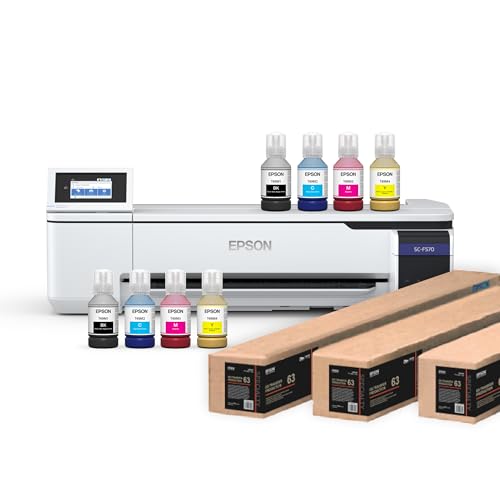
The Epson SureColor F570 Pro stands out for its crisp 24″ output and reliable, low-maintenance operation.
The Pinckney Cartridge-Free offers wide-format versatility with easy refilling and wireless convenience, making it a top choice for diverse printing needs.
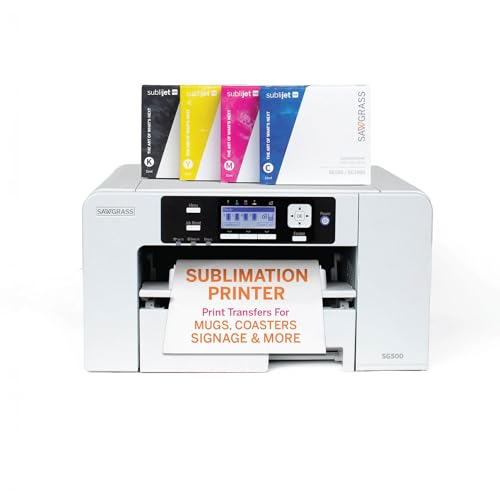
If desktop space is limited, the Sawgrass SG500 delivers detailed prints up to 8.5” wide with smart auto-maintenance features.
Keep considering your specific requirements to find your perfect fit—explore these models to boost your printing efficiency and quality in 2026.
| Image | Name | Editor's Rating | Price |
|---|---|---|---|
|
Epson Surecolor F570 24" Desktop Sublimation Printer, Includ...
|
|
|

|
Pinckney Cartridge-Free Super-Tank Printer with Sublimation ...
|
|
|
|
Sawgrass SG500 Sublimation Printer, 31 mL Inks and Paper Bun...
|
|
Epson Surecolor F570 Pro 24″ Sublimation Printer Kit
| Preview | Product | Price | |
|---|---|---|---|
|
|
Epson Surecolor F570 24" Desktop Sublimation Printer, Includes Two... | $2,650.00 | Buy Now |
The Epson SureColor F570 Pro 24″ sublimation printer delivers crisp, consistent prints with its advanced PrecisionCore MicroTFP printhead and Nozzle Verification Technology. It supports wide-format printing up to 24 inches, making it ideal for detailed, vibrant designs. The printer comes ready to use, including two full ink sets, sublimation paper, and free remote installation.
Designed for efficiency, the F570 Pro features a 50-sheet auto-feed tray and a built-in cutter to streamline production. It works seamlessly with Epson T49M dye sublimation inks, ensuring vivid results on polyester fabrics and coated ceramics. The printer combines professional-grade functionality with practical features tailored for desktop use.
Best for: Small to medium-sized businesses and professionals needing a reliable, easy-to-use sublimation printer for high-quality prints on polyester and coated ceramic items.
Pros:
- Includes two full ink sets, sublimation paper, and free remote installation for fast setup
- PrecisionCore MicroTFP printhead with Nozzle Verification Technology ensures sharp prints up to 24 inches
- 50-sheet auto-feed tray and built-in cutter enhance workflow efficiency
Cons:
- May have limited portability due to its weight
- Supports only simplex printing; duplex printing is not available
- Single USB port could restrict hardware connectivity options
Important:
This description is based solely on the provided product details without additional claims.
Pinckney Cartridge-Free Super-Tank Wide Format Printer
| Preview | Product | Price | |
|---|---|---|---|
|
|
Pinckney Cartridge-Free Super-Tank Printer with Sublimation Ink Bundle... | $799.99 | Buy Now |
The Pinckney Cartridge-Free Super-Tank Wide Format Printer offers a cartridge-free ink tank system that ensures easy and clean refilling. It delivers vibrant colors with fine droplet precision, ideal for high-quality sublimation printing. This printer supports wireless all-in-one functionality, including scanning and copying, making it a versatile tool for creative projects.
Its design is both compact and lightweight, handling media up to 13 x 19 inches and producing borderless prints up to 11 x 17 inches. The 2.7-inch touchscreen simplifies operation, while duplex printing adds efficiency. This printer suits various sublimation applications, such as T-shirts and mugs, by combining wide-format capabilities with user-friendly features.
Best for: Creators and small business owners needing a reliable sublimation printer with easy maintenance and wireless multifunction use for heat transfer projects.
Pros:
- Cartridge-free ink tank system with clean, straightforward refilling and vibrant color output
- Supports wide-format, borderless printing up to 11 x 17 inches and duplex functionality
- Compact design with wireless connectivity and built-in scanning and copying
Cons:
- Scanning size is limited to 8.5 x 14 inches, smaller than the maximum print size
- Ink is shipped separately, which might require additional purchasing or waiting
- One-year warranty coverage may be shorter than some competitors’ offerings
Important:
Information is based solely on provided product details without external additions.
Sawgrass SG500 Sublimation Printer Bundle with Inks
| Preview | Product | Price | |
|---|---|---|---|
|
|
Sawgrass SG500 Sublimation Printer, 31 mL Inks and Paper Bundle | $659.95 | Buy Now |
The Sawgrass SG500 Sublimation Printer Bundle with Inks offers a compact solution for high-quality sublimation printing. It produces sharp prints up to 1200 dpi on media up to 8.5” x 14”. The bypass tray lets you print longer items up to 8.5” x 51”. This printer uses SubliJet UHD inks to deliver vibrant and consistent colors.
Wi-Fi connectivity and auto-maintenance print head technology help ensure reliable operation. The MySawgrass platform makes designing simple and accessible. Its compact design fits well on most desktops, making it a practical choice for small spaces.
This bundle is designed for hobbyists, entrepreneurs, and small businesses that need a versatile sublimation printer with dependable performance. It balances professional print quality with desktop convenience.
Best for: Small businesses and creatives who require a reliable, high-definition sublimation printer with flexible media options.
Pros:
- Produces vibrant, detailed prints up to 1200 dpi with SubliJet UHD inks
- Handles media sizes up to 8.5” x 14” and longer prints up to 8.5” x 51”
- Features Wi-Fi connectivity and auto-maintenance print head technology
- Includes user-friendly design tools via the MySawgrass platform
Cons:
- Media width primarily limited to 8.5”, which may restrict larger format printing
- Ink cartridges hold 31mL, potentially needing frequent replacement for high-volume use
- Printer dimensions might be less suited for very small or crowded desktop areas
Important:
This description is based solely on the provided product details without additional claims.
Factors to Consider When Choosing a Large Format Sublimation Printer
When choosing a large format sublimation printer, you’ll want to focus on print resolution quality and the maximum media size it can handle. Don’t forget to check ink system efficiency and the connectivity options available to guarantee smooth operation.
Also, make sure the printer’s software compatibility fits your workflow needs.
Print Resolution Quality
Choosing a large format sublimation printer means paying close attention to print resolution quality, as it directly affects the sharpness and detail of your images. Higher resolution, measured in dpi, delivers sharper, more intricate prints. For example, a 2400×1200 dpi printer captures finer details than one with 1200×600 dpi.
You want consistent resolution across all prints to guarantee uniform color and clarity, especially for complex designs. Printers with advanced dpi capabilities also produce more vibrant, true-to-life colors, elevating the professionalism of your sublimation products.
Ultimately, print resolution quality impacts how your final output looks and feels, so choosing a printer with high and consistent dpi performance is vital to achieve exceptional results every time.
Maximum Media Size
How large do you need your prints to be? The maximum media size of a sublimation printer determines the biggest print area you can work with, directly affecting the size of your finished products. If you plan to create banners, posters, or fabric panels, choosing a printer that supports larger media—typically 24 inches or more—is essential for professional-grade, large-format prints.
Keep in mind, media size limits include both width and length, so you’ll want to verify these dimensions align with your typical project requirements. Picking the right maximum media size helps you avoid multiple print runs, streamlining your workflow and expanding your creative possibilities without constraints. Always match the printer’s capacity to your needs for the best results.
Ink System Efficiency
Why settle for frequent interruptions when an efficient ink system can keep your large format sublimation printer running smoothly? Look for printers with high-capacity ink tanks or cartridges to minimize refills and downtime. Cartridge-free or refillable ink tanks with auto-fill features help prevent leaks and mess, making maintenance easier.
Precision matters—choose printers with micro-dispensers or advanced nozzles for consistent ink flow, reducing clogs and ensuring even print quality. Also, guarantee the printer supports high-quality sublimation inks designed specifically for its system, enhancing color vibrancy and print durability. Clear refill indicators and straightforward refilling procedures streamline your workflow and cut ink waste.
Prioritizing these features means you’ll enjoy reliable, efficient printing without constant interruptions or messy upkeep.
Connectivity Options Available
Three key connectivity options—Ethernet, USB, and Wi-Fi—shape how you integrate a large format sublimation printer into your workflow. Ethernet offers stable, high-speed network access, ideal if multiple users share the printer in a busy workspace. USB provides straightforward, plug-and-play connections, perfect for quick setups and reliable local printing.
Wi-Fi lets you print wirelessly from various devices, supporting mobile and cloud-based workflows with ease. Many printers combine Ethernet and Wi-Fi, giving you flexibility to switch between wired and wireless connections depending on your needs. When choosing your printer, consider which connectivity options best fit your work environment and collaboration style to guarantee smooth, efficient printing without connectivity hiccups.
Software Compatibility Features
Once you’ve settled on the connectivity options that suit your workspace, it’s important to guarantee your large format sublimation printer works seamlessly with your design software. Make sure it’s compatible with popular programs like Adobe Creative Cloud or CorelDRAW, so you won’t face any interruptions. Check if the printer supports standard file formats such as PDF, JPEG, PNG, and SVG, ensuring smooth workflow integration.
Also, verify that the printer’s software offers advanced color management tools to keep your colors accurate across different media. Don’t forget to confirm driver compatibility with your operating system, whether it’s Windows or macOS, for reliable performance. Finally, look for software features like job nesting, pattern repeats, and layout controls to help you optimize print efficiency and reduce waste.
Printer Speed And Productivity
When choosing a large format sublimation printer, you’ll want to take into account how print speed and productivity align with your workflow demands. Larger formats often mean slower print speeds due to the media size, so check the pages per hour (PPH) or square footage per hour ratings to compare models effectively.
Features like automatic media feeding and multi-page printing can boost throughput and reduce downtime. Also, consider how easy it is to load and handle media, as smooth operation keeps productivity high.
Keep in mind that some high-speed printers might compromise on print quality, so you’ll need to balance speed with the level of detail your projects require to maintain an ideal workflow.
Maintenance And Durability
Balancing speed and quality is just one part of choosing the right large format sublimation printer; maintaining that performance over time is equally important. You’ll want a printer with durable construction and high-quality materials to withstand frequent use and avoid premature wear.
Regular cleaning of print heads and nozzles is essential to prevent clogs and keep your prints consistent. Opt for models with features like automatic print head maintenance and easy ink refilling systems to reduce downtime. Using genuine consumables and following the manufacturer’s maintenance guidelines helps you avoid costly repairs and keeps the printer running smoothly.
Also, proper storage and handling of media and inks will preserve your printer’s functionality, ensuring it delivers reliable results for years to come.
Warranty And Support
Choosing the right large format sublimation printer means paying close attention to warranty and support options. You want a thorough warranty, ideally with at least one year of coverage, protecting you from defects and technical issues. Make sure the warranty covers critical parts like print heads and ink systems, as these can be costly to replace.
It’s also smart to check if the manufacturer offers warranty extensions or additional service plans for long-term peace of mind. Reliable customer support via phone, email, or live chat is essential when you need quick troubleshooting. Lastly, confirm that support includes software updates and maintenance guidance, helping you keep your printer performing at its best over time.
These factors ensure your investment stays protected and productive.
Frequently Asked Questions
How Long Does Sublimation Ink Typically Last After Printing?
Sublimation ink typically lasts several years after printing, especially on polyester fabrics or coated surfaces. You’ll find colors remain vibrant for 5-10 years if you avoid excessive sunlight and harsh washing, keeping your prints durable and bright.
Proper care and storage can extend the lifespan of sublimation prints significantly. Avoiding prolonged exposure to direct sunlight helps prevent fading. Gentle washing methods also contribute to maintaining print quality over time.
Can Sublimation Printers Be Used on Cotton Fabrics?
You absolutely can’t use sublimation printers directly on cotton fabrics—it’s like trying to paint a rainbow on fog! Sublimation works best on polyester or polymer-coated surfaces, so stick to those for vibrant, lasting prints.
What Maintenance Is Required for Large Format Sublimation Printers?
You’ll need to clean print heads regularly, check ink levels, perform nozzle checks, and flush the system to prevent clogs.
Don’t forget to update firmware and keep the printer environment dust-free for peak performance.
Are Sublimation Printers Environmentally Friendly?
You’re not just printing—you’re painting with eco-consciousness. Sublimation printers use less ink and produce minimal waste, so you’re helping reduce pollution while creating vibrant designs.
Just remember to recycle and choose eco-friendly materials!
Can Sublimation Printing Be Done on Non-Textile Materials?
Yes, you can do sublimation printing on non-textile materials like specially coated ceramics, metals, and plastics.
Just make sure the surface has a polymer coating to bond with the sublimation ink for vibrant, durable results.
Conclusion
Choosing the right large format sublimation printer can feel like steering a maze, but it doesn’t have to be overwhelming. Each option here offers unique strengths that fit different needs and budgets. By considering key factors carefully, you’ll find a printer that not only meets your expectations but also opens the door to creative possibilities.
Remember, sometimes what seems like a big decision is just the first step toward exciting new opportunities. With the best large format sublimation printers for 2026, you can elevate your printing projects to new heights. Investing in the right equipment ensures quality, efficiency, and versatility in your sublimation work.